





Storyboarder makes it easy to visualize a story as fast you can draw stick figures. Quickly draw to test if a story idea works. Create and show animatics to others. Express your story idea without making a movie.
Cost / License
- Free
- Open Source
Application typeApplication types
Platforms
- Mac
- Windows
- Linux




+3
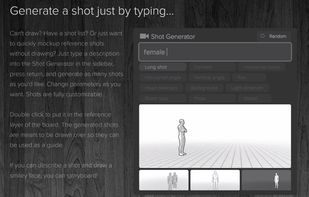


To quickly makes storyboard on PC !























Comments
Reccomendation for Android emulator to add to the list: MSI App Player
First of all A great list that you have made here! I love it! I have minor implementation that I want to add. I agree that Nox App Player is a good alternative than the Bluestacks. Just to inform that Nox is running under a Chinese company named Noxgroup. I am not a software engineer but after using BlueStacks for a while, the Nox really looks and interacts the same as an older version of Bluestacks. (Considering it as IP theft,) And if Nox player is sending telemetry to the company servers makes me doubt on how safe the data is stored to the eyes from CCP. So for now I use the WSA (Windows Subsystem for Android) https://github.com/microsoft/WSA
Yeah, honestly Android emulation on Android always has been quite shady I will consider removing Nox. Note that WSA support has been drop from Microsoft recently, I've recently added to AlternativeTo an app called WSABuilds which is an open source build that is still maintained. Once it is approved I'll add it to the list as the main Android Emulation option. I might keep Nox App Player but will add this guide to debloat it : https://gist.github.com/TameemS/72c4b92131977aced56e727d51599a48
Thanks for this comment ! 🫡
What makes Bluestacks shady ooc?
I would like to recommend sumatraPDF. Small, fast and can open almost any file type be it pdf, epub etc.
You can add SimpleWall, it's the most intuitive and lightweight manual firewall i've come across. It gives peace of mind knowing that apps you installed can't phone home all the time without permission
https://www.henrypp.org/product/simplewall
Source: https://github.com/henrypp/simplewall
SimpleWall is on the list for some time now, just click on "Load more apps" ;)
Very good list! I have some suggestions of my own.
Speccy - For a detailed log of your hardware and system specs
TreeSize Free - For knowing what folder is taking up how much space
snap2html - You can create an interactive html file that lists all your folders on your computer and their content. (Useful if you have multiple external hard disks and you're not sure which stuff is on what disc. This way you will save having to plug the disc and searching it.)
PotPlayer - Like VLC but it can also play flash games, plus it has better interface
Resilio Sync - Sync files between devices. It also has an android and mac version and its very easy to set up.
Bulk Rename Utility - As the name suggests it can rename items in bulk. Useful when you're renaming hundreds of files. UI is a bit messy but it has almost everything you might need,
JetBrains Pycharm Community - Python IDE. Very good and its free.
Hi I have some suggestions.
Instead of ShutUp10++ or others use: WPD
and
Instead of ShareX:
WPD
and
Instead of ShareX:  Flameshot
Never heard of WPD, while it looks super basic it also looks like a nice easy option. I know Flameshot, might give an honorable mention, cuz in my opinion ShareX is far superior.
I'm so happy you mentioned Obsidian, FireAlpaca, and Mod Organizer 2! I love those apps