Auto Dark Mode icon
Auto Dark Mode icon

Auto Dark Mode

Auto Dark Mode helps you to be more productive. When it is light outside, we enable you to have a bright and clearly readable OS. After the sun starts to set, your operating system switches to a matching theme to take care of your eyes.
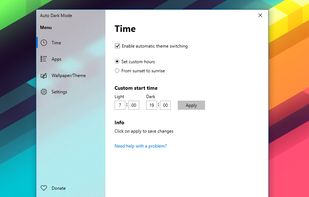
Main UI

Cost / License

Platforms

  • Windows  Require Windows 10 Version 1809 and Later
19likes
0articles
Save

Features

Features

Highlights All activities

Auto Dark Mode News & Activities

Recent activities

Auto Dark Mode information

  • Developed by

    Armin Osaj
  • Licensing

    Open Source (GPL-3.0) and Free product.
  • Written in

  • Rating

    Average rating of 4
  • Alternatives

    4 alternatives listed
  • Badge

    Get an embeddable badge for Auto Dark Mode
  • Supported Languages

    • English
    • Czech
    • German
    • French
    • Italian
    • Dutch
    • Japanese
    • Russian
    • Chinese

GitHub repository

  •  9,762 Stars
  •  308 Forks
  •  67 Open Issues
  •   Updated  
View on GitHub

Our users have written 1 comments and reviews about Auto Dark Mode, and it has gotten 19 likes

Auto Dark Mode was added to AlternativeTo by pandalovfree on and this page was last updated .

Comments and Reviews

   
Top Negative Comment
playmobilmeister
-1

It does everything it says it does, but it's Huge ! (more than 50 MB for installer)

Featured in Lists

The Windows setup for everyone (with freeware only) Will make Windows suck less

This is the apps for Windows 11 that I would recommend to anyone who just got a PC ! The same list for macOS : Linux kernel (GUI apps only) :

By Darlene Sonalder142 appsUpdated

Windows 11, but good

An alternative setup for Windows 11 focusing on open source and privacy-friendly alternatives. Also worth your while: https://alternativeto.net/lists/42604/demicrosoft-your-life/
By andrealc37 appsUpdated

Software I Love

🏆 = seriously impressed/impresses me
By Hush150386 appsUpdated

Official Links

Install from the command line

  • winget install -e --id ArminOsaj.AutoDarkMode

Be careful what you paste into a terminal. Check what a command installs before running it.

What is Auto Dark Mode?

Auto Dark Mode helps you to be more productive. When it is light outside, we enable you to have a bright and clearly readable OS. After the sun starts to set, your operating system switches to a matching theme to take care of your eyes. This app saves you from the annoying way to switch the design manually in the Windows settings.

By enabling the automatic theme switcher in the app, a task in the Task Scheduler of Windows is created. This task will launch the app and set your theme. No background task, no interruption of a CMD-window, no footprint and no reliability issues. You can find many settings in the easy-to-understand user interface.

Features: Easy to use and clean user-interface. Theme switch based on custom times or the suntimes of your location + time offset. Desktop wallpaper switch. Windows .Theme-File switch, to also change Accent Color and Mouse Cursor. Office theme switch You can choose if only Apps should change their theme, or both apps and system. Support for accent color on the Taskbar and other system elements. Ability to automatically enable the grayscale color filter of Windows 10. Easy theme switch with a Jump-List, accessible from the Startmenu or Taskbar. Lightweight with 100% clean uninstall. No admin-rights needed. Multi-language support.