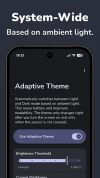
Adaptive Theme automatically switches your system theme between light and dark based on your ambient light sensor – not a fixed schedule.
🌟 FEATURED ON
• Android Authority: "A brilliant app that once installed makes you wonder how you lived without it. [...] This app gives Android the automatic dark mode feature it desperately needs."
• HowToMen (YouTube): "No tapping, no schedules needed. It just does it on its own. [...] And don't worry, it's not killing your battery either."
• Computerworld: "This is how Android's dark mode should have worked since the start. Ready for an overdue injection of extra intelligence?"
• How-To Geek: "With a simple app, you can make dark mode (and light mode) switch with the lighting around you."
Why Adaptive Theme?
Most Android phones only switch themes at sunset or on a fixed schedule. Adaptive Theme uses your device's ambient light sensor to switch intelligently – optimizing readability, eye comfort, and battery life based on actual lighting conditions.
Get the readability of light mode in bright daylight and the eye-comfort of dark mode in low light. A true automatic dark mode experience that native Android doesn't offer.
Key Features
• Smart Ambient Detection: Uses your device's physical light sensor to automatically toggle the system dark mode.
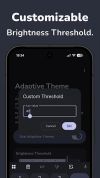
• Full Customization: Set your own lux threshold or pick a preset (e.g. indoor, outdoor, sunlight).
• Battery Friendly: Event-driven architecture — only checks the sensor when you turn the screen on. Zero background battery drain.
• Ad-Free & Open Souce: No ads at all and publicly available on GitHub (xLexip/Adaptive-Theme).
• Shizuku Support: One of multiple setup methods.
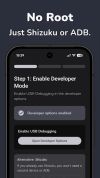
• No Root Required: Works on stock devices. Root supported as an alternative.
• Material You design: Dynamic UI that adapts to your system theme and colors.
• 50+ Languages: Fully localized for a global audience.
• Quick Settings Tile: Toggle the service directly from your quick settings.
One-Time Setup Required
Android requires a one-time permission grant to allow theme switching. Adaptive Theme makes this straightforward, you can use one of the following options:
• Web Tool (Recommended)
• Shizuku
• Root
• Manual ADB
The one-time permission grant is required because Android restricts apps from changing the system theme by default. The permission (WRITE_SECURE_SETTINGS) only allows changing system settings such as the dark mode toggle — it does not grant root access or read any user data, and is fully reversible by uninstalling the app.
Made with 🥨 in Germany





 EU
EU
 Emin added Adaptive Theme: Auto Dark Mode as alternative to Essentials
 AltSaru added Adaptive Theme: Auto Dark Mode as alternative to TrayLight
 Emin added Adaptive Theme: Auto Dark Mode as alternative to Easy Dark Mode
 Emin added Adaptive Theme: Auto Dark Mode as alternative to Luna and Auto Dark Mode


 xLexip

No comments or reviews, maybe you want to be first?