Apps tagged with 'Desktop Customization' Page 6 of 7

All apps in Apps tagged with 'Desktop Customization' category. Use the filters below to narrow down your search. 
Copy a direct link to this comment to your clipboard
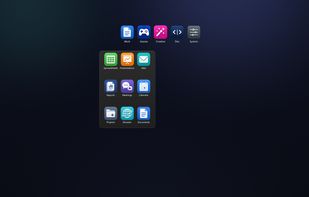
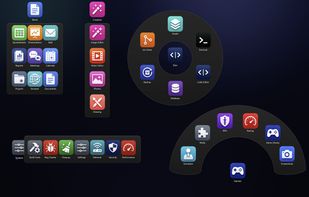
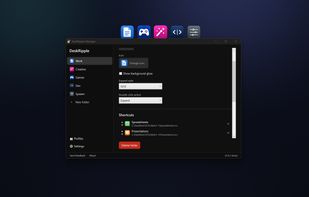
  1. DeskRipple keeps each group of shortcuts in a single folder icon on the Windows desktop. Hover or click to open its shortcut panel, then close it back to one icon. The folders sit alongside regular desktop icons, behind normal windows.

    Cost / License

    • Paid
    • Proprietary

    Application type

    Platforms

    • Windows
    • US flagUnited States
    Folders sit on the desktop and expand on hover or click — here Work opens into a Grid of shortcuts.
    The five expand styles shown together: Grid, Column, Row, Fan, and a 360° Ring.
    The Manager window: rename a folder, choose its expand style, and reorder its shortcuts.
    24 alternatives
  2. Shortcutty is a shortcut launcher for Windows. If your desktop is cluttered with shortcuts or you constantly dig through folders to find your apps or files — this app lets you organize everything into tabs and groups, always one click away.

    Cost / License

    • Paid
    • Proprietary

    Application type

    Platforms

    • Windows
    • Steam
    Shortcutty screenshot 1
    Shortcutty screenshot 1
    Shortcutty screenshot 2
    +8
    Shortcutty screenshot 3
    37 alternatives
  3. Keeps real Finder folders on your Mac desktop as compact tiles that expand on hover into a full file grid. Drag and drop, Quick Look and multi-display support, with Finder still the source of truth. One-time purchase, 14-day trial, no account.

    Cost / License

    • Freemium
    • Proprietary

    Platforms

    • Mac
    • UA flagUkraine
    Screen Folders screenshot 1
    Screen Folders screenshot 1
    Screen Folders screenshot 2
    +3
    Screen Folders screenshot 3
    19 alternatives
  4. Walyro icon
     Like

    Walyro is a live wallpaper app for Mac that runs on your own videos. Drop in an MP4 or MOV clip and it plays as your desktop background, up to 4K, with a different one on each display. Build playlists that rotate on their own and control everything from the menu bar or the Now...

    Cost / License

    • Freemium
    • Proprietary

    Application type

    Platforms

    • Mac
    Walyro screenshot 1
    Walyro screenshot 1
    Walyro screenshot 2
    +2
    Walyro screenshot 3
    14 alternatives
  5. Glassline icon
     Like

    Glassline replaces the Windows 11 taskbar and Start menu with a menu bar at the top of the screen and a dock at the bottom, drawn in clear glass that takes the colour of your wallpaper.

    Cost / License

    • Paid
    • Proprietary

    Platforms

    • Windows
    Glassline screenshot 1
    Glassline screenshot 1
    Glassline screenshot 2
    +4
    Glassline screenshot 3
    7 alternatives
  6. Frostpane icon
     Like

    Frostpane gathers the icons on your Windows desktop into translucent panes you can move, roll up to their title, stack into tabs and sort by rule.

    Cost / License

    • Paid
    • Proprietary

    Platforms

    • Windows
    Frostpane screenshot 1
    6 alternatives
  7. Glass Desktop Box combines Windows desktop organization and personalization with browser-based file sharing. Organize real files and folders in customizable Boxes, use Selection Tabs and folder linking, add notes, and choose static or animated backgrounds.

    Cost / License

    • Paid
    • Proprietary

    Platforms

    • Windows
    Organize files and folders in customizable desktop Boxes.
    Browser-based file sharing with the colleagues, clients, or friends you invite.
    Share across Windows, Mac, Linux, iPhone, iPad, and Android.
    +3
    Personalize your Boxes with animated backgrounds.
    7 alternatives
  8. Xmas snow icon
     1 like

    Desktop snow snow on your desktop, know how many days until Christmas or days until new year, you can also add on desktop Christmas tree and listen every hour holiday tune.Xmas snow has, windows level settings, fixing window position,launch at login.

    Cost / License

    • Paid
    • Proprietary

    Platforms

    • Mac
    Xmas snow screenshot 1
    Xmas snow screenshot 1
    Xmas snow screenshot 2
    +2
    Xmas snow screenshot 3
    7 alternatives
  9. Folderizer is your ultimate solution for adding a touch of personalization to your Mac desktop. With Folderizer, you can easily customize the icons of your folders, making them stand out and reflect your unique style.

    Cost / License

    • Paid
    • Proprietary

    Platforms

    • Mac
    Folderizer screenshot 1
    Folderizer screenshot 1
    Folderizer screenshot 2
    13 alternatives
  10. Focusdim icon
     Like

    Professional focus enhancement for macOS. Dim background applications or highlight your active window with beautiful colored borders.

    Cost / License

    • Freemium
    • Proprietary

    Platforms

    • Mac
    • US flagUnited States
    Focusdim screenshot 1
    Focusdim screenshot 1
    Focusdim screenshot 2
    +1
    Focusdim screenshot 3
    22 alternatives
  11. Is your desktop overwhelmed with files and folders? Introducing Desktop Ghost Pro—the ultimate solution to instantly declutter your workspace. With a single click or a customizable hotkey, hide all your desktop items without deleting or moving them.

    Cost / License

    • Paid
    • Proprietary

    Platforms

    • Mac
    Desktop Ghost Pro screenshot 1
    Desktop Ghost Pro screenshot 1
    Desktop Ghost Pro screenshot 2
    +3
    Desktop Ghost Pro screenshot 3
    14 alternatives
  12. Turn your macOS Dock into a dynamic light bar that syncs with your music and brings your Dock to life. Display track details and album cover art right beside the Dock. Control music playback with clickable controls that are always visible. Like songs.

    Cost / License

    • Paid
    • Proprietary

    Platforms

    • Mac
    • US flagUnited States
    Dock Party screenshot 1
    Dock Party screenshot 1
    Dock Party screenshot 2
    +5
    Dock Party screenshot 3
    1 alternatives
  13.  Like

    Okigae swaps the small monochrome icons in your menu bar for illustrated characters. Pick a face for each app you want to change and leave the rest alone.

    Cost / License

    • Free
    • Open Source (MIT)

    Platforms

    • Mac
    • JP flagJapan
    Character artwork sitting in the menu bar
    The menu bar before, with the usual status icons
    The same menu bar after, with icons replaced
    4 alternatives