





DeskRipple
Like
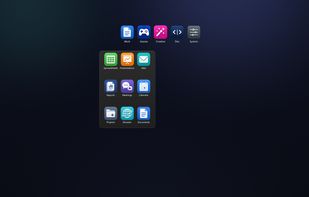
DeskRipple keeps each group of shortcuts in a single folder icon on the Windows desktop. Hover or click to open its shortcut panel, then close it back to one icon. The folders sit alongside regular desktop icons, behind normal windows.

Cost / License
- Pay once
- Proprietary
Application typeApplication types
Platforms
- Windows


Features
Highlights All activities
DeskRipple News & Activities
Recent activities
 ezzhasan added DeskRipple as alternative to Maktaby
- deskripple updated DeskRipple
- deskripple updated DeskRipple
- deskripple updated DeskRipple
 Ludwig-Fun added DeskRipple as alternative to Turfs
- deskripple updated DeskRipple
- deskripple replied to a comment / review on DeskRipple
- added Lightweight as a feature to DeskRipple
 Logiciel NaNXOR added DeskRipple as alternative to piDock


Developed by
 DeskRipple
 Licensing
Proprietary and Commercial product.Pricing
One time purchase (perpetual license).Alternatives
24 alternatives listedBadge
Get an embeddable badge for DeskRippleSupported Languages


Comments and Reviews
Beta build stops working on September 1, 2026. Uninstalling restores archived desktop shortcuts. A one-time paid version is planned later , and beta testers get a founder discount.
Thanks for laying this out. I'm the developer, and part of it has changed since July.
DeskRipple 1.0 is out, so the paid version has shipped. It's a one-time purchase, not a subscription. The price is shown at checkout, and every purchase can be refunded within 14 days.
The rest still holds. Without a license key, DeskRipple stops working on September 1, 2026; enter a key under Manager → About and there's no expiry. Removing an entry or uninstalling still restores your archived desktop shortcuts.
Beta testers do get 50% off with their founder code.