
MyDesktopWidget icon

MyDesktopWidget

A modern Windows desktop widget engine with zero-wake gaming pause, wallpaper-layer rendering, and an experimental Rainmeter skin importer.
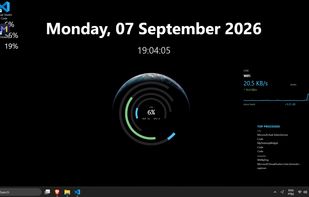
MyDesktopWidget screenshot 1

Cost / License

  • Pay once
  • Proprietary

Platforms

  • Windows
0likes
0articles

Features

Properties

  1.  Support for Themes
  2.  Privacy focused
  3.  Lightweight

Features

  1.  Works Offline
  2.  Support for Multiple Monitors
  3.  No Tracking
  4.  Ad-free
  5.  Customize Windows
  6.  Custom widgets
  7.  Widgets

MyDesktopWidget News & Activities

Highlights All activities

Recent activities

MyDesktopWidget information

  • Developed by

    BR flagMyDesktopWidget
  • Licensing

    Proprietary and Commercial product.
  • Pricing

    One time purchase (perpetual license) ranging between $8 and $10.
  • Alternatives

    44 alternatives listed
  • Badge

    Get an embeddable badge for MyDesktopWidget
  • Supported Languages

    • English
    • Portuguese
    • German
    • Spanish
    • Ukrainian
    • Russian
    • Japanese
    • Korean
    • Chinese
    • Polish
    • Italian
    • French

AlternativeTo Category

OS & Utilities
MyDesktopWidget was added to AlternativeTo by Lucas Riechelmann Ramos on and this page was last updated .
No comments or reviews, maybe you want to be first?

Official Links

What is MyDesktopWidget?

MyDesktopWidget is a next-generation Windows desktop widget engine built on .NET 10 and Avalonia 12, designed for PC enthusiasts, gamers, and desktop customisers who want rich desktop information without sacrificing performance or system security.

Unlike traditional widget platforms that use floating tool windows or heavy browser engines, MyDesktopWidget renders directly into the Windows wallpaper layer beneath desktop icons, ensuring full compatibility with Windows "Show Desktop" (Win+D) and desktop file interactions.

Key Features

  • True Zero-Wake Game Mode: The engine event-monitors full-screen 3D and borderless games via SHQueryUserNotificationState. Upon game launch, the internal scheduler completely disposes every active PeriodicTimer, dropping to 0.0% CPU and zero OS wakeups while gaming.
  • Wallpaper Layer Integration: Widgets render cleanly beneath your desktop icons without flickering or overlapping your desktop workflow. Built with a 4-strategy fallback locator to handle Windows Explorer restarts gracefully.
  • Experimental Rainmeter & Conky Importer: Drop in existing .rmskin packages, loose .ini folders, or Conky configurations for a best-effort structural translation. A transparent pre-conversion report shows exactly what meters converted and what was skipped before saving.
  • Declarative JSON & Live Visual Editor: No complex proprietary .ini coding required. Skins are authored in declarative JSON with support for flex/grid layouts, vector shapes, animations, and custom fonts. An interactive WYSIWYG editor provides live color pickers and layout tweaking.
  • Enterprise-Grade Script Sandboxing: Custom widget C# logic runs in an isolated, non-elevated process governed by a Windows Job Object (ACTIVE_PROCESS_LIMIT = 1 and a 256 MB memory cap), preventing unapproved child process spawning or system file tampering.
  • OLED-Protected Ambient Screensaver: Built-in idle detector triggers customizable full-screen ambient scenes (Matrix rain, retro clocks, system HUDs) with integrated sub-pixel shifting to prevent OLED burn-in.
  • Lightweight Native Performance: Direct GPU-accelerated SkiaSharp rendering with tuned Workstation GC (RetainVMGarbageCollection=false), keeping the working set at ~40–70 MB RAM.
  • Offline-First & Privacy-Respecting: Zero background tracking, no advertising SDKs, and zero telemetry. Caches signed tokens locally via Windows DPAPI for full offline functionality.
  • Expansive Library: Includes 155 bundled widgets, 14 shipped languages, and 1-click access to an online catalog of 600+ community skins and themes.
