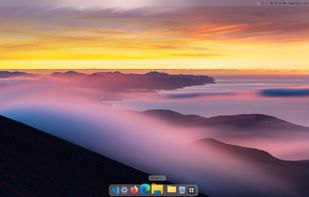
Glassline replaces the Windows 11 taskbar and Start menu with a menu bar at the top of the screen and a dock at the bottom, drawn in clear glass that takes the colour of your wallpaper.
The menu bar shows the app you're using and, for apps that have them, its own menus. On the right sit the weather, Wi-Fi, sound, battery, notifications, the tray icons you pin there and a clock that opens your calendar. When a window fills the screen, the bar takes its colour.
The dock magnifies under the pointer and shows running dots, unread notification counts and live window previews. Drag icons into any order, drop apps from Search to keep them, and keep folders in the dock: they open as stacks you can drag files out of. Any icon can wear a picture of your own.
Press the Windows key and Search finds apps, files and settings, does sums, converts units and currencies and sends anything else to the web. With the free Everything app installed, every file on your drives shows up as you type, and Ctrl+Space previews a file. Optional translation (beta) runs on your own PC.
Control Center has Wi-Fi, Bluetooth, brightness, sound output, microphone and volume per app, switches for Do Not Disturb, dark mode, airplane mode and the mobile hotspot, a Hardware page with the load and temperatures of your PC, and three skins to choose from. Today shows the calendar, your own events, calendars you subscribe to and your notifications.
Every part can be adjusted, and the whole setup saves to one file. No account needed. In English, Spanish, German, Polish, French and Brazilian Portuguese.
Quit or uninstall it and the Windows taskbar and Start menu come back exactly as they were.
Requires Windows 11, version 22H2 or later. Available in the Microsoft Store.




 Sam_1234 added Glassline as alternative to RocketDock, 7+ Taskbar Tweaker, Winstep Nexus, Docky and 3 more


No comments or reviews, maybe you want to be first?