CCCCorners means confidential, confidential, confidential!
Stop ignoring those 4 pieces of real estate on your screen. CCCCorners turns your Mac's hot corners into the ultimate productivity hack, letting you launch apps and run shortcuts in an instant. It’s the powerful, lightweight, and PRIVACY focused menu bar utility you've been missing.
Unlike other similar utilities, CCCCorners does NOT require Accessibility permissions for the main functionality to work!
Features:
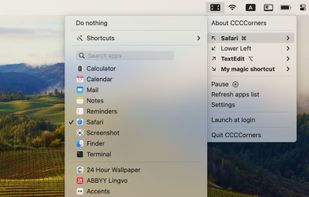
• Assign any app, keyboard combination, or shortcut from the Shortcuts app (requires macOS 12 or newer) to hot corners
• Smart toggle action: activate a hot corner once to launch. Activate it second time to hide the app's window, minimize it, or quit that app entirely
• Multiple displays support: different hot corners for each monitor
• App names in the lists are translated to your Mac language
• Use optional modifier keys (?, ?, ^, ?) for a specific hot corner to activate it. There is also an option to duplicate every hot corner for using with modifier keys – you can have one app assigned to a hot corner and another one that is opened only when one of the modifier keys is pressed
• Choose from 8 menu bar icons OR
• Hide the menu bar icon completely! CCCCorners will keep working silently in the background (open the app again from Finder to access the settings window)
Get CCCCorners and start making every corner count, confidentially!







 Paul added CCCCorners as alternative to Preme for Windows, HotCornersWX and WinXCorners


No comments or reviews, maybe you want to be first?