

Screen Folders icon
Screen Folders icon

Screen Folders

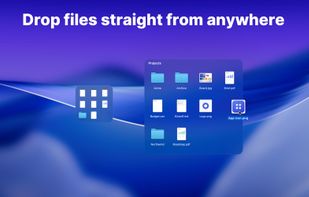
Keeps real Finder folders on your Mac desktop as compact tiles that expand on hover into a full file grid. Drag and drop, Quick Look and multi-display support, with Finder still the source of truth. One-time purchase, 14-day trial, no account.
Screen Folders screenshot 1

Cost / License

  • Freemium (Pay once)
  • Proprietary

Platforms

  • Mac
0likes
0articles
Save

Features

Properties

  1.  Lightweight

Features

  1.  Dark Mode
  2.  Support for Multiple Monitors
  3.  Ad-free
  4.  Works Offline
  5.  No registration required
  6.  Drag and Drop
  7.  Visual Organization

Screen Folders News & Activities

Highlights All activities

Recent activities

Screen Folders information

  • Developed by

    UA flagDmytro Shabanov
  • Licensing

    Proprietary and Freemium product.
  • Pricing

    One time purchase (perpetual license) that costs $15 + free version with limited functionality.
  • Alternatives

    19 alternatives listed
  • Badge

    Get an embeddable badge for Screen Folders
  • Supported Languages

    • English
    • Belarusian
    • Chinese
    • Dutch
    • French
    • German
    • Italian
    • Japanese
    • Kazakh
    • Korean
    • Polish
    • Portuguese
    • Russian
    • Spanish
    • Turkish
    • Ukrainian

AlternativeTo Category

OS & Utilities
Screen Folders was added to AlternativeTo by Dmytro-Shabanov on and this page was last updated .

No comments or reviews, maybe you want to be first?

Official Links

What is Screen Folders?

Screen Folders is a Mac desktop organizer that puts the folders you use most within immediate reach.

Keep folders compact on your desktop until you intentionally hover over them. They expand into a convenient file grid, giving you quick access to everyday files without opening another Finder window.

Open, rename, move, copy, delete, drag, and preview items using familiar macOS interactions. Your files remain real files in normal folders, so they continue to work with Finder and your other apps.

Create app-managed folders for new projects, or link folders you already use. Changes made in Finder appear in Screen Folders, keeping your desktop view in sync with the filesystem.

Designed for focused Mac productivity: • Keep frequently used folders visible and easy to reach • Expand folders on demand and collapse them when finished • Drag and drop files using familiar Finder gestures • Preview files with Quick Look • Place folders across multiple displays • Choose an appearance that fits your desktop and wallpaper • Keep your files local with no account required

Requires macOS 26 or later.

Screen Folders is a lightweight desktop productivity utility for people who want less clutter and faster access to everyday files—without replacing Finder.

Screen Folders Videos
