





Desktop Frames +
16 likes
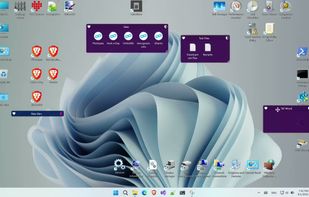
Organizes desktop icons into virtual fences with customizable design options, enhanced visual effects, and right-click interactions. Works on Windows, portable via USB, lightweight, supports multiple monitors, runs offline, and requires no registration for core features.

Cost / License
- Free
- Open Source
Application typeApplication types
Platforms
- Windows

Features
Desktop Frames + News & Activities
Highlights All activities
Recent News
No news, maybe you know any news worth sharing?
Share a News Tip
Recent activities
 Dmytro-Shabanov added Desktop Frames + as alternative to Screen Folders
 Ludwig-Fun added Desktop Frames + as alternative to Turfs
 Young-Gi Park added Desktop Frames + as alternative to Ghostyak Boxes
 H-Tung added Desktop Frames + as alternative to DeskBox
 Logiciel NaNXOR added Desktop Frames + as alternative to piDock
- Slaideth updated Desktop Frames +
- def cik liked Desktop Frames +
 deskripple added Desktop Frames + as alternative to DeskRipple
- Cassie liked Desktop Frames +
 the_Libre_one added Desktop Frames + as alternative to Deskepty


Featured in Lists


Basics
My basics for windows and linux, mainly open source with exceptions.


Desktop Fences (OSS)
A list with 3 apps by casualUser without a description.
What is Desktop Frames +?
Desktop Frames + Videos
Desktop Frames + information
Developed by
limbo666Licensing
Open Source and Free product.Written in
Rating
Average rating of 5Alternatives
25 alternatives listedBadge
Get an embeddable badge for Desktop Frames +Supported Languages

AlternativeTo Category
OS & UtilitiesGitHub repository
- 639 Stars
- 64 Forks
- 12 Open Issues
- Updated


Comments and Reviews
It works really well and helps to keep the desktop organized for those who like to arrange icons. It would be nice if we could choose the colour by hex code, but the software gives plenty of options. Now, it's a must have in all my setups.
Loved Stardocks Fences and this is the open source version sooo hands down 5/5. Bravo, good work !
A FOSS (free/open source) alternative to ITop desktop. Very similar to the program DeskFrame, but easier to navigate setups of files and folders. AutoStart is not on by default.. it must be toggled in Setting. To change a Fence title, double click it. I might miss the way the subfolder thumbnails show in the ITop panel vs an explorer popup, but privacy is a tradeoff.