




WorkTop
Like
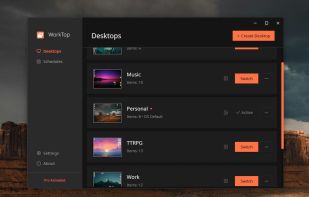
Multi-desktop manager for Windows with separate files, icon layouts, and wallpapers per desktop. Not just virtual workspaces.

Cost / License
- Freemium (Pay once)
- Proprietary
Application typeApplication types
 EU
EUPlatforms
- Windows



Features
Highlights All activities
WorkTop News & Activities
Recent activities
 jacob-nobbe added WorkTop as alternative to MultiDesk App
- jacob-nobbe replied to a comment / review on WorkTop
- TBayAreaPat replied to a comment / review on WorkTop
- jacob-nobbe replied to a comment / review on WorkTop
- TBayAreaPat commented on WorkTop
Would not run robustly on my system.. don't know why. Wouldn't let me create new desktop.
- jacob-nobbe added WorkTop
 jacob-nobbe added WorkTop as alternative to VirtuaWin, dt_noodle, Sysinternals Desktops, Stardock Tiles and 1 more


Developed by
 Nystik
 Licensing
Proprietary and Freemium product.Pricing
One time purchase (perpetual license) ranging between $15 and $20 + free version with limited functionality.Alternatives
8 alternatives listedBadge
Get an embeddable badge for WorkTopSupported Languages


Comments and Reviews
Would not run robustly on my system.. don't know why. Wouldn't let me create new desktop.
Sorry you ran into issues! If you don't mind sharing, what OS and version were you on, and did you see an error message when you tried to create a desktop, or did nothing happen?
OS Name Microsoft Windows 10 Pro .. Version 10.0.19045 Build 19045 .. no error msg .. no dashboard showed
Thanks. This comment section probably isn't the best place to handle support, so if you still want to try getting it working, feel free to send an email to support@worktop.dev and I'll try my best to help.