Workspace Managers

All apps in Workspace Managers category. Use the filters below to narrow down your search. 
Copy a direct link to this comment to your clipboard
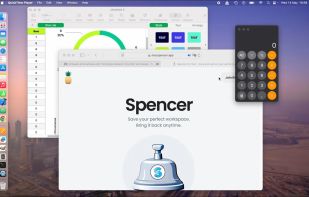
  1. Customize your workspace with profiles for any context or task — whether you’re working, browsing, or creating. Easily return to your favorite window setup anytime.

    Cost / License

    • Paid
    • Proprietary

    Application type

    Platforms

    • Mac
    Spencer for Mac screenshot 1
    38 alternatives
  2. Putback icon
     3 likes

    Automatically restores window layouts on macOS when displays change, designs and applies desk scenes, protects privacy, supports hotkeys, no data leaves device.

    Cost / License

    • Paid
    • Proprietary

    Application type

    Platforms

    • Mac
    • AU flagAustralia
    The problem it solves: unplug and macOS piles every window onto one screen. Putback keeps a separate memory per display setup and puts everything back in 0.4 seconds.
    The menu bar panel: one click restores your layout, undo for every restore, and scenes to switch desks. Putback counts what it actually did.
    Scene Studio: design a desk on a canvas of your real displays. Add apps as placeholders, even ones that are not running, and Apply opens them into place.
    +1
    The Workbench: every display setup Putback remembers, with your scenes and per-app rules in one optional window. The menu bar is all you need day to day.
    12 alternatives
  3. BetterStage icon
     7 likes

    Every window where it belongs. AI analyzes your open windows and organizes them into project-focused stages automatically. Then switch your entire multi-monitor setup between them instantly — no animations, no lag.

    Cost / License

    • Freemium
    • Proprietary

    Application type

    Platforms

    • Mac
    • US flagUnited States
    BetterStage screenshot 1
    BetterStage screenshot 1
    35 alternatives
  4. Tatami icon
     2 likes

    Tatami is a macOS workspace manager that combines automatic BSP tiling with virtual workspaces, without disabling SIP. You get the window tiling yabai is known for and fast app-grouping workspaces in one app.

    Cost / License

    Application type

    Platforms

    • Mac
    • KR flagSouth Korea
    Tatami screenshot 1
    9 alternatives
  5. NVIDIA RTX Desktop Manager is a software tool that manages single or multi-monitor workspaces. It comes with the NVIDIA RTX Enterprise/Quadro driver package or can be downloaded separately. Its main function is to boost productivity by optimizing workspace layout.

    Cost / License

    • Free
    • Proprietary

    Application type

    Platforms

    • Windows
    • US flagUnited States
    NVIDIA RTX Desktop Manager screenshot 1
    NVIDIA RTX Desktop Manager screenshot 1
    NVIDIA RTX Desktop Manager screenshot 2
    +1
    NVIDIA RTX Desktop Manager screenshot 3
    24 alternatives
  6. ShiftPlus icon
     1 like

    One macOS hotkey to switch entire project contexts: browser profiles (10 browsers), apps, window layouts, terminal env vars, and Spaces - all restored instantly. Native, unsandboxed, with iCloud sync.

    Cost / License

    • Paid
    • Proprietary

    Application type

    Platforms

    • Mac
    ShiftPlus screenshot 1
    ShiftPlus screenshot 1
    ShiftPlus screenshot 2
    34 alternatives
  7. Do you want a minimalist setup for deep work and a vibrant vibe for creative sessions? Why manually toggle system settings and app themes every time? Desktop Composer combines your entire macOS aesthetic into one-click profiles, finally allowing your environment to keep up with...

    Cost / License

    • Paid
    • Proprietary

    Application type

    Platforms

    • Mac
    • Setapp
    • PL flagPoland
    • European Union flagEU
    Desktop Composer screenshot 1
    Desktop Composer screenshot 1
    Desktop Composer screenshot 2
    2 alternatives
  8. MultiDesk App icon
     2 likes

    MultiDesk is a lightweight and practical Windows utility designed to boost productivity by organizing your desktop into customized, swappable workspaces.

    Cost / License

    • Freemium
    • Proprietary

    Application type

    Platforms

    • Windows
    • DE flagGermany
    • European Union flagEU
    MultiDesk App screenshot 1
    MultiDesk App screenshot 1
    MultiDesk App screenshot 2
    +2
    MultiDesk App screenshot 3
    3 alternatives
  9. Snapset icon
     1 like

    Snapset is a workspace manager for Mac that saves and restores apps, window arrangements, browser tabs, and Finder folder locations. Create layouts for different tasks and switch using keyboard shortcuts, the menu bar, or voice commands processed locally on your Mac.

    Cost / License

    • Paid
    • Proprietary

    Application type

    Platforms

    • Mac
    Save and restore your entire Mac workspace
    Automatic layouts for different display setups
    Voice control processed locally on your Mac
    +2
    Switch layouts from the menu bar and other triggers
    12 alternatives
  10. Chauffeur icon
     Like

    Save your whole working setup — open files, editor tabs, browser tabs, PDF pages and projects — as a named context and restore it with one click. Runs fully locally: no account, no cloud, no telemetry.

    Cost / License

    • Freemium
    • Proprietary

    Application type

    Platforms

    • Mac
    • Windows
    • Linux
    Main Panel
    Plugins/Integrations on Windows
    10 alternatives
  11. Save, restore and manage window positions on Windows 10 & 11. Create desktop profiles, auto-detect monitors, snap layouts, and switch workspaces with hotkeys. One-time $9.99 purchase.

    Cost / License

    • Paid
    • Proprietary

    Application type

    Platforms

    • Windows
    PositionPro screenshot 1
    PositionPro screenshot 1
    PositionPro screenshot 2
    +1
    PositionPro screenshot 3
    11 alternatives
  12. Spaceman icon
     Like

    Spaceman is an application for macOS that allows you to view your Spaces / Virtual Desktops in the menu bar. Spaceman allows you to see which space you are currently on (or spaces if you are using multiple displays) relative to the other spaces you have.

    Cost / License

    • Free
    • Open Source (MIT)

    Application type

    Platforms

    • Mac
    • AU flagAustralia
    Spaceman screenshot 1
    Spaceman screenshot 1
    10 alternatives
  13. Snapback icon
     Like

    Free macOS window manager that saves and restores your entire workspace layout with one keystroke. Every app, every window position, every display. Includes window snapping, drag-to-snap, and unlimited named workspaces.

    Cost / License

    • Freemium
    • Proprietary

    Application type

    Platforms

    • Mac
    • MX flagMexico
    Instant layout presets, one shortcut arranges all open windows into halves, thirds, or full screen
    Menu bar app with minimal resource usage
    Window snapping to halves, thirds, quarters, etc...
    +2
    Smart settings with app ignore list, customizable shortcuts, and behavior controls
    14 alternatives
  14. A lightweight macOS menu bar app that lets you assign custom names and emoji labels to your Desktop Spaces, so you can instantly recognize each workspace at a glance, and switch instantly into that workspace.

    Cost / License

    • Paid
    • Proprietary

    Application type

    Platforms

    • Mac
    Desktop Space Renamer screenshot 1
    5 alternatives