ShiftPlus icon
ShiftPlus icon

ShiftPlus

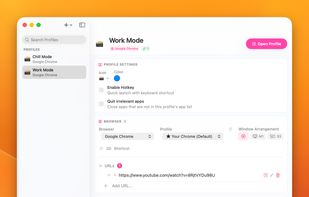
One macOS hotkey to switch entire project contexts: browser profiles (10 browsers), apps, window layouts, terminal env vars, and Spaces - all restored instantly. Native, unsandboxed, with iCloud sync.
ShiftPlus screenshot 1

Cost / License

  • Pay once
  • Proprietary

Platforms

  • Mac
0likes
0comments
0articles

Features

No features, maybe you want to suggest one?

ShiftPlus News & Activities

Highlights All activities

Recent activities

ShiftPlus information

  • Licensing

    Proprietary and Commercial product.
  • Pricing

    One time purchase (perpetual license) ranging between $24 and $39.
  • Alternatives

    30 alternatives listed
  • Supported Languages

    • English

AlternativeTo Category

OS & Utilities
ShiftPlus was added to AlternativeTo by nghialuong on and this page was last updated .
No comments or reviews, maybe you want to be first?

What is ShiftPlus?

ShiftPlus is a native macOS workspace switcher that bundles your browser profiles, apps, window layouts, and terminal environment into a single hotkey. Instead of using a window manager and a browser profile tool and a launcher and a terminal multiplexer — ShiftPlus does all of it in one place, designed specifically for people who work across multiple projects, clients, or contexts every day. Press one shortcut and ShiftPlus will:

  • Open the right apps with the right documents
  • Launch your browsers (up to 10 supported: Chrome, Safari, Arc, Brave, Edge, Firefox, Vivaldi, Opera, Zen, Dia) with the correct profiles and URLs already loaded
  • Restore your window positions across multiple monitors and macOS Spaces (Desktops)
  • Inject project-specific environment variables into your terminal (perfect for switching between AWS_PROFILE, staging vs prod, etc.)
  • Pull up your project folders, quick links, and per-project hotkeys

Built for:

  • Full-stack and DevOps engineers managing multiple dev/staging/prod contexts
  • Freelancers and agency owners juggling 3+ client workspaces
  • Product managers and consultants who switch between initiatives all day
  • Anyone tired of the 23-minute tax to regain focus after a context switch

Key features:

  • 🚀 One-hotkey workspace switching (apps + browsers + windows + terminal)
  • 🌐 Multi-browser profile support — Chrome, Arc, Brave, Edge, Firefox, Safari, and more
  • 🪟 Window layout & multi-monitor arrangement memory
  • 💻 Terminal environment variable injection (unique to ShiftPlus)
  • 🔗 Per-project quick links, folders, and apps whitelist
  • ?? iCloud Sync — your profiles roam across all your Macs (Pro 2 Devices)
  • ? Native Swift app — no Electron, low memory footprint
  • 🔒 Privacy-first — everything stays on your devices

Why ShiftPlus instead of the alternatives:

  • More than Spencer or Stay — ShiftPlus restores not just windows, but your full workspace state including browser logins and terminal env
  • Lighter than Shift or Wavebox — native macOS, not a heavy Electron wrapper around your browser
  • Deeper than Arc Spaces — works across all your browsers and apps, not just inside one browser
  • Complements Raycast and Alfred — ShiftPlus handles the workspace state they don't

Pricing: Lifetime license via Lemon Squeezy. Pro tier for single Mac, Pro 2 Devices tier adds iCloud Sync across 2 Macs. No subscription, free updates within major version.

Requirements: macOS 14.6 or later. Apple Silicon and Intel both supported.

ShiftPlus Videos

Official Links