Simple. Human. Personal. Soar the skies with AirSpace.
See your spaces reimagined, giving you complete control. Give them custom names, styles, colors, and teleport between them, all from your menu bar.
NO AI Code -
AirSpace is created with 0 AI Code, 0 AI Text, and 0 AI Art. To learn more, read the AI Info section at https://hazels.garden/airspace.?
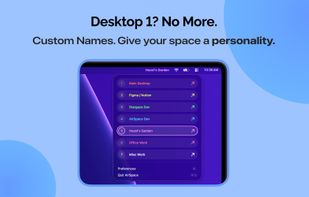
Name your spaces -
Never forget which space does what by giving them custom names.
Teleportation -
You no longer have to wade through your spaces or open Mission Control to get to the one you want. Easily jump to your intended space with AirSpace.
Heads up! -
See your custom names up top with the new HUD feature that shows up when you change spaces.
Iconic -
Custom text not your style? AirSpace can now switch to numbered icons, so you can keep it simple and clean at all times.
Multi-monitor support -
Seeing the digital world from every angle? Now AirSpace sees it with you, with support for multi-monitor setups.
Fullscreen spaces support -?Want to quick jump to spaces with fullscreen windows? With AirSpace, it's as easy as a click.
Track your spaces -
Know which space you’re on at a glance from the menu bar.
Make AirSpace yours -
Need to try a different style? Change up the appearance in AirSpace with the custom color and text style options.
Per-space unique colors -
Need to identify which space you’re on quickly? Now you can by giving each space a unique color, which will also theme the switcher menu and HUD.
? + Freedom -
Want to switch spaces on a dime? Jump from desktop 1 through 16 with customizable keyboard shortcuts.
Reorder, Delete, Reorganize -
Turn chaos into order with AirSpace’s organized list of spaces. You can reorder, delete, and manage all with the click of a button.
Privacy -
AirSpace does not collect any data or track you. All your data belongs to you, no logins, no sign-ups.?
Never lose your data -
Protect your custom names with the auto data backup ability in AirSpace, making sure your data survives a restart.







 PixelSolution added AirSpace as alternative to DesktopTitle
 Paul added AirSpace as alternative to WhichSpace
 Paul added AirSpace as alternative to SpaceJump, Spaces Renamer, Spaceman and Desktop Space Renamer
 Paul added AirSpace as alternative to Spencer for Mac, Spaces for macOS, Spring - Shortcuts, App Fleet and 7 more




 Hazel's Garden LLC
No comments or reviews, maybe you want to be first?