Name your macOS spaces. Switch in milliseconds.
Stop getting lost in "Desktop 1, 2, 3". Name your spaces, jump back to where you were, and set up in under a minute.
Name your Spaces and see those names everywhere: in the menu bar, in Mission Control, and in the Quick Switcher. The first and only app to show custom Space names inside Mission Control on Apple Silicon Macs.
Quick Switcher, drag windows between Spaces, per-Space and per-app time tracking with CSV export, multi-display support, and idle detection. Native Swift, ~6MB, runs on macOS 13+.
Everything you need to master your Spaces
- Names, Icons & Colors: Give each Space a name, icon, and color. Your custom names show in the menu bar and in Mission Control. Always know which desktop you're on.
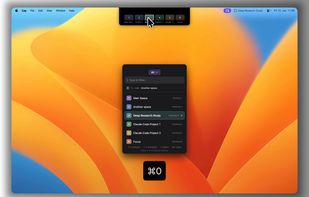
- Quick Switcher & Jump Back: Press Cmd+0 to open the fast picker with a visual space bar showing all your desktops. Type to filter, press 1-9 to jump, or instantly return to your previous Space.
- Drag to Move: Start dragging a window, hold Shift, and drop it on any Space. No Mission Control, no edge dragging. Works on all screens.
- Space Automations: Auto-mute when entering your "Focus" space. Enable Do Not Disturb in "Deep Work". Your spaces adapt to your workflow.
- Session Tracking: Create named work sessions, track time across Spaces, pause and resume anytime. Export to CSV for billing.
- Space Hover: Hover the camera notch — or the top bar on external monitors — to reveal all your Spaces. Click any Space to switch instantly.
- External Display Support: Full support for external monitors. Track time, see Spaces, and use Quick Switcher across all your displays.
No timers to start or stop. SpaceJump tracks time automatically as you switch between Spaces, with idle detection built in. See exactly where your hours went, per Space and per app.






 EU
EU


 PixelSolution added SpaceJump as alternative to DesktopTitle
 Paul added SpaceJump as alternative to WhichSpace
 Paul added SpaceJump as alternative to Toggl Track, Clockify, Timing, FlashSpace and 10 more




 Ideabridge GmbH

No comments or reviews, maybe you want to be first?