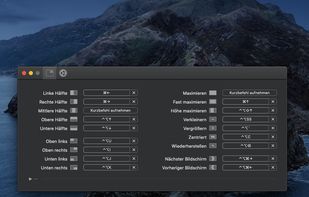
Move and resize windows on macOS with keyboard shortcuts. Rectangle is a window management app based on Spectacle Wndow Manager, written in Swift (programming language).

Putback is described as 'Automatically restores window layouts on macOS when displays change, designs and applies desk scenes, protects privacy, supports hotkeys, no data leaves device' and is a Window Manager in the office & productivity category. There are more than 10 alternatives to Putback for Mac and Homebrew. The best Putback alternative is Rectangle, which is both free and Open Source. Other great apps like Putback are Magnet, Workspaces, Moom and Settle.
Move and resize windows on macOS with keyboard shortcuts. Rectangle is a window management app based on Spectacle Wndow Manager, written in Swift (programming language).

Every time you multitask with many apps open, you need all the windows arranged accordingly. Magnet makes this process swift and easy.


Workspaces is a straightfoward productivity tool for Mac to recreate your work environment in two clicks. Simply drop files, folders, apps and websites into the application and select the ones you want to auto-launch. Open them all by clicking the START button.

Moom makes window management as easy as clicking a mouse button—or using a keyboard shortcut, if you're one of those types of people.


Enables window snapping, remembers and restores multi-app and multi-display layouts, supports workspace profiles, automation for monitor, time, and app rules, local data storage, per app positioning, works offline, and adapts window layouts to display changes.


Saves complete macOS window layouts and restores them with one click or hotkey, including multi-monitor and multi-Space setups.


If you’re fastidious about keeping your windows tidy, Stay is for you. Stay ensures that your windows are always where you want them to be, even as you connect and disconnect displays.
Display Maid allows you to save and restore window locations based on your display configuration or user created profiles.


FlowShelf a free Mac app that turns your notch into a Dynamic Island and gives everything you copy, drop, or screenshot a temporary home.


Arrange macOS windows into halves, thirds, quarters, or custom grid layouts using live previews, drag actions, or fully remappable shortcuts. Restore positions with one key, move windows across displays, manage layouts via the menu bar, and customize every action.