
Tiles Window Align icon

Tiles Window Align

Arrange macOS windows into halves, thirds, quarters, or custom grid layouts using live previews, drag actions, or fully remappable shortcuts. Restore positions with one key, move windows across displays, manage layouts via the menu bar, and customize every action.
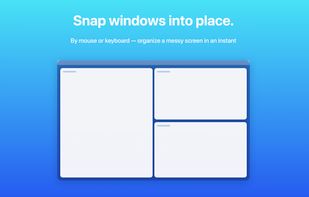
Tiles Window Align screenshot 1

Cost / License

  • Pay once
  • Proprietary

Application type

Platforms

  • Mac  Requires macOS 13 Ventura or later. Distributed directly, signed with an Apple Developer ID certificate and notarized by Apple (not on the Mac App Store).
0likes
0comments
0articles

Features

Properties

  1.  Lightweight
  2.  Privacy focused

Features

  1.  No registration required
  2.  Works Offline
  3.  No Tracking
  4.  Ad-free
  5.  Dark Mode
  6.  Support for Multiple Monitors
  7.  Tiling
  8.  Native application
  9.  Keyboard Shortcuts
  10.  Tiling Window Manager
  11.  Snap windows

Tiles Window Align News & Activities

Highlights All activities

Recent activities

Tiles Window Align information

  • Developed by

    JP flagfivenine design
  • Licensing

    Proprietary and Commercial product.
  • Pricing

    One time purchase (perpetual license) that costs $9.
  • Alternatives

    30 alternatives listed
  • Supported Languages

    • English
    • Japanese
    • Chinese
    • Korean
    • German
    • French
    • Spanish
    • Italian
    • Portuguese
    • Russian

AlternativeTo Category

OS & Utilities
Tiles Window Align was added to AlternativeTo by Haruqun on and this page was last updated . Tiles Window Align is sometimes referred to as Tiles
No comments or reviews, maybe you want to be first?

What is Tiles Window Align?

Tiles is a lightweight window manager for macOS, built with Swift and SwiftUI. It lives in the menu bar and stays out of the way until you need it.

Features:

  • Drag a window to a screen edge or corner to snap it, with a live preview before you release
  • Keyboard shortcuts for halves, quarters, thirds, two-thirds, maximize, and center
  • Size cycling: press the same shortcut repeatedly to move through 1/2, 2/3, and 1/3
  • Restore a window to its position before it was tiled, with one key
  • Custom layouts: draw any position and size on a grid, save it, and assign a shortcut
  • Move windows between displays while preserving relative position and size, even across different resolutions
  • Every shortcut is remappable; every action is also available from the menu bar
  • Localized into 11 languages: English, Japanese, Simplified and Traditional Chinese, Korean, German, French, Spanish, Italian, Portuguese, Russian
  • About 2 MB, no Dock icon, no account required

Tiles uses the macOS Accessibility API to move and resize windows, which macOS requires you to grant explicitly. It does not read screen contents or keystrokes. The only network activity is the update check; anonymous usage statistics are opt-in and off by default.

Distributed directly, signed with an Apple Developer ID certificate and notarized by Apple. Requires macOS 13 Ventura or later. Free to try with no time limit; a license is $9 one-time.

Disclosure: I am the developer of Tiles.

Official Links
