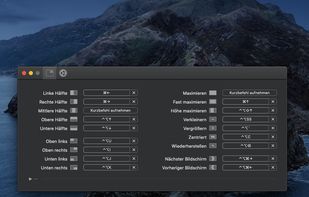
Move and resize windows on macOS with keyboard shortcuts. Rectangle is a window management app based on Spectacle Wndow Manager, written in Swift (programming language).

Tiles Window Align is described as 'Snap macOS windows into halves, thirds, quarters, or custom layouts with drag-and-drop or remappable shortcuts. Live previews, grid drawing, multi-display support' and is a Window Manager in the os & utilities category. There are more than 25 alternatives to Tiles Window Align for Mac and Windows. The best Tiles Window Align alternative is Rectangle, which is both free and Open Source. Other great apps like Tiles Window Align are Loop - Window Management, Magnet, Swish and Amethyst.
Move and resize windows on macOS with keyboard shortcuts. Rectangle is a window management app based on Spectacle Wndow Manager, written in Swift (programming language).

Loop is a macOS app that simplifies window management for you! You can effortlessly choose your window direction using a radial menu triggered by a simple key press, and customize it according to your preferences with personalized colors and settings.


Every time you multitask with many apps open, you need all the windows arranged accordingly. Magnet makes this process swift and easy.


Amethyst is a tiling window manager for Mac similar to the xmonad tiling window manager popular on Linux. Amethyst is written in Objective-C and has configurable shortcuts, multi-monitor support, multiple layouts, and the option to float certain applications.


Automatically restores window layouts on macOS when display setups change, offering instant position recovery, desk scene customization with app placement and wallpaper settings, hotkey triggers, undo feature, strong privacy protections, and no subscription needed.


Every window where it belongs. AI analyzes your open windows and organizes them into project-focused stages automatically. Then switch your entire multi-monitor setup between them instantly — no animations, no lag.


Divvy is an entirely new way of managing your workspace. It allows you to quickly and efficiently "divvy up" your screen into exact portions.


Moom makes window management as easy as clicking a mouse button—or using a keyboard shortcut, if you're one of those types of people.


Enables window snapping, remembers and restores multi-app and multi-display layouts, supports workspace profiles, automation for monitor, time, and app rules, local data storage, per app positioning, works offline, and adapts window layouts to display changes.


ShiftIt is an application for OSX that allows you to quickly manipulate window position and size using keyboard shortcuts. It intends to become a full featured window organizer for OSX. It is a complete rewrite of the original ShiftIt by Aravindkumar Rajendiran which is not...