
Settle icon
Settle icon

Settle

Enables window snapping, remembers and restores multi-app and multi-display layouts, supports workspace profiles, automation for monitor, time, and app rules, local data storage, per app positioning, works offline, and adapts window layouts to display changes.
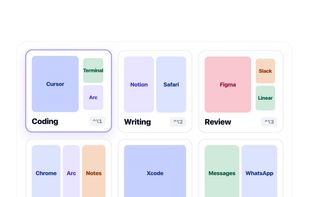
Menu bar popover with saved layouts, applied with one click.

Cost / License

  • Pay once
  • Proprietary

Application type

Platforms

  • Mac  Requires macOS 14 Sonoma or later. Universal binary for Apple Silicon and Intel.
0likes
0comments
0articles

Features

Properties

  1.  Privacy focused
  2.  Lightweight

Features

  1.  No registration required
  2.  No Tracking
  3.  Works Offline
  4.  Dark Mode
  5.  Support for Multiple Monitors
  6.  Support for scripting
  7.  Ad-free
  8.  Sits in the MenuBar
  9.  Grid layout
  10.  Support for Keyboard Shortcuts
  11.  Custom templates
  12.  Premade templates
  13.  Snap windows

Settle News & Activities

Highlights All activities

Recent activities

Settle information

  • Developed by

    TR flagGökhan Gökova
  • Licensing

    Proprietary and Commercial product.
  • Pricing

    One time purchase (perpetual license) that costs $10.
  • Alternatives

    14 alternatives listed
  • Supported Languages

    • English
    • Turkish
Settle was added to AlternativeTo by gokhangokova on and this page was last updated .
No comments or reviews, maybe you want to be first?

What is Settle?

Settle is a window manager for macOS that goes beyond snapping. Alongside keyboard shortcuts and drag to edge snapping, it remembers complete window arrangements: which apps were open, where each window sat, and on which display.

Save a layout once, for example "Development" with your editor on the left, terminal bottom right and browser on the right, then restore it any time from the menu bar or with a shortcut. Settle reopens closed apps, positions every window, and adapts when a display is missing.

Workspaces group your layouts and rules by context: Work, Personal, Meeting. Automation applies the right layout when your monitor setup changes, at a time of day you choose, or when a specific app launches.

Window positions are stored as percentages, so layouts survive resolution changes and different display sizes.

Everything runs on your Mac. No account, no cloud sync, and window contents never leave your machine.

Main features:

  • Snap with keyboard shortcuts or by dragging windows to screen edges
  • Save and restore multi app, multi display layouts
  • Workspaces (profiles) that group layouts and rules by context
  • Automation: monitor connect and disconnect, time of day, app launch rules
  • Per app rules that position a window when the app opens
  • English and Turkish interface
  • Universal binary for Apple Silicon and Intel, requires macOS 14 Sonoma or later

Settle is a direct download, signed and notarized by Apple. Free 7 day trial, then a one time 9.99 USD license with no subscription.
