
Snapback icon
Snapback icon

Snapback

Free macOS window manager that saves and restores your entire workspace layout with one keystroke. Every app, every window position, every display. Includes window snapping, drag-to-snap, and unlimited named workspaces.
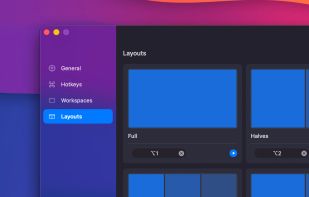
Instant layout presets, one shortcut arranges all open windows into halves, thirds, or full screen

Cost / License

  • Freemium (Pay once)
  • Proprietary

Platforms

  • Mac
Menu bar app with minimal resource usage
Window snapping to halves, thirds, quarters, etc...
+2
Smart settings with app ignore list, customizable shortcuts, and behavior controls
0likes
0comments
0alternatives
0articles

Features

Properties

  1.  Lightweight

Features

  1.  Support for Multiple Monitors
  2.  Dark Mode
  3.  Ad-free
  4.  Support for scripting
  5.  No registration required
  6.  No Tracking
  7.  Works Offline
  8.  Multiple window layouts
  9.  Tiling Window Manager
  10.  Snap windows

Snapback News & Activities

Highlights All activities

Recent activities

Snapback information

  • Developed by

    MX flagSnapback
  • Licensing

    Proprietary and Freemium product.
  • Pricing

    One time purchase (perpetual license) that costs up to $10 + free version with limited functionality.
  • Alternatives

    0 alternatives listed
  • Supported Languages

    • English

AlternativeTo Categories

Office & ProductivityOS & Utilities
Snapback was added to AlternativeTo by Ricka7x on and this page was last updated .
No comments or reviews, maybe you want to be first?

What is Snapback?

Snapback is a free macOS utility that saves and restores your entire workspace with a single keyboard shortcut. Every open app, every window position, every display captured and restored instantly. Switch between dev mode, design mode, and meeting mode in seconds.

Unlike other window managers that only move and resize windows, Snapback remembers your full layout. It can reopen closed apps, handle monitor disconnections gracefully, and persist workspaces across restarts.

Core features include window snapping (halves, thirds, quarters), drag-to-snap (hold ? and drag to any edge or corner), predefined layout presets, unlimited named workspaces, and multi-display support for up to 6 screens. Lives in your menu bar. Keyboard-first with fully customizable shortcuts.

Requires macOS 14.2+. Apple Silicon native. No account required. Free forever.

Official Links
