Apps tagged with 'Screenshots' Page 11 of 13

All apps in Apps tagged with 'Screenshots' category. Use the filters below to narrow down your search. 
Copy a direct link to this comment to your clipboard
  1. BlurSnap icon
     Like

    BlurSnap is a Windows screenshot utility built around an inverted workflow: instead of capturing a screen and then hunting for sensitive details to hide, the capture opens fully blurred and you paint to reveal only the parts you actually want to show.

    Cost / License

    • Pay once
    • Proprietary

    Application type

    Since

    • Since 2026

    Platforms

    • Windows
    • UA flagUkraine
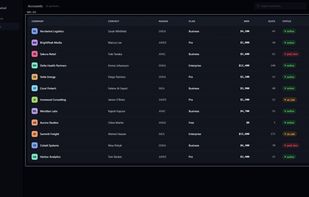
    Press the global hotkey and select the area to capture — anything on screen, here a CRM account list.
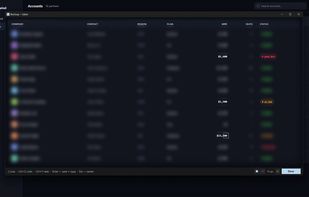
    The capture opens fully blurred. Brush over only what you want visible — here three revenue figures and their status.
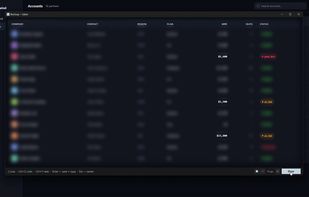
    Press Done or Enter and the result is copied to the clipboard and saved. Everything you didn't reveal stays hidden.
    8 alternatives
  2. Do you save many screenshots for work or to avoid forgetting something you saw on your device? Do you have the photo album on your phone full of screens that you can never find quickly? Screenshot PRO lets you better manage your screenshots

    Cost / License

    • Freemium (Subscription)
    • Proprietary

    Application type

    Since

    • Since 2022 (updated Sep 2025)

    Platforms

    • iPhone
    • iPad
    • IT flagItaly
    • European Union flagEU
    Screenshot Pro Screenshots App screenshot 1
    Screenshot Pro Screenshots App screenshot 2
    +3
    Screenshot Pro Screenshots App screenshot 3
    8 alternatives
  3. With Screenshot Guru, you can capture beautiful, full-length high-resolution (retina display) PNG screenshot images of web pages, tweets and any public website. It works every on your desktop, Android mobile phone, iPhone or iPad.

    Cost / License

    • Free
    • Proprietary

    Application type

    Since

    • Since 2021

    Platforms

    • Online
    • Google Chrome
    • Brave
    • Chromium
    • Vivaldi Browser
    • IN flagIndia
    Screenshot Guru screenshot 1
    Screenshot Guru screenshot 2
    4 alternatives
  4. Capture.Page icon
     1 like

    Effortlessly capture screenshots, create PDFs, scrape content, and extract metadata from any website with our state-of-the-art API. We offer blazing-fast performance and reliability, giving you the best user experience possible.

    Cost / License

    • Freemium (Pay once)
    • Proprietary

    Application type

    Since

    • Since 2017

    Platforms

    • Online
    • AU flagAustralia
    Capture.Page screenshot 1
    Capture.Page screenshot 2
    Capture.Page screenshot 3
    +1
    Capture.Page screenshot 4
    36 alternatives
  5. PScreen icon
     Like

    PScreen provides a convenient way to take screenshots and now available as a menu bar application.

    Cost / License

    • Pay once
    • Proprietary

    Since

    • Since 2018

    Platforms

    • Mac
    • US flagUnited States
    PScreen screenshot 1
    PScreen screenshot 2
    PScreen screenshot 3
    PScreen screenshot 4
  6. ApiLeap icon
     Like

    Best URL Screenshot API based on Chrome to make full page snapshots or thumbnails of any website. The service is fully automated and offers many options and features like mobile screenshots, custom resolution, fixed viewport, ...

    Cost / License

    • Freemium (Subscription)
    • Proprietary

    Application type

    Since

    • Since 2017

    Platforms

    • Online
    • FR flagFrance
    • European Union flagEU
    ApiLeap screenshot 1
    ApiLeap screenshot 2
    ApiLeap screenshot 3
    27 alternatives
  7. Gemoo's YouTube video screenshot converter is a valuable tool for content creators who want to improve the quality and visibility of their YouTube videos. It quickly generates high-quality screenshots from any YouTube video for free, and there is no need to register to get...

    Cost / License

    • Free
    • Proprietary

    Application type

    Since

    • Since 2023

    Platforms

    • Online
    • US flagUnited States
    Overview of Gemoo's YouTube Screenshot Tool
    Screenshot Local Video or YouTube Video online
    Capture images from YouTube Video
    52 alternatives
  8. CreamShot X is a native screen-capture and annotation tool for macOS. Snip any area, mark it up, pin a capture on top of other windows, or extract text from an image with built-in OCR. CreamShot X is included in every getapps.cafe subscription.

    Cost / License

    • Pay once or Subscription
    • Proprietary

    Application type

    Since

    • Since 2026

    Platforms

    • Mac
    • US flagUnited States
    CreamShot X screenshot 1
    CreamShot X screenshot 2
    CreamShot X screenshot 3
    +1
    CreamShot X screenshot 4
    5 alternatives
  9. A Mac and Windows app for indie developers who need App Store, Google Play, and Microsoft Store screenshots. Pick a preset, drop in your screenshots, add text and gradients, export exact-size PNGs.

    Cost / License

    • Pay once
    • Proprietary

    Since

    • Since 2026

    Platforms

    • Windows
    • Mac
    ListingShots screenshot 1
    ListingShots screenshot 2
    51 alternatives
  10. SiteSnapr icon
     Like

    Sitesnapr is a real-time webpage screenshot service. We grab screenshots, store them, serve them, and make sure they stay up to date. Simply give us a target and we will return an image. REST API available.

    Cost / License

    • Free Personal
    • Proprietary

    Application type

    Since

    • Since 2016

    Platforms

    • Windows
    • Mac
    • Linux
    • Online
    SiteSnapr screenshot 1
    26 alternatives
  11. RepeatShot is a native macOS screenshot tool that eliminates the need to repeatedly select the same capture area. Made for anyone who captures the same regions again and again in their daily workflow

    Cost / License

    • Pay once
    • Proprietary

    Since

    • Since 2025

    Platforms

    • Mac
    • TW flagTaiwan
    RepeatShot screenshot 1
  12. HovText icon
     Like

    HovText is a simple free open source Windows .NET Framework clipboard manager, which will remove any formatting from the copied text and save it for later retrieval via hotkeys. It stores both the unformatted cleartext and the original formatting along with images.

    Cost / License

    • Free
    • Open Source

    Since

    • Since 2022

    Platforms

    • Windows
    HovText screenshot 1
    HovText screenshot 2
    2 alternatives
  13. Hawkr icon
     Like

    Ever needed to quickly grab text from an image, a non-selectable PDF, a video, or a website that blocks copying? Hawkr makes it effortless. With a simple keyboard shortcut, you can capture any text visible on your screen and have it instantly copied to your clipboard.

    Cost / License

    • Free
    • Proprietary

    Application type

    Since

    • Since 2026

    Platforms

    • Mac
    Hawkr screenshot 1
    Hawkr screenshot 2
    Hawkr screenshot 3
    +5
    Hawkr screenshot 4
    24 alternatives
  14. Free browser tool that auto-sorts your screenshots into smart folders — no upload, no login.

    Cost / License

    • Free
    • Proprietary

    Since

    • Since 2026

    Platforms

    • Online
    OrganizeShots screenshot 1
    OrganizeShots screenshot 2
    OrganizeShots screenshot 3
    OrganizeShots screenshot 4
    2 alternatives
  15. Synapse is a native macOS utility suite that combines clipboard history, screenshots, OCR, Keep Awake, QR scanning, and other everyday tools into a single lightweight app. Built in Swift, Synapse is designed to stay fast, efficient, and out of the way.

    Cost / License

    • Freemium (Pay once)
    • Proprietary

    Application type

    Since

    • Since 2026

    Platforms

    • Mac
    • LK flagSri Lanka
    How it looks menubar popover
    Screenshot, OCR, annotations
    turn off what you dont want.
    what people says
    8 alternatives
  16. Tapic icon
     Like

    Tapic can help you manage your screenshots.

    Cost / License

    • Free
    • Proprietary

    Since

    • Since 2020 (updated Aug 2019)

    Platforms

    • iPhone
    Tapic screenshot 1
    Tapic screenshot 2
    Tapic screenshot 3
  17. Tinge icon
     Like

    Free Screenshot Mac OS X Software capable of capture drop down menus and lists at the moment of the shot. It lets annotate the image and store it either locally or to the Dropbox.

    Cost / License

    • Free
    • Proprietary

    Since

    • Since 2016

    Platforms

    • Mac
    Tinge screenshot 1
  18. shotkit icon
     Like

    Capture a pixel-perfect webpage screenshot of any URL, HTML or Markdown with one HTTP request: full-page, retina or mobile, cookie banners and ads removed. Get PNG, PDF, video or Markdown back. Start free, no credit card.

    Cost / License

    • Freemium (Subscription)
    • Proprietary

    Application type

    Since

    • New

    Platforms

    • Online
    • RO flagRomania
    • European Union flagEU
    shotkit screenshot 1
    shotkit screenshot 2
    shotkit screenshot 3
    +1
    shotkit screenshot 4
    38 alternatives
  19. Design screenshots, edit and translate multilingual metadata on one Mac, then sync everything through your own App Store Connect API — no more browser tabs and spreadsheets.

    Cost / License

    • Pay once
    • Proprietary

    Application type

    Since

    • New

    Platforms

    • Mac
    • CN flagChina
    Store Connect Studio screenshot 1
    Store Connect Studio screenshot 2
    Store Connect Studio screenshot 3
    +2
    Store Connect Studio screenshot 4
    3 alternatives
  20. A private clipboard manager for macOS with local history that turns copied material into finished work: searchable history, named Keepers, an ordered paste queue, one-shot transforms, redaction review before pasting, and one-shortcut screenshot framing.

    Cost / License

    • Freemium (Pay once)
    • Proprietary

    Application type

    Since

    • New

    Platforms

    • Mac
    • DE flagGermany
    • European Union flagEU
    Clip 4 Breakfast screenshot 1
    28 alternatives
  21. ScreenLogger is a tiny program that runs in the background and saves screenshots in timed intervals. It can be used to keep a log of what has happened on a computer. For example you could use it as a fallback ground truth when you work for a client and forget to write down your...

    Cost / License

    Application type

    Since

    • Since 2021 (updated May 2021)

    GitHub

    • GitHub stars: 3

    Platforms

    • Windows
    • Linux
    ScreenLogger screenshot 1
    ScreenLogger screenshot 2
    12 alternatives