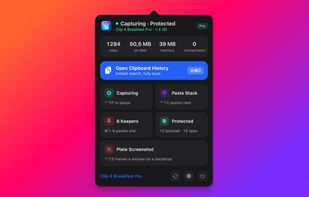
Clip 4 Breakfast is a native macOS clipboard command center for people who copy and paste all day. History is where it starts, not where it stops.
Recall. Everything you copy stays searchable by content, name, type, source app, or age. Text, rich text, images, files, URLs, colors, and graphics. Keyboard-first, no mouse required.
Keep. Turn the clips you reuse into named Keepers. They never age out of history cleanup.
Deliver. Queue several clips into a Paste Stack and paste them back one at a time, in order. Built for filling forms and repetitive work.
Transform. Paste As changes one paste without touching the stored original: strip tracking parameters from a link, trim whitespace, format JSON.
Review. Safe Paste shows you what is about to leave and lets you replace sensitive fragments locally before it reaches the destination. It matters most when the destination is an AI tool.
Bundle. Context Packs collect up to 20 ordered clips into a single Markdown brief with an instruction, for pasting into an AI tool.
Frame. Plate Screenshot captures a window with one shortcut and returns it to your clipboard already framed on a designed backdrop, with padding, rounded corners, and a soft shadow. Ten backdrops, or Auto samples the colors of the shot itself. Press Space mid-capture to drag a region instead, and smart crop trims it to the object. The raw capture stays in history beside the framed one, so an old screenshot can be re-framed at any time.
Graphics kept intact. A PDF or vector copied from a design app pastes back whole. The full data lives on disk and only a thumbnail stays in memory, so a history of heavy artwork never grows the app's footprint.
Privacy. Clipboard history lives in a local SQLite database with user-only file permissions. No account, no cloud processing, no analytics. Password managers and Keychain Access are excluded by default, and concealed or transient pasteboard types are rejected outright. The app shows its own live footprint: item count, database size, image storage, and memory.
Honest limits. There is no cross-device or iCloud sync. It is macOS only. It is not open source. High-signal secret detection cannot reliably catch every free-form password or one-time code, and the app says so.
Requires macOS 14.0 or later. Universal build for Apple Silicon and Intel, signed with a Developer ID certificate and notarized by Apple.
Free keeps your 40 most recent clips with no time limit. Pro is a one-time purchase at $9.99 for the first 500 customers, then $24.99, and every future update including major versions is included. No subscription. A 14-day Pro trial needs no credit card and no account.






 EU

 Kapisch Bhardwaj added Clip 4 Breakfast as alternative to Raycast, Clipboard History IO, PastePal, Ditto and 24 more
 onekapisch



No comments or reviews, maybe you want to be first?