BlurSnap icon
BlurSnap icon

BlurSnap

BlurSnap is a Windows screenshot utility built around an inverted workflow: instead of capturing a screen and then hunting for sensitive details to hide, the capture opens fully blurred and you paint to reveal only the parts you actually want to show.
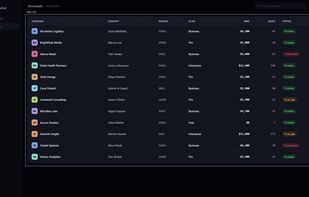
Press the global hotkey and select the area to capture — anything on screen, here a CRM account list.

Cost / License

  • Pay once
  • Proprietary

Application type

Platforms

  • Windows  Runs on Windows 10 (version 1809 / build 17763 or later) and Windows 11. Distributed exclusively through the Microsoft Store — there is no standalone installer.
0likes
0comments
0articles

Features

Properties

  1.  Lightweight
  2.  Privacy focused

Features

  1.  Works Offline
  2.  No registration required
  3.  Dark Mode
  4.  Ad-free
  5.  No Tracking
  6.  Edit screenshots

BlurSnap News & Activities

Highlights All activities

Recent activities

BlurSnap information

  • Developed by

    UA flagBoringApps
  • Licensing

    Proprietary and Commercial product.
  • Pricing

    One time purchase (perpetual license) that costs $10.
  • Alternatives

    8 alternatives listed
  • Supported Languages

    • English
BlurSnap was added to AlternativeTo by boring_apps on and this page was last updated .
No comments or reviews, maybe you want to be first?

What is BlurSnap?

BlurSnap is a Windows screenshot utility built around an inverted workflow: instead of capturing a screen and then hunting for sensitive details to hide, the capture opens fully blurred and you paint to reveal only the parts you actually want to show. Anything you don't reveal stays hidden.

Paint to reveal — Press a global hotkey, select an area, and the editor opens with everything obscured. A brush uncovers the regions that matter; brush size, blur strength, hotkey and save folder are all configurable.

Hold to peek — Hold a key to see the original underneath, so you can find what you're looking for without guessing, then it blurs back. While peeking the editor is view-only, so nothing gets saved by accident.

Frosted glass mode (optional) — Goes a step further and replaces hidden regions with a plain sheet instead of a blur — useful when a screenshot is headed to a wider or less familiar audience.

Nothing to peel off — The hiding is applied to the pixels of the exported file rather than drawn as a separate layer, so there is no overlay to remove from the saved image.

Works entirely offline — BlurSnap makes no network calls at all: no cloud processing, no uploads, no accounts, no telemetry.

Finish in one step — When you're done, the result is copied to the clipboard and saved automatically.

Distributed through the Microsoft Store. 15-day free trial, then a one-time $9.99 purchase; trial exports carry a small corner watermark.

Official Links