


Penpot
272 likes
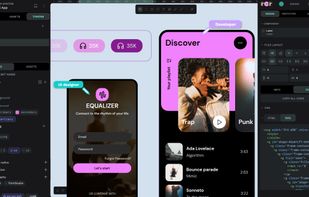
Open-source design platform offering web-based and self-hosted workflows, code inspection in HTML and CSS, adaptive layouts with CSS Grid and Flex, real-time collaboration, auto layout features, reusable components, design tokens, layer support, plugins, and no tracking.

Cost / License
- Freemium (Subscription)
- Open Source (MPL-2.0)
Application typeApplication types
 EU
EUPlatforms
- Online
- Self-Hosted


Features
Highlights All activities
Penpot News & Activities
Recent News
- Fla published news article about Penpot
- Paul published news article about Penpot
- Fla published news article about Penpot


Recent activities




Create without Adobe (free n' paid) 2025
There is no doubt that Adobe Suite is great, even in some case it's probably the best. But you can be mad at Adobe for many reasons, expensive monthly subscribtion method, bad stability, useless features, paying for tools you don't use. Here is my list with the best way to ditch Adobe monopoly in my opinion.
I tried to add Open Source alternatives too as some are really good.
I only covered Adobe softwares that I've used so I'm sorry if you don't find what you came for...


Selfhosting
Selfhosting is where you're hosting your own websites, apps, software, tools, and much more on your own server instead of having to rely on 3rd-party cloud providers such as Hetzner. Taking this approach to hosting gives you more control over your data and how your server or servers are managed.
When you are running multiple things on one or two servers, within your home, it's called a "Homelab" and you're "Homelabbing" at that point.
Running your own server and homelab within your home is great for privacy-conscious individuals such as myself, tech enthusiasts, small businesses, and those seeking more control of their digital life.
The following lists provided here are applications and software I've gotten comfortable with and enjoyed using over the past 3 and a half years since I started homelabbing, it's based on my experience and what fits my criteria. Some well known softwares won't be listed here, as my experience may of not been at best with them.
My criteria is that software is built in the open, respects user privacy and security, should not require a license to operate, and don't contain profanity and other minor things.
I'm also willing to test new software to selfhost, feel free to comment or message me to try out other alternatives.
There are other places to check out as well for those interesting selfhosting, such as Awesome Selfhosted, selfh.st, and other places you can find on the internet.
https://github.com/awesome-selfhosted/awesome-selfhosted
https://github.com/awesome-foss/awesome-sysadmin
https://github.com/veggiemonk/awesome-docker
If you ever need help with selfhosting, you can check out the following communities:
Homelab Community on Fluxer, I personally run
/r/selfhosted (Reddit)
/c/selfhosted (Lemmy / Fediverse)
There's also a wiki you can look into as well.
If you believe an alternative software should be added to this list, please contact me or direct message via my AlternativeTo account. I'm also available on Signal.
This lists gets updated every month at least, check back regularly.


Powerful Open Source Creative Softwares
Ever wondering about free great open source software to start your idea? Here's a list for you to get started.
Also mentions several rarely known and newer software as well!
Please note that almost none of these alternatives are 1-to-1 replacement with exact some features. Most of these software might have entirely different scope of project.
Notable event: Libre Graphics Meeting, annual meeting on Free/Libre and Open Source software for graphics.
https://www.libregraphicsmeeting.org
Cover image by David Revoy (CC-BY 4.0) https://www.davidrevoy.com/article1061/cmyk-support-in-inkscape-could-be-a-game-changer-for-professional-print-designers
Developed by
 Kaleidos
 Licensing
Open Source (MPL-2.0) and Freemium product.Pricing
Subscription ranging between $7 and $25 per month + free version with limited functionality.Rating
Average rating of 4.7Alternatives
94 alternatives listedNews
15 news article related to PenpotBadge
Get an embeddable badge for PenpotSupported Languages
AlternativeTo Categories
Photos & Graphics, Development, Network & Admin, System & Hardware, AI Tools & ServicesGitHub repository
- 60,952 Stars
- 4,202 Forks
- 807 Open Issues
- Updated



Comments and Reviews
Penpot is really intuitive: I never used such kind of application but managed to quickly prepare an interactive set of mock-ups of a mobile app feature. Particularly the creation of components (groups of elements) and the editing of one specific instance of such component is really convenient (as well as the updating of instances with the latest version of the master component). Big plus also that it's open source and free for everyone to use.
Unfortunately it's raw as a butchered chicken at the moment; the functionality may be good but the user experience is just awful. Freezes when working with images, editing paths is unintuitive, undo/redo changes random stuff, shapes jump and twist when moving/transforming them, and everything has sooo much friction. And SVG code exported is too complex for a regular shape with an outline. Shortly, it's riddled with tiny bugs, and covered in questionable hotkey choices. Fun to look at, rage-inducing when you actually use it.
I haven't switched from Figma completely yet, but Penpot has improved a lot over the last couple of years. I'm curious if anyone here is using it as their main design tool and how it's working out in day-to-day projects.
Sadly no Android & ios support. Working on mobile devices deals with PC native fronted. Also i am missing some workflow visualization like automatically attaching arrows of views for schematic design. The Setup was pretty tricky, using Podman. but worked after some github issue research. Rich templates are are fine feature. But i still miss default notion like Markdown Notes support. Would be a great nice feature - and would lead up penpot more into the merge of Figma & Miro boards with LogSeq - like AFFinE.
The dev actively collaborate with active FOSS project to get actual feedback, like the current colaboration with KDE Visual Design Group community.
Although I'm not a designer i can say this app is very good. Ive used it in some designs and it was a bit difficult, but its easy to learn
Give it a try! Easy to use, intuitive interface, FOSS, European.