• CrystalDiskInfo icon
  • Defraggler icon
  • FileGriffon icon
  • Microsoft Defender icon
  • MultiPar icon
  • +28

Data hoarding/organizing/storing/backing up

everylostbiteverylostbit33 appsUpdated
Copy a direct link to this comment to your clipboard

Software I use to collect, organize, sort, de-duplicate, store, check data, and more (for Windows). Most of these have multiple uses, but I ordered them into categories in ways I use them most for.

Last update: 2026/11/11 - Added VirusTotal and Microsoft Defender, for antimalware solutions.

1. Storage protection and integrity

Protecting the files you acquire and where you store them; this is probably the most important category for a data hoarder/archivist

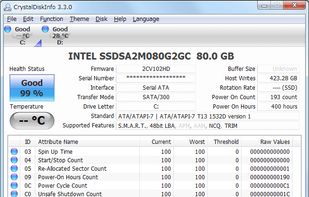
  1. Open-source HDD/SSD utility for monitoring S.M.A.R.T. values, disk temperature and other information.

    Cost / License

    • Free
    • Open Source

    Application type

    Platforms

    • Windows
    • PortableApps.com
    CrystalDiskInfo screenshot 1
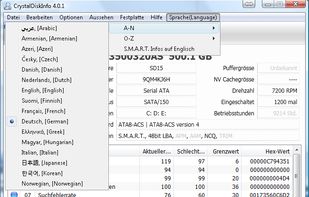
    "Reallocated Sectors Count" in German
    More than 30 languages
    everylostbiteverylostbit’s note

    Got to keep track of the storage devices stats. I've recently (as of November 2026) read that it bundles adware now; you need to decide on your own if you want to bother with it or not.

  2. It differs from other defrag tools on the market, by enabling you to quickly and simply defrag the files you want to, without having to process the whole drive. You can defrag only if the computer is idle for a definable time, so Defraggler does not slow down the computer if you...

    Cost / License

    • Freemium
    • Proprietary

    Application type

    Platforms

    • Windows
    Defraggler screenshot 1
    Defraggler screenshot 1
    Option to defrag only larger files
    +3
    Schedule
    everylostbiteverylostbit’s note

    People say this app isn't updated anymore, which might be true but at least on Win 10 as of 2026 it still works like a charm. This is required because constantly downloading/shuffling files around will cause fragmentation.

  3. FileGriffon is a local file integrity monitor, watching folders of any scope or even single files for silent corruption: it hashes files, re-checks them on a schedule, reports anything corrupted, missing or moved, with optional PAR2 repair, duplicate detection, SMART drive health.

    Cost / License

    • Freemium
    • Proprietary

    Platforms

    • Windows
    The dashboard: every monitored folder/file (vault) with how much of it has been verified, and anything found corrupt or missing.
    Vaults you check often can be pinned to the top. Each card shows verified percentage, file count and parity coverage.
    Adding a vault: point it at a folder, choose manual or scheduled scanning, and optionally generate PAR2 parity data for repairs.
    +7
    Every file event in one place: corrupt, missing, moved, new and verified. Filterable by vault and type.
    everylostbiteverylostbit’s note

    To protect files, folders, drives from decay. Integrates well with Teracopy. Also has par2 protection. Automates a lot of things regarding the protection of file integrities.

  4. Windows Security (known as Windows Defender Antivirus before Windows 10 May 2020 Update, Windows Defender before Windows 10 Creators Update, or Microsoft Defender Antivirus before Windows 11) is an anti-malware component of Microsoft Windows.

    Cost / License

    • Free Personal
    • Proprietary

    Application type

    Platforms

    • Windows
    • Android
    • iPhone
    • iPad
    • Android Tablet
    Microsoft Defender screenshot 1
    everylostbiteverylostbit’s note

    You got to have at least one proper antimalware solution, that runs live checks on your system, at least on Windows. Microsoft's own Defender does a good enough job for that.

  5. MultiPar icon
     Like

    Though console applications are open source (PAR clients are GPL), GUI application is closed source. Console applications and some UI resource are open source.

    Cost / License

    • Free
    • Proprietary

    Application type

    Platforms

    • Windows
    MultiPar screenshot 1
    MultiPar screenshot 1
    MultiPar screenshot 2
    +5
    MultiPar screenshot 3
    everylostbiteverylostbit’s note

    Used to be my go-to for parity creation, but nowadays I don't use as much.

  6. This is a fork of par2cmdline which replaces core computation routines with ParPar’s processing backend, improving par2cmdline’s performance on x86/ARM platforms.

    Cost / License

    • Free
    • Open Source

    Application type

    Platforms

    • Windows
    • Mac
    • Linux
    everylostbiteverylostbit’s note

    Command line tool for par2, when more bulky tools aren't really needed. But requires careful use.

  7. SeaTools icon
     Like

    SeaTools is a diagnostic tool that helps you determine the condition of the disk drive in your external hard drive, desktop or laptop computer.

    Cost / License

    • Free
    • Proprietary

    Platforms

    • Windows
    SeaTools screenshot 1
    SeaTools screenshot 1
    SeaTools screenshot 2
    +5
    SeaTools screenshot 3
    everylostbiteverylostbit’s note

    Another tool to check drive health.

  8. Analyse suspicious files, domains, IPs and URLs to detect malware and other breaches, automatically share them with the security community.

    Cost / License

    • Free Personal
    • Proprietary

    Application type

    Platforms

    • Windows
    • Mac
    • Linux
    • Online
    • Software as a Service (SaaS)
    • Android
    • Android Tablet
    • Google Chrome
    • Mozilla Firefox
    • Microsoft Edge
    Scan results for alternativeto.net
    the macOS/Linux desktop uploader
    the VT4Browsers Firefox extension
    +1
    Home
    everylostbiteverylostbit’s note

    This is for uploading or checking files that you are unsure of how safe they are. IMPORTANT is to keep in mind, one needs to treat this as uploading to a public source, as the file is ingested by many sources. So, no personal or sensitive files go there. Otherwise very useful online tool, not just for Windows.

2. Backing up

This is second in importance only to integrity protection, because backing up broken/wrong files doesn't mean much.

  1. Securely backup data, clone and image disks using local, network, or USB drives with a subscription model accommodating personal and commercial needs.

    Cost / License

    • Paid
    • Proprietary

    Application type

    Platforms

    • Windows
    Macrium Reflect screenshot 1
    Macrium Reflect screenshot 1
    Macrium Reflect screenshot 2
    +1
    Macrium Reflect screenshot 3
    everylostbiteverylostbit’s note

    Using this to image disks, I haven't found anything else that can take images of system disks faster than this.

  2. Veeam Agent for Microsoft Windows and Veeam Agent for Linux work with Veeam Availability Suite to deliver Availability for ALL workloads — virtual, physical and cloud — from a single management console, extending Veeam’s leadership position from being the best for VMware vSphere...

    Cost / License

    • Paid
    • Proprietary

    Application type

    Platforms

    • Windows
    • Linux
    Status page
    Get an overview of your recent backups in the Control Panel.
    CryptoLocker protection for USB storage
    +6
    Restore individual files from ANY backup type
    everylostbiteverylostbit’s note

    Using this to create snapshots of computers, free, but is a bit cumbersome to use.

  3. VMware Workstation Player builds on the industry leading foundation of Workstation Pro, and delivers a streamlined user interface for creating and running operating systems and applications in a virtual machine.

    Cost / License

    • Free Personal
    • Proprietary

    Application type

    Platforms

    • Windows
    • Linux
    VMware Workstation Player screenshot 1
    everylostbiteverylostbit’s note

    Free and good enough to play virtual machines.

3. File Handling/Organizing/Deduplication

These are rarely used to transfer files from some place to another, but more for general organization of files.

  1. 7-Zip icon
     Like

    Efficient file archiver offering superior compression and encryption. Supports multiple formats such as TAR, ZIP, with a unique self-extracting feature.

    Cost / License

    • Free
    • Open Source

    Application type

    Platforms

    • Windows
    • Mac
    • Linux
    • BSD
    • Arch Linux
    • PortableApps.com
    • ReactOS
    Main Window
    Add to Archive
    Options
    everylostbiteverylostbit’s note

    For archiving/compressing I don't think there's anything better for Windows

  2. AllDup icon
     Like

    Find and remove duplicate files! Find and hardlink duplicate files! Find and shortcut duplicate files! Find similar files!.

    Cost / License

    • Free
    • Proprietary

    Application type

    Platforms

    • Windows
    AllDup screenshot 1
    Image previews
Size can be changed
    make shortcuts instead of duplicates
make hardlinks instead of duplicates
remove duplicates
    everylostbiteverylostbit’s note

    Excellent file de-duplication too, I use this interchangeably with dupeguru. Either one shines in various tasks. I think this one was fully free though, so there's that.

  3. dupeGuru icon
     Like

    dupeGuru is a free and open source tool to find duplicate files on your computer. It can scan either filenames or contents. The filename scan features a fuzzy matching algorithm that can find duplicate filenames even when they are not exactly the same.

    Cost / License

    • Free
    • Open Source

    Application type

    Platforms

    • Windows
    • Mac
    • Linux
    dupeGuru screenshot 1
    dupeGuru screenshot 1
    dupeGuru screenshot 2
    +7
    dupeGuru screenshot 3
    everylostbiteverylostbit’s note

    This is my go-to app when I have to find and remove duplicates in different folders/drives. It isn't perfect but among similar tools does the best job, unfortunately not free.

  4. Locate files and folders by filename on Windows instantly, displaying all items on NTFS volumes and mapped network drives. Supports 19 languages.

    Cost / License

    • Free
    • Proprietary

    Application type

    Platforms

    • Windows
    Locate files and folders by name instantly.
    everylostbiteverylostbit’s note

    Ever tried to find something on your computer using the default windows search feature? This is what you need.

  5. Dual-panel manager with tabbed interface, built-in viewer, ZIP/RAR/7z archive support, folder sync, batch rename, search and customizable shortcuts.

    Cost / License

    • Freemium
    • Proprietary

    Application type

    Platforms

    • Windows
    • PortableApps.com
    FreeCommander screenshot 1
    FreeCommander screenshot 1
    FreeCommander screenshot 2
    +5
    FreeCommander screenshot 3
    everylostbiteverylostbit’s note

    One of the better file/folder explorers, although the free version is only 32bit and not very fast, its feature rich and does the job.

  6. MediaElch icon
     Like

    MediaElch is a MediaManager for Kodi icon Kodi. It directly accesses XBMCs database (SQLite and MySQL) and thumbnail cache to store information about movies and TV shows.

    Cost / License

    • Free
    • Open Source

    Application type

    Platforms

    • Windows
    • Mac
    • Linux
    everylostbiteverylostbit’s note

    I mostly use this to keep track of media files, but this is one where I need to try to find a better alternative.

  7. Disk analysis tool with treemap views, duplicate file detection, and cleanup actions. Works offline and ad-free on Windows as an open-source project.

    Cost / License

    • Free
    • Open Source

    Application type

    Platforms

    • Windows
    Folder sorted after their foldersize
    Settings TreeMap
    Settings Cleanups and user defined actions
    +2
    Drive Selection
    everylostbiteverylostbit’s note

    Similar to WizTree, simpler. Main drawback is that it takes more time to scan usually. But is free, no ads, no premium etc.

  8. WizTree icon
     Like

    Ultra-fast disk space analyzer for Windows, showing largest files and folders according to space usage by utilizing the NTFS file system's Master File Table for unmatched speed.

    Cost / License

    • Free Personal
    • Proprietary

    Application type

    Platforms

    • Windows
    • Mac
    WizTree screenshot 1
    WizTree screenshot 1
    WizTree screenshot 2
    +1
    WizTree screenshot 3
    everylostbiteverylostbit’s note

    To see which files are taking most space in any given folder or drive. Ideal to find stale/unneeded files that take too much space.

  9. VVV is an application that catalogs the content of removable volumes like CD and DVD disks for off-line searching. Folders and files can also be arranged in a single, virtual file system. Each folder of this virtual file system can contain files from many disks so you can...

    Cost / License

    • Free
    • Open Source

    Application type

    Platforms

    • Windows
    • Mac
    • Linux
    • PortableApps.com
    Physical view, Windows
    Virtual view, Linux
    Search view, Windows
    everylostbiteverylostbit’s note

    To keep a full list of files and folders of all storage, but I'm using it less and less these days.

4. Downloading

Software to use when downloading.

  1. JDownloader is a download manager, written in Java, which allows automatic download of groups of files from one-click hosting sites.

    Cost / License

    • Free
    • Proprietary

    Application type

    Platforms

    • Windows
    • Mac
    • Linux
    • Java
    • Flathub
    • Flatpak
    2019-03-11 on Mac
    2019-03-11 on Mac
    2019-03-11 on Mac
    +5
    JDownloader screenshot 3
    everylostbiteverylostbit’s note

    Old school downloader I rarely use anymore, but for some specific platforms it is sometimes still useful.

  2. Open-source, ad-free torrent client offering a polished user interface, integrated multi-site search, RSS support, remote web control, and cross-platform availability.

    Cost / License

    • Free
    • Open Source

    Application type

    Platforms

    • Windows
    • Mac
    • Linux
    • FreeBSD
    • Haiku
    • Flathub
    • Snapcraft
    • Flatpak
    • AppImage
    Main window (General tab collapsed)
    Main window (General tab expanded)
    Options dialog
    +1
    Search engine
    everylostbiteverylostbit’s note

    My go-to app for torrenting, for years.

  3. yt-dlp icon
     Like

    Command line program that's a youtube-dl icon youtube-dl fork that downloads videos from YouTube and over 1000 sites. The main focus of this project is adding new features and patches while also keeping up to date with the original project.

    Cost / License

    • Free
    • Open Source

    Application type

    Platforms

    • Windows
    • Mac
    • Linux
    • BSD
    • Linux Mobile
    • Haiku
    • Termux
    yt-dlp screenshot 1
    yt-dlp screenshot 1
    everylostbiteverylostbit’s note

    To download anything from most websites.

5. Transferring

Apps to use when transferring files from one device to another (usually on the internal network or between disks/folders)

  1. FreeFileSync is a folder comparison and synchronization software that creates and manages backup copies of all your important files. Instead of copying every file every time, FreeFileSync determines the differences between a source and a target folder and transfers only the...

    Cost / License

    • Freemium
    • Open Source

    Application type

    Platforms

    • Windows
    • Mac
    • Linux
    • PortableApps.com
    • Flathub
    • Chocolatey
    Windows
    macOS
    openSUSE Linux
    +7
    Expressive progress dialogs
    everylostbiteverylostbit’s note

    Another app to transfer files, I use this more when merging folders or keeping folders in sync, as the name suggests. Otherwise I use TeraCopy

  2. LocalSend icon
     Like

    Free open-source tool offers secure, end-to-end encrypted file and message sharing over local networks across major desktop and mobile operating systems.

    Cost / License

    • Free
    • Open Source

    Platforms

    • Windows
    • Mac
    • Linux
    • Arch Linux
    • Android
    • iPhone
    • iPad
    • Android Tablet
    • F-Droid
    • Flathub
    LocalSend screenshot 1
    LocalSend screenshot 1
    LocalSend screenshot 2
    +5
    LocalSend screenshot 3
    everylostbiteverylostbit’s note

    This is the simplest and best when it comes to sharing files among various devices in the same network. Supports windows, linux, android and probably ios and macos too.

  3. SyncTrayzor is a wrapper for Syncthing which allows Syncthing's window to be hidden in the tray area. SyncTrayzor has a built-in web browser to manage Syncthing without opening your browser. SyncTrayzor can be configured to automatically start at PC startup.

    Cost / License

    • Free
    • Open Source

    Application type

    Platforms

    • Windows
    SyncTrayzor screenshot 1
    everylostbiteverylostbit’s note

    Built on syncthing, for syncing data over the network among multiple computers.

  4. TeraCopy icon
     Like

    TeraCopy is a utility software for efficient and reliable file copying. It verifies copied files by comparing their hashes and can skip bad files during the process to avoid terminating the entire transfer.

    Cost / License

    • Freemium
    • Proprietary

    Application type

    Platforms

    • Windows
    • Mac
    TeraCopy screenshot 1
    TeraCopy screenshot 1
    TeraCopy screenshot 2
    +3
    TeraCopy screenshot 3
    everylostbiteverylostbit’s note

    To copy files from one location to another, and making sure they arrive at the target intact. It has the option of saving a hash file with the transfer (you need to enable verification after transfers), that is helpful to check integrity of files later.

6. Recovery

If all else goes wrong...

  1. DMDE icon
     Like

    DMDE (DM Disk Editor and Data Recovery Software) is a data recovery and disk management tool for Windows, macOS, Linux and DOS.

    Cost / License

    • Freemium
    • Proprietary

    Application type

    Platforms

    • Windows
    • Mac
    • Linux
    • MS-DOS
    Quick scan
    Recover files
    Volume selection
    everylostbiteverylostbit’s note

    Demo version is free but is limited. But a very capable software.

  2. Recover deleted files with free trial and protect data using Recovery Vault. Supports diverse drives and file types, offering advanced scanning modes.

    Cost / License

    • Freemium
    • Proprietary

    Application type

    Platforms

    • Windows
    • Mac
    Disk Drill screenshot 1
    Disk Drill screenshot 1
    Disk Drill screenshot 2
    everylostbiteverylostbit’s note

    This is considered as one of the best apps for file recovery but the actual recovery process is paid. I never used it to recover files, but to discover.

  3. PhotoRec icon
     Like

    PhotoRec is file data recovery software designed to recover lost files including video, documents and archives from hard disks, CD-ROMs, and lost pictures.

    Cost / License

    • Free
    • Open Source

    Application type

    Platforms

    • Windows
    • Mac
    • Linux
    • BSD
    PhotoRec screenshot 1
    everylostbiteverylostbit’s note

    One of the best for individual file recovery.

  4. Recuva icon
     Like

    Retrieve lost files from your PC, recycle bin, or portable devices with a free and user-friendly tool offering deep scans and secure overwrites.

    Cost / License

    • Freemium
    • Proprietary

    Application type

    Platforms

    • Windows
    • PortableApps.com
    Recuva screenshot 1
    Recuva screenshot 1
    Recuva screenshot 2
    +3
    Recuva screenshot 3
    everylostbiteverylostbit’s note

    Good free solution to find files but I never had much luck recovering files fully intact with this.

  5. TestDisk icon
     Like

    Free command-line tool for recovering lost partitions, repairing non-booting disks, supporting multiple file systems and converting disks to basic format.

    Cost / License

    • Free
    • Open Source

    Application type

    Platforms

    • Windows
    • Mac
    • Linux
    • BSD
    • Haiku
    Starting TestDisk
    Selecting a Hard Disk To Scan
    TestDisk screenshot 2
    +1
    TestDisk screenshot 3
    everylostbiteverylostbit’s note

    Goes hand in hand with PhotoRec. This one is helpful when you think your filesystem is intact.

This is a work in progress, as I'm always striving to find the best data hoarding and data archival tools for Windows. If you have any suggestions or corrections please contact me.

No comments so far, maybe you want to be first?