Most file corruption is silent. A photo, a video or an archive goes bad on disk and nothing reports it — no error, no warning. You find out years later when you open the file.
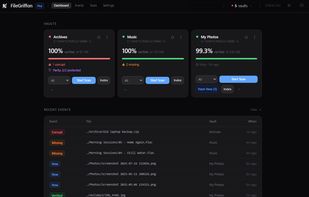
FileGriffon watches drives, folders or even single files on storage media such as SSDs, HDDs and removable drives, and catches that. Each thing you ask it to look after is called a "Vault". One folder, a whole drive, or a single irreplaceable file. It hashes every file with a secure hashing algorithm, stores the results in a local database, and re-checks them on a schedule or on demand. When a file's contents change without you touching it, you get notified. It also distinguishes between files that are genuinely missing and files that were simply moved or renamed, so a re-organized folder doesn't look like data loss.
What it does:
- Detects silent corruption (bit rot) by comparing file hashes over time
- Separates missing files from moved or renamed ones
- Repairs damaged files using PAR2 parity data generated ahead of time
- Finds duplicate files across your vaults
- Monitors SMART drive health and warns before a disk fails
- Runs scheduled scans in the background, with a tray icon and a local web dashboard
- Optionally encrypts its own database
It is not a backup tool in the traditional sense, but it can help with you managing your backups in a safer and more efficient way. It verifies that the copies you already have are still intact, and tells you which ones aren't. That way you know which file to restore from backup before you overwrite a good copy with a corrupted one.
Local by default. Everything runs on your machine. There is no account, no cloud sync, and no file contents, names or paths leave your computer.
Pricing. The free tier covers one vault of any size, forever, including scheduled scanning, encryption (of its database), corruption and move detection, and PAR2 repair at Light redundancy and basic drive health monitoring. Pro adds unlimited vaults, whole-drive monitoring, advanced SMART drive health, email and ntfy alerts, and the full PAR2 redundancy tiers. There's a 14-day Pro trial you can start from inside the app without a credit card.
Windows 10 and 11, 64-bit. (Linux and macOS versions are in the works.)







 FileGriffon added FileGriffon as alternative to MultiPar, ICE ECC, pyFileFixity and par2cmdline-turbo

No comments or reviews, maybe you want to be first?