


CrystalDiskInfo
354 likes
Open-source utility for monitoring S.M.A.R.T. data, disk temperature and more. Offers portable use, dark mode, no ads or tracking, and supports 30+ languages. Designed to provide an accurate health status and includes features such as temporary file deletion and file recovery options.

Platforms
- Windows
- PortableApps.com


Bundleware
Since 2025 it has an Adware version that will install unwanted software. It is the version installed by default if you click “Download” on their website.

Features
Highlights All activities
CrystalDiskInfo News & Activities
Recent News
No news, maybe you know any news worth sharing?
Share a News Tip
Recent activities
- gdaz8lhqgo liked CrystalDiskInfo
 UltraDAGcom added CrystalDiskInfo as alternative to Hardware Clinic
- baka nep replied to a comment / review on CrystalDiskInfo
- baka nep replied to a comment / review on CrystalDiskInfo
- baka nep updated CrystalDiskInfo
PSA: The last version before the Adware is 9.6.3
- BezantSoft liked CrystalDiskInfo
- Maria-Oliver liked CrystalDiskInfo
- Robin_P liked CrystalDiskInfo
- Gatril Studio liked CrystalDiskInfo




The Windows setup for everyone (with freeware only) Will make Windows suck less
This is the apps for Windows 11 that I would recommend to anyone who just got a PC !
The same list for
macOS :
Linux kernel (GUI apps only) :


Open/Free soft must have
Must have



The Best Set Of Tools To Test A PC
Whether you want to make sure that your computer's hardware is properly functioning, benchmark it, or just want to inspect a second-hand computer you're thinking of buying; the benchmarking tools and stress testing utilities in this list will help you a lot.
You can use these apps and software to thoroughly check up on a used laptop or desktop pc, as they enable you to spot any faulty hardware component or find out how much performance being impacted by its usage. So, this guide should also serve as a life-saver for someone who's looking into a second-hand deal.
Official Links

Install from the command line
winget install -e --id CrystalDewWorld.CrystalDiskInfo
Developed by
 hiyohiyo
 Licensing
Open Source and Free product.Rating
Average rating of 4.2Alternatives
44 alternatives listedBadge
Get an embeddable badge for CrystalDiskInfoSupported Languages


Comments and Reviews
A great hard disk monitoring application. I used it to more closely examine the S.M.A.R.T. status of a hard disk drive that I was informed was on the brink of failing. The Intel storage controller driver that informed me of this (RapidStorage for Enterprises) did so flawlessly, which I am immensely thankful for, but it did not give me any more information apart from the fact that the drive was "at risk".
You can get CrystalDiskInfo in a portable archive if you want, so you don't need to install anything. That's always a very important offering for anything related to drive health.
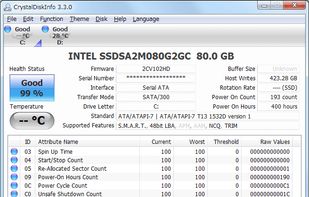
The interface is very clean and simple to use. You can instantly see where to find the information you need, even if you're not knowledgable about drives and their internals. Just click the drive you are interested in (any partitions/drive letters it holds are displayed to help you). A LED shows you at one glance if one drive reports critical S.M.A.R.T. information, i.e., thinks it's about to die.
Upon clicking a drive, you get all the basic information such as model and serial number, total size, firmware version, cache size, rotational speed, etc. You're also told what interface it uses (helps you make sure that, for example, a S-ATA II drive is not erroneously using S-ATA I in backwards-compatibility mode, which would make it slower than it needs to be), and what features are enabled (most notably, to make sure that an SSD has TRIM enabled, and a hard disk doesn't, which can otherwise be pretty hard to find out in Windows).
Most important are of course the diagnostics. You get a big display of your drive's overall status—a big blue 'good' or a big red 'bad'—its current operating temperature, how many times it has been turned on and how many hours it has been in operation (very interesting!) A listbox in the bottom shows the detailed S.M.A.R.T. information with their warning limits, so that you can find out exactly why the drive reports that it is going to fail, and whether you should take it seriously (you probably should). You can also export all this data for all the drives in your system into a handy text file, which includes the raw binary data from with the stats are extracted. A good snapshot if you need an expert's opinion.
There's more to the application still. You can have it start with your system and run discretely in the background, making its presence known only if it detects something bad happening. You can even let it install a Windows Gadget showing diagnostic information.
I will likely keep this tool around even though both Intel RapidStorage and Windows 7 itself informed me of the S.M.A.R.T. warnings, because the additional information and diagnostics it gives are both nerdily interesting and helpful.
Installs adware/malware without asking the user any questions during installation.
https://forums.tomshardware.com/threads/is-crystaldiskinfo-still-safe.3882065/post-23507823
The July 7 analysis by ictmeister on Tom’s Hardware shows that only the CrystalDiskInfo9_7_0Ads.exe installer includes an extra adware payload. If the file name ends in Ads.exe, expect the GMO INSIGHT / ESTART bundle. Use the ZIP or the non‑Ads installer only.
weird move by them, I was shocked when it tried installing adware
PSA: The last version before the Adware is 9.6.3
and for crystalmark it is 8.0.6
Latest Windows https://sourceforge.net/projects/crystaldiskinfo/files/9.9.1/CrystalDiskInfo9_9_1.zip/download
It recognizes and shows more info about an OEM NVMe drive that came with my PC, compared to all alternatives.
Good but you must make little bit edit like a if you S.M.A.R.T values is wierd go functionAdvanced FeatureRAW Values and chose 10 [DEC] options and tada S.M.A.R.T values shows normal.
I use the portable version, since it works out of the box, without the need of installation.
Lightweight and full of features is a must have to every computer that uses mechanical or SSD drives.
Lifesaver when the disk health is in danger and warns the user about the eminent failure.