Apps tagged with 'Mermaid Diagrams'

All apps in Apps tagged with 'Mermaid Diagrams' category. Use the filters below to narrow down your search. 
Copy a direct link to this comment to your clipboard
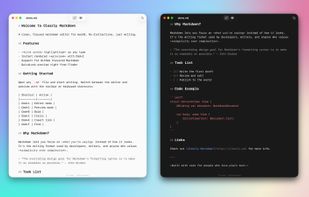
  1. Clean, native Markdown editor for Mac with syntax highlighting, instant preview, Mermaid diagrams, KaTeX, PDF export, side-by-side editing, and open source.

    Cost / License

    • Free
    • Open Source

    Application type

    Platforms

    • Mac
    • US flagUnited States
    Clearly Markdown screenshot 1
    77 alternatives
  2. Ferrite icon
     14 likes

    Fast, native editor with Markdown live preview, syntax highlighting, Mermaid diagram rendering, multiple view modes, CSV/TSV viewer, Git, and workspace support.

    Cost / License

    • Free
    • Open Source (MIT)

    Application type

    Platforms

    • Mac
    • Windows
    • Linux
    • Flathub
    • Flatpak
    • NO flagNorway
    Ferrite screenshot 1
    Ferrite screenshot 1
    Ferrite screenshot 2
    59 alternatives
  3. marka.md icon
     12 likes

    A native macOS markdown editor specialized for AI context management. Live editor on the left (codemirror 6), rendered preview on the right (markdown-it + shiki + mermaid). Minimal Chrome, full catppuccin + matcha themes, macOS vibrancy, orange octopus mascot. ~10 MB bundle.

    Cost / License

    • Free
    • Open Source (MIT)

    Application type

    Platforms

    • Mac
    • Windows
    • PH flagPhilippines
    marka.md screenshot 1
    marka.md screenshot 1
    marka.md screenshot 2
    +1
    marka.md screenshot 3
    55 alternatives
  4. Downright icon
     5 likes

    Native macOS Markdown reader and editor offering Document, Split, and Source views, Finder integration, customizable themes, real-time file tracking, and broad Markdown rendering.

    Cost / License

    • Free
    • Open Source (MIT)

    Application type

    Platforms

    • Mac
    • Homebrew
    • US flagUnited States
    Downright screenshot 1
    Downright screenshot 1
    Downright screenshot 2
    51 alternatives
  5. Constly icon
     4 likes

    Constly is a WYSIWYG Markdown editor for macOS, Windows and Linux. It renders Markdown inline as you type - headings, bold, lists, tables, KaTeX math and Mermaid diagrams all appear in place, with the raw marks showing only where your cursor is.

    Cost / License

    • Freemium
    • Proprietary

    Application type

    Platforms

    • Mac
    • Windows
    • Linux
    • AU flagAustralia
    Markdown that renders as you type
    Write naturally without losing your plain-text Markdown
    Export your Markdown to multiple document formats
    +5
    Edit Markdown tables directly in place
    6 alternatives
  6. Logue icon
     2 likes

    Privacy-first AI meeting notes & writing assistant for Mac — on-device transcription, smart minutes, action items & 60+ writing modes, running entirely on Apple Silicon.

    Cost / License

    • Free
    • Open Source (MIT)

    Application type

    Platforms

    • Mac
    • CA flagCanada
    Logue screenshot 1
    Logue screenshot 1
    Logue screenshot 2
    +2
    Logue screenshot 3
    55 alternatives
  7. Marked icon
     20 likes

    Native macOS tool for Markdown and markup previews with real-time updates, grammar and spelling checks, readability scoring, and export features.

    Cost / License

    • Paid
    • Proprietary

    Platforms

    • Mac
    • Google Chrome
    • Safari
    • Setapp
    • Mozilla Firefox
    • US flagUnited States
    Marked screenshot 1
    Marked screenshot 1
    Marked screenshot 2
    +3
    Marked screenshot 3
    77 alternatives
  8. Open Note icon
     2 likes

    OpenNote is a modern Android note-taking and markdown editor application built entirely with Compose.

    Cost / License

    Alerts

    • Discontinued

    Platforms

    • Android
    • F-Droid
    • CN flagChina
    Open Note screenshot 1
    Open Note screenshot 2
    Open Note screenshot 3
    58 alternatives
  9. PeekMark icon
     1 like

    A native, local-first Markdown viewer and workspace for macOS with Finder Quick Look, Mermaid and Math rendering, plus optional workspaces, full-text search, backlinks, knowledge graph and export.

    Cost / License

    Platforms

    • Mac
    • US flagUnited States
    Preview Markdown instantly in Finder with native Quick Look, including GFM, syntax highlighting, Mermaid, Math/LaTeX, frontmatter and wikilinks.
    Write or paste Markdown in Scratchpad and see the rendered preview update as you work.
    Open a local folder as a connected Markdown workspace and navigate documents without moving files into a proprietary library.
    +2
    Search the entire workspace by content, title, tags, file paths and exact phrases.
    9 alternatives
  10. A native macOS Markdown viewer and writing workspace with live preview, templates, diagrams, PDF export, iCloud Sync, AI-assisted review, and accessibility-focused reading controls.

    Cost / License

    • Paid
    • Proprietary

    Platforms

    • Mac
    • US flagUnited States
    Telescopo Markdown Studio screenshot 1
    Telescopo Markdown Studio screenshot 1
    Telescopo Markdown Studio screenshot 2
    +4
    Telescopo Markdown Studio screenshot 3
    11 alternatives
  11. Nabu icon
     Like

    Transform your Markdown into beautifully formatted PDFs and Word documents. Native macOS app with zero external dependencies.

    Cost / License

    • Paid
    • Proprietary

    Platforms

    • Mac
    Nabu screenshot 1
    Nabu screenshot 1
    Nabu screenshot 2
    +2
    Nabu screenshot 3
    7 alternatives
  12. Visimer icon
     Like

    Visimer brings “what you see is what you get” editability to Mermaid diagrams. Rename labels, change shapes, add new nodes, etc. by live editing the rendered diagram.

    Cost / License

    • Free
    • Open Source (MIT)

    Application type

    Platforms

    • JavaScript
    • Typescript
    • npm
    • React
    • Self-Hosted
    • US flagUnited States
    Visimer screenshot 1
    Visimer screenshot 1
    Visimer screenshot 2
    1 alternatives
  13. MDV icon
     Like

    MDV is the best Markdown viewer for Mac. It's like Preview… but for Markdown!

    Cost / License

    • Free
    • Proprietary

    Platforms

    • Mac
    • US flagUnited States
    MDV screenshot 1
    17 alternatives
  14. I got tired of opening Lucidchart or draw.io every time I needed a quick sequence diagram — fighting with boxes and arrows for something that should take two minutes. SeqDiagram is the alternative: you just write the flow as text, and the diagram appears on the right as you type.

    Cost / License

    • Free
    • Proprietary

    Platforms

    • Online
  15. Preview folders, archives, source code with syntax highlighting, Markdown, Mermaid diagrams, ebooks, and many more file types directly in macOS Quick Look.

    Cost / License

    • Paid
    • Proprietary

    Platforms

    • Mac
    • Homebrew
    • US flagUnited States
    Unfold — Quick Look screenshot 1
    Unfold — Quick Look screenshot 1
    Unfold — Quick Look screenshot 2
    +2
    Unfold — Quick Look screenshot 3
    20 alternatives
  16. Discreet AI desktop overlay that helps you answer coding, system design, and verbal theory questions during live technical interviews.

    Cost / License

    • Paid
    • Proprietary

    Platforms

    • Windows
    • CA flagCanada
    InterviewHelpers screenshot 1
    InterviewHelpers screenshot 1
    InterviewHelpers screenshot 2
    +1
    InterviewHelpers screenshot 3
    2 alternatives