A fast, private Markdown notes app for thinking, writing, and linking ideas for your Mac.
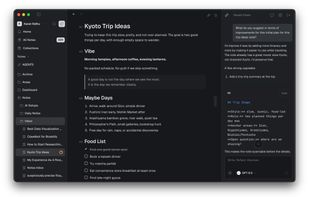
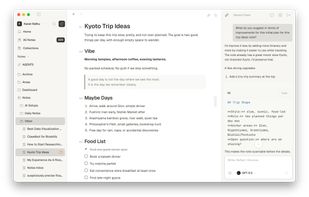
A Markdown editor built for real writing.
Everything you'd expect from a modern Markdown editor, as a beautiful Mac app.
- Slash commands for headings, lists, and tasks
- Drag-and-drop images and media inline
- Smart lists with auto-renumbering and indentation
- Works with your existing Obsidian, VSCode, Typora or Logseq markdown files
AI that works with your notes.
Summarize a note or chat across your vault. Bring your own AI agents like Codex, Opencode or AmpCode, or API keys or run models entirely on your Mac.
- Summarize, ask, chat, and edit any note
- ChatGPT, Claude, Gemini, OpenRouter, Amp, Codex, Opencode
- Run llama.cpp or Ollama 100% locally
Find any note in an instant.
Your entire knowledge base is always within reach, no matter how many files you have.
- Quick Open (?P) for any title, tag, or text
- Lightning fast search
- Open files in tabs and pin important notes
- Keyboard-first, mouse optional
Linked notes that make sense.
Connect ideas with [[wikilinks]] and see every backlink the moment you write them.
- Type [[ to link any note in seconds
- Backlinks update as you type
- See connections without leaving the editor
- Auto-complete picks across folders
See your notes as a map.
A local graph view shows how each note connects to the rest of your vault, one click away.
- Local graph for any open note
- Distinct nodes for notes, tags, and links
- Click a node to jump straight in
Notes, tasks, and boards.
Tables, kanban boards, and task lists, all built from your notes and frontmatter properties.
- Kanban boards from YAML and frontmatter properties
- Switch between table and board views
- Group by status, priority, tag or any field
Your whole vault, organized.
A three-pane layout for browsing notes, folders, for those used to Notebook mode
- Sidebar with folders and tags
- Pin folders and notes you live in
- Note previews with thumbnails and tags
Themes & details you can tune.
- Custom icons and colors per folder or note. Choose from over 50 + icons and colors
- Over 20+ curated themes including popular ones like Catppuccin, One Dark, Gruvbox, Tokyo Night and more for both light & dark modes
- Vim mode for keyboard-driven editing
- Remap any shortcut across any command in the app
And more:
- Mermaid diagrams, callouts, tables and code blocks with syntax highlighting
- Extract selection into a new note to link notes together
- Open a global Quick Note anywhere on your Mac
- Daily notes and Templates
- Database views including tables and Kanban boards
- Works with files on Google Drive, iCloud, OneDrive, NAS, SMB, and network drives, all markdown files stay where you control them













 Paul added Glyph for Mac as alternative to Files.md
 Paul added Glyph for Mac as alternative to Workflowy, Markor, Dendron, sleek and 28 more

 Karat Sidhu


No comments or reviews, maybe you want to be first?