Apps with 'Distraction-free Writing' feature Page 5 of 7

All apps in Apps with 'Distraction-free Writing' feature category. Use the filters below to narrow down your search. 
Copy a direct link to this comment to your clipboard
  1. Wonders AI icon
     1 like

    AI-powered research workspace for literature review. Search 550M+ sources, organize papers visually, and get transparent AI assistance that keeps you in control.

    Cost / License

    • Paid
    • Proprietary

    Application type

    Platforms

    • Online
    • US flagUnited States
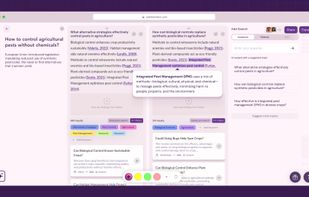
    Wonders AI - Academic Research Workspace
    Wonders AI Projects Dashboard Screenshot
    Wonders AI Team Collaboration
    +2
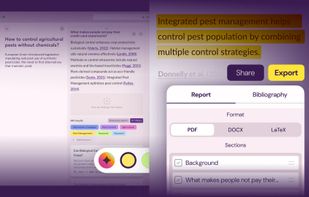
    Wonders AI Annotate & Export
    12 alternatives
  2. WordGrinder icon
     4 likes

    WordGrinder is a word processor for processing words. It is not WYSIWYG. It is not point and click. It is not a desktop publisher. It is not a text editor. It does not do fonts and it barely does styles. What it does do is words. It's designed for writing text.

    Cost / License

    • Free
    • Open Source (MIT)

    Platforms

    • Mac
    • Windows
    • Linux
    • GB flagUnited Kingdom
    WordGrinder screenshot 1
    WordGrinder screenshot 1
    8 alternatives
  3. Qute icon
     2 likes

    Qute for PC/Mac is a text editor with Markdown and TeX support. Qute offers per paragraph preview, i.e., users can switch between editing the source and viewing a rich text rendering with typeset formulas for each paragraph separately.

    Cost / License

    • Free
    • Open Source

    Application type

    Alerts

    • Discontinued

    Platforms

    • Mac
    • Windows
    • Linux
    8 alternatives
  4. WordTsar icon
     1 like

    WordTsar is a Wordstar 7.0D document mode clone. It loads Wordstar 4, Wordstar 7, RTF (partial), and DOCX (partial) files, and saves in Wordstar 7 and RTF format.

    Cost / License

    • Free
    • Open Source

    Application type

    Platforms

    • Mac
    • Windows
    • Linux
    • CA flagCanada
    WordTsar screenshot 1
    92 alternatives
  5. Papier icon
     2 likes

    Papier is a Chrome extension that provides a clean, clutter-free interface for capturing ideas quickly using Markdown formatting.

    Cost / License

    • Free
    • Proprietary

    Application type

    Platforms

    • Mac
    • Windows
    • Linux
    • Google Chrome
    Papier screenshot 1
    Papier screenshot 1
    Papier screenshot 2
    +1
    Papier screenshot 3
    11 alternatives
  6. Typen icon
     4 likes

    Write and share anywhere, distraction free, on a customizable look. Plain text, unlimited space, easy to manage, free to use, customize the background, font and color. Track the number of characters written, words, lines, reading time, and more.

    Cost / License

    • Free
    • Proprietary

    Application type

    Alerts

    • Discontinued

    Platforms

    • Online
    Default state
    Customize
    Share
    +1
    Customization samples
    20 alternatives
  7. KeenWrite icon
     1 like

    A free, open-source, cross-platform desktop Markdown editor for producing beautifully typeset PDFs.

    Cost / License

    Application type

    Platforms

    • Mac
    • Windows
    • Linux
    • Java
    • CA flagCanada
    KeenWrite screenshot 1
    KeenWrite screenshot 1
    KeenWrite screenshot 2
    +5
    KeenWrite screenshot 3
    92 alternatives
  8. InkBreaker icon
     2 likes

    Inkbreaker is a full writing platform for your whole writing practice. Draft and publish in a real editor, build a body of work, and grow alongside a community of working writers. It supports fiction, nonfiction, poetry, copywriting, journalism, technical writing, screenwriting...

    Cost / License

    • Freemium
    • Proprietary

    Application type

    Platforms

    • Online
    • Windows
    • Mac
    • Linux
    • US flagUnited States
    Exquisite corpse game.
    Be a beta reader or request beta readers.
    All of the tools are usable from within the editor.
    +29
    Collaborate real time within the editor.
    77 alternatives
  9. INK icon
     2 likes

    INK is the first Al content optimization platform built specifically for writers & content specialists. You don’t need to be an SEO expert or sacrifice quality to rank in search. With INK, feel confident you've streamlined your content workflow and created on-brand...

    Cost / License

    • Paid
    • Proprietary

    Application type

    Platforms

    • Mac
    • Windows
    • Wordpress
    • US flagUnited States
    INK screenshot 1
    INK screenshot 1
    INK screenshot 2
    +6
    INK screenshot 3
    42 alternatives
  10. Worst Draft icon
     3 likes

    Worst Draft is a Java-based, minimalist word processor that removes access to the two biggest roadblocks for writers: editing & distractions.

    Cost / License

    • Free
    • Proprietary

    Application type

    Platforms

    • Mac
    • Windows
    • Linux
    • Java
    • US flagUnited States
    Worst Draft screenshot 1
    Worst Draft screenshot 1
    31 alternatives
  11. Draftline icon
     1 like

    Free, open source, local-first novel editor with writing, planning, continuity checks, prose analysis, typeset export, and BYO cloud sync. No account or subscription required.

    Cost / License

    • Free
    • Open Source (MIT)

    Application type

    Platforms

    • Windows
    • Linux
    • Mac
    • US flagUnited States
    The writing editor with the Writing Dashboard open, showing manuscript word count against your target, daily goals, session stats, and a chapter-by-chapter length breakdown, all updating as you write.
    The Pacing panel scores prose tempo from sentence shape and dialogue and tracks flow across the whole book, shown here in both dark and light themes. The read-aloud player runs along the bottom, highlighting each sentence as it's read.
    The Planner timeline, with story lines for the main plot, subplots, and each character running across chapters. Plot cards show location, status, and characters, and your codex characters can be added as their own lanes.
    +2
    The Scratchpad docked below the manuscript, so your outline and notes sit right under the chapter you're drafting. The same notes open in the Planner too, and nothing in the scratchpad ever touches the manuscript.
    51 alternatives
  12.  1 like

    Distraction-free markdown editor offers line-by-line AI feedback as sidebar comments, customizable prompts, local file editing, and privacy-first features.

    Cost / License

    • Freemium
    • Proprietary

    Application type

    Platforms

    • Mac
    • Online
    • DE flagGermany
    • European Union flagEU
    Home page
    See you folders and overview your work
    Pick your default AI model
    +6
    Use great built-in checks for professional self-editing
    7 alternatives
  13. oodbo icon
     1 like

    A forward-only, distraction-free writing tool, oodbo introduces a constraint where in Forward Mode, you are blocked from editing: backspace, delete, select are all disabled.

    Cost / License

    • Freemium
    • Proprietary

    Platforms

    • Online
    • Windows
    • Microsoft Word
    Home screen
    Forward Mode in green
    9 alternatives
  14. KoalaWriter icon
     6 likes

    Koalawriter is a fullscreen, distraction-free plain text editor with customizable background images and ambient music. Like its Mac OS counterpart Ommwriter, its onscreen controls fade out of sight when you begin to type and appear again on mouseover.

    Cost / License

    • Free
    • Open Source

    Application type

    Alerts

    • Discontinued

    Platforms

    • Mac
    • Linux
    • AU flagAustralia
    With controls
    Without
    45 alternatives
  15. A free, native macOS screenplay editor with a built-in AI assistant, Quill, that suggests changes as diffs you approve or reject.

    Cost / License

    • Freemium
    • Proprietary

    Platforms

    • Mac
    • iPhone
    • iPad
    • US flagUnited States
    Inkwell at a glance: a free, native macOS screenplay editor. Quill's suggestions arrive as diffs you accept or reject, and your words stay yours.
    Quill never auto-applies edits. Suggestions appear as diffs—added text in green, deletions in red. Click accept or reject. Simple. Transparent. You stay in complete control of every single word.
    Chat with Quill AI like you'd brainstorm with a writing partner. Ask for scene ideas, dialogue options, character development, or plot twists. Quill understands your script's context and offers suggestions tailored to your story.
    +3
    Write on a plane. Write in a cabin. Write anywhere without worrying about Wi-Fi. Inkwell is a desktop app that saves locally and autosaves your work. When you're back online, Quill is ready—but the editor never stops working.
    19 alternatives
  16. Inka icon
     1 like

    Inka is a writing room you customize to fit your vibe. You set the room up first, the way you would set up a desk, and then you write.

    Cost / License

    • Freemium
    • Proprietary

    Application type

    Platforms

    • Online
    • US flagUnited States
    Write inside the room. No sidebars, no toolbars, nothing in the way.
    A focus block, on the candle clock.
    Thirty-eight rooms. Five are free.
    +2
    Four typefaces, four pages. Legible mode is always free.
    55 alternatives
  17. Penultimate icon
     1 like

    Penultimate combines distraction-free, natural handwriting and sketching with the power of Evernote’s sync and search. Take class or meeting notes, journal your thoughts, or outline your next big idea—in the office or on the go.

    Cost / License

    • Freemium
    • Proprietary

    Application type

    Platforms

    • iPad
    • US flagUnited States
    Penultimate screenshot 1
    Penultimate screenshot 2
    Penultimate screenshot 3
    21 alternatives
  18. Tolstoy Compose is a local-first professional writing app you can use in your browser or install as a Progressive Web App. Keep your notes, research, citations, feedback and earlier versions together in one place.

    Cost / License

    • Paid
    • Proprietary

    Application type

    Platforms

    • Online
    • Software as a Service (SaaS)
    • GB flagUnited Kingdom
    Tolstoy Compose running on desktop and mobile, with a long-form document open beside the Shelf for notes and research. The same writing workspace adapts across devices while keeping supporting material close to the writing.
    The Tolstoy Compose Shelf keeps notes, ideas and research beside the document, with built-in citation tools for managing sources while you write. Notes can be searched, organised and added directly to the document when needed.
    Built-in citation management in Tolstoy Compose, showing saved sources, source details and DOI lookup alongside the writing. Sources can be reused throughout a document for citations, footnotes and bibliographies.
    +3
    Tolstoy Compose in dark mode across desktop and mobile, showing the writing workspace together with Shelf notes and Review feedback. The interface keeps writing and the tools around it together while adapting to different devices.
    30 alternatives
  19. Tradugo icon
     3 likes

    Translating text for hours doesn't have to be painful. Meet tradugo, a clutter-free, cloud-based app for translators looking for something different.

    Cost / License

    • Paid
    • Proprietary

    Application type

    Platforms

    • Software as a Service (SaaS)
    Tradugo screenshot 1
    Tradugo screenshot 1
    Tradugo screenshot 2
    +2
    Tradugo screenshot 3
    33 alternatives