




Grammarly
252 likes
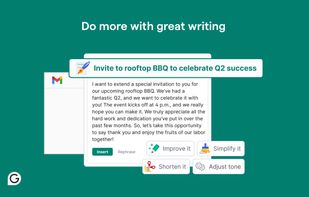
Delivers real-time spelling, grammar, and style check, generative AI for instant drafts, comprehensive writing feedback, and enhanced sentence clarity and word choice for effective communication on multiple platforms, including desktops and web browsers.

Cost / License
- Freemium (Subscription)
- Proprietary
Application typeApplication types
Since
- Since 2011


Features

Highlights All activities
Grammarly News & Activities
Recent News
- Mauricio B. Holguin published news article about Grammarly
- Mauricio B. Holguin published news article about Superhuman Mail
- Mauricio B. Holguin published news article about Coda.io


Recent activities
 BenjiBurn added Grammarly as alternative to FreeCorrector
 foldermd added Grammarly as alternative to ArticleScore
 T1red_Developer added Grammarly as alternative to Tiny Writer AI
 Rash-4039 added Grammarly as alternative to BYO Bridge
 Matt Falcon added Grammarly as alternative to Falcontext
 mimumu added Grammarly as alternative to LingoTweaker



My Setup - All Apps and Software
Master List of all Apps and Software I use for both work and personal life.


Academia & Skills
A list with 422 apps by AmileyaRyver without a description.


Apps for Productive Workstation
A list with 61 apps by deersplinter without a description.
Official Links
Install from the command line
winget install -e --id Grammarly.Grammarly
Developed by
 Grammarly, Inc.
Licensing
Proprietary and Freemium product.Pricing
Subscription ranging between $10 and $30 per month + free version with limited functionality.Rating
Average rating of 3.3Alternatives
201 alternatives listedNews
6 news articles related to GrammarlyBadge
Get an embeddable badge for GrammarlySupported Languages



Comments and Reviews
Not open-source.
Best grammar bot so far. The Citation Generator is useful too.
It is really good utility and better corrects gramma and punctuation than MS WORD :)
After deleting the Chrome extension, I noticed that the CPU load decreased a lot. Although there are currently 20 extensions installed, they do not consume as much resources. I checked them all one by one. Also, the free version is not very useful. I can't buy the paid version because I don't use it all the time.
After one year of using Grammarly in a professional context, I decided I didn't like it.
As a non-native English speaker, it is practical for me to identify mistakes and correct typos on the go.
On the other hand, its excessive suggestions often change the meaning of the text, which IMHO is unacceptable. It has too many glitches, and I suspect it to slow down my old computer a lot. It often interferes with my mouse pointer when I edit text, which is highly annoying.
This review will be the last text edited with Grammarly on my computer before I uninstall it.
The free version is a great tool for basic grammar and spelling checks. However, it often freezes my MS Office apps and I find that disabling the app resolves the issue. Oftentimes, it gets a little bit intrusive with other things that I have to shut it off. Other than that, I hope it wasn't laggy with apps where I need it most. 🤷🏻♀️
Grammarly log everything you type, better try LanguageTool, which is Open source and doesn't track you.