Apps tagged with 'File Renaming'

All apps in Apps tagged with 'File Renaming' category. Use the filters below to narrow down your search. 
Copy a direct link to this comment to your clipboard
  1. Mp3tag icon
     649 likes

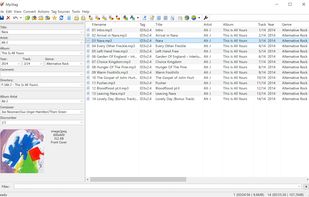
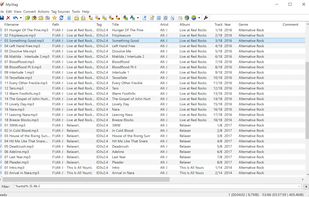
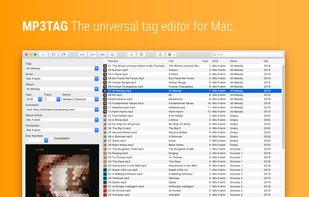
    Edit and organize audio metadata easily with comprehensive support for batch editing and various audio formats. Available free for Windows; macOS version costs $20.

    Cost / License

    • Free
    • Proprietary

    Application type

    Since

    • Since 2009

    Platforms

    • Windows
    • Mac
    • DE flagGermany
    • European Union flagEU
    Mp3tag screenshot 1
    Mp3tag screenshot 2
    Mp3tag screenshot 3
    +3
    Mp3tag screenshot 4
    81 alternatives
    4.6
    Excellent20 ratings
  2. Usability-focused file manager with tabbed browsing, dual panes, remote protocol support, archive browsing, integrated renaming, and file type previews.

    Cost / License

    Application type

    Since

    • Since 2010

    Platforms

    • Windows
    • Linux
    • KDE Plasma
    • Flathub
    • DE flagGermany
    • European Union flagEU
    Dolphin File Manager screenshot 1
    Dolphin File Manager screenshot 2
    Dolphin File Manager screenshot 3
    +1
    Dolphin File Manager screenshot 4
    111 alternatives
    4.8
    Excellent12 ratings
  3. Batch renaming tool for Windows with customizable criteria, date/time stamps, EXIF, ID3 tag support, preview, and business licensing requirements.

    Cost / License

    • Free Personal
    • Proprietary

    Application type

    Since

    • Since 2009

    Platforms

    • Windows
    • AU flagAustralia
    Bulk Rename Utility screenshot 1
    Bulk Rename Utility screenshot 2
    Bulk Rename Utility screenshot 3
    +2
    Dark Mode
    103 alternatives
    4.1
    Very Good23 ratings
  4. Ant Renamer icon
     99 likes

    Free, open-source tool for batch-renaming files and folders with Unicode support, multiple renaming rules, MP3 tag and EXIF info use, preview, and no content changes.

    Cost / License

    Application type

    Since

    • Since 2010

    Platforms

    • Windows
    • PortableApps.com
    • Wine
    • BE flagBelgium
    • European Union flagEU
    Files list
    Actions
    Files list, classic style
    +3
    Actions, under Windows XP
    95 alternatives
    4.0
    Very Good7 ratings
  5. TagScanner icon
     150 likes

    TagScanner is a multifunction program for organizing and managing your music collection. It can edit tags of mostly state-of-the-art audio formats, rename files based on the tag information, generate tag information from filenames, and perform any transformations of the text...

    Cost / License

    • Free
    • Proprietary

    Application type

    Since

    • Since 2009

    Platforms

    • Windows
    • RU flagRussia
    Edit tab
    Filename patterns
    Advanced tag editing
    +8
    Amazon tags
    67 alternatives
    4.5
    Excellent6 ratings
  6. FileBot icon
     112 likes

    FileBot is the ultimate tool for organizing and renaming your movies, tv shows or anime, and music well as downloading subtitles and artwork. It's smart and just works.

    Cost / License

    • Pay once or Subscription
    • Proprietary

    Application type

    Since

    • Since 2010

    Platforms

    • Windows
    • Mac
    • Linux
    • AT flagAustria
    • European Union flagEU
    Rename episodes
    Define your own episode format with any kind of media info for your episode format
    Reverse rename files using internal history
    +1
    Fetch list of episodes
    36 alternatives
  7. ReNamer icon
     171 likes

    Batch file and folder renaming with meta tag support, RegEx, rule sets, prefix, suffix, case change, extension handling, and Unicode compatibility.

    Cost / License

    • Freemium (Pay once)
    • Proprietary

    Application type

    Since

    • Since 2009

    Platforms

    • Windows
    • AU flagAustralia
    Main window
    Side by side
    Rules dialog
    +4
    Insert meta tags
    94 alternatives
  8. Floxtop icon
     10 likes

    AI-powered Mac file organizer with smart renaming. Automatically sorts files by content and suggests intelligent filenames. Supports 50+ languages. 100% private, offline, no subscriptions.

    Cost / License

    • Freemium (Pay once)
    • Proprietary

    Application type

    Since

    • Since 2026

    Platforms

    • Mac
    • DE flagGermany
    • European Union flagEU
    Floxtop screenshot 1
    54 alternatives
  9. DropIt icon
     80 likes

    Automates file tasks with 17 available actions, advanced filters, profiles, drag-and-drop support, folder monitoring, scheduling and rule-based sorting.

    Cost / License

    • Free
    • Open Source

    Application type

    Since

    • Since 2010

    Platforms

    • Windows
    • IT flagItaly
    • European Union flagEU
    Main UI
    Association
    Options
    36 alternatives
  10. ranger icon
     57 likes

    Terminal file manager with VI key bindings. It provides a minimalistic and nice curses interface with a view on the directory hierarchy. The secondary task of ranger is to psychically guess which program you want to use for opening particular files.

    Cost / License

    Application type

    Since

    • Since 2012 (updated Sep 2026)

    GitHub

    • GitHub stars: 17.5k

    Platforms

    • Mac
    • Linux
    • BSD
    • Cygwin
    ranger screenshot 1
    ranger screenshot 2
    ranger screenshot 3
    ranger screenshot 4
    37 alternatives
  11. Rename X Pro icon
     3 likes

    Professional batch file renaming tool for macOS. Perfect for photographers, web professionals, and home users. Organize files using EXIF data, photo locations, regex support, and more with live preview.

    Cost / License

    • Pay once
    • Proprietary

    Application type

    Since

    • Since 2025

    Platforms

    • Mac
    Rename X Pro screenshot 1
    Rename X Pro screenshot 2
    Rename X Pro screenshot 3
    Rename X Pro screenshot 4
    61 alternatives
  12. SortSage icon
     11 likes

    Automated rules-based file organizer for Windows that sorts, renames, and manages files with smart rules, monitors folders, detects duplicates, with undo-dryrun and works fully offline.

    Cost / License

    • Pay once
    • Proprietary

    Application type

    Since

    • Since 2026

    Platforms

    • Windows
    SortSage screenshot 1
    SortSage screenshot 2
    SortSage screenshot 3
    +2
    SortSage screenshot 4
    18 alternatives
  13. Easy to use application to assist you in Renaming your TV Show files based in TheTVDB.com data. The new TheTVDB API v2 has been implemented in this new version. Dark Theme is supported for macOS and Linux. macOS application is 64 bit and signed.

    Cost / License

    • Free
    • Proprietary

    Application type

    Since

    • Since 2012

    Platforms

    • Windows
    • Mac
    • Linux
    • NL flagNetherlands
    • European Union flagEU
    macOS normal theme
    macOS dark theme (Mojave/High Sierra)
    Linux normal theme (Mint)
    +4
    Linux dark theme (Mint)
    7 alternatives
  14. Keep It Shot icon
     5 likes

    Uses AI to generate descriptive names for images and videos, batch rename files, provide private offline search, enable keyword indexing, and revert changes easily.

    Cost / License

    • Freemium (Pay once or Subscription)
    • Proprietary

    Application type

    Since

    • Since 2024

    Platforms

    • Mac
    • Setapp
    • FR flagFrance
    • European Union flagEU
    Keep It Shot screenshot 1
    Keep It Shot screenshot 2
    Keep It Shot screenshot 3
    +1
    Keep It Shot screenshot 4
    66 alternatives
  15. Privacy-first desktop app where local AI analyzes files and the app safely performs deterministic sorting with image and document renaming.

    Cost / License

    Application type

    Since

    • Since 2026 (updated Nov 2026)

    GitHub

    • GitHub stars: 1.9k

    Platforms

    • Windows
    • Mac
    • Linux
    Windows - Files sorted
    macOS - Benchmarking dialog
    Windows - Benchmarking
    +6
    Windows - LLM downloads
    37 alternatives
  16. Rename Master icon
     20 likes

    Rename Master is a freeware utility designed to rename multiple files with a just few clicks. Anyone that has worked with websites, file archives, or collections of music, videos, or pictures has probably spent way too much time renaming hundreds of files.

    Cost / License

    • Free
    • Open Source

    Application type

    Since

    • Since 2011

    Platforms

    • Windows
    • US flagUnited States
    Rename Master screenshot 1
    File List - Columns
    Renaming Script - mouse clicks
    +1
    File List - Context Menu/File Tags
    94 alternatives
  17. NameQuick icon
     3 likes

    NameQuick is the app that renames files based on their content, for Mac and Windows. It reads PDFs, scans, images and Office documents, applies your naming template, and files them with review, rules, watch folders and undo.

    Cost / License

    • Pay once or Subscription
    • Proprietary

    Application type

    Since

    • Since 2025

    Platforms

    • Windows
    • Mac
    • NL flagNetherlands
    • European Union flagEU
    NameQuick screenshot 1
    NameQuick screenshot 2
    NameQuick screenshot 3
    +4
    NameQuick screenshot 4
    71 alternatives
  18. KRename icon
     20 likes

    KRename is a powerful batch renamer for KDE. It allows you to easily rename hundreds or even more files in one go. The filenames can be created by parts of the original filename, numbering the files or accessing hundreds of informations about the file, like creation date or Exif...

    Cost / License

    • Free
    • Open Source

    Application type

    Since

    • Since 2009

    Platforms

    • Linux
    • Flathub
    • DE flagGermany
    • European Union flagEU
    Files page
    Destination page
    Plugins page
    Filename page
    86 alternatives
  19. Surco icon
     2 likes

    Convert, tag, check audio quality and organize DJ tracks in one app — what used to take five apps, in seconds.

    Cost / License

    Application type

    Since

    • Since 2026 (updated Nov 2026)

    GitHub

    • GitHub stars: 9

    Platforms

    • Windows
    • Mac
    • Linux
    • ES flagSpain
    • European Union flagEU
    Surco screenshot 1
    Surco screenshot 2
    Surco screenshot 3
    +1
    Surco screenshot 4
    53 alternatives
  20. Rename your files directly or with your favorite text editor, making use of all your 1337 keyboard shortcuts.

    Cost / License

    • Free
    • Open Source (MIT)

    Application type

    Since

    • Since 2020 (updated Jul 2026)

    GitHub

    • GitHub stars: 117

    Platforms

    • Windows
    • Mac
    • Linux
    • US flagUnited States
    Simple to use interface - that's all there is.
    Simple to use interface - that's all there is.
    80 alternatives
  21. AutoShelf icon
     1 like

    A Mac menu bar app that files, renames, tags, and trashes your files automatically, based on rules you set once.

    Cost / License

    • Freemium (Pay once)
    • Proprietary

    Application type

    Since

    • New

    Platforms

    • Mac
    AutoShelf screenshot 1
    AutoShelf screenshot 2
    AutoShelf screenshot 3
    +1
    AutoShelf screenshot 4
    40 alternatives
  22. mnamer icon
     9 likes

    mnamer is an intelligent and highly configurable media organization utility. It parses media filenames for metadata, searches the web to fill in the blanks, and then renames and moves them.

    Cost / License

    • Free
    • Open Source (MIT)

    Application type

    Since

    • Since 2020 (updated Oct 2026)

    GitHub

    • GitHub stars: 1.2k

    Platforms

    • Windows
    • Mac
    • Linux
    • BSD
    command line interface
    10 alternatives
  23. F2 icon
     11 likes
    • F2 helps you organise your filesystem through batch renaming so that your files and directories can have a consistent naming scheme.

    Cost / License

    • Free
    • Open Source (MIT)

    Application type

    Since

    • Since 2022 (updated Nov 2026)

    GitHub

    • GitHub stars: 2.5k

    Platforms

    • Windows
    • Mac
    • Linux
    F2 screenshot 1
    F2 screenshot 2
    F2 screenshot 3
    89 alternatives