


Bulk Rename Utility
194 likes
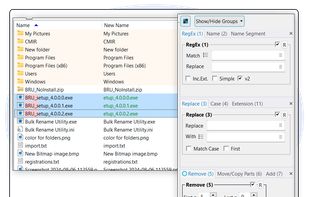
Batch utility for Windows enables advanced file and folder renaming using customizable rules, date/time stamps, EXIF and ID3 tags, case conversion, wildcards, batch processing, preview changes, command-line options, and requires a license for business use.

Cost / License
- Free Personal
- Proprietary
Application typeApplication types
Platforms
- Windows


Features
Bulk Rename Utility News & Activities
Highlights All activities
Recent News
No news, maybe you know any news worth sharing?
Share a News Tip
Recent activities
 itsMakingThings added Bulk Rename Utility as alternative to AppRig
 TylerSedacca added Bulk Rename Utility as alternative to PixelRank
 Alireza Noori added Bulk Rename Utility as alternative to Filewright
 vivenario added Bulk Rename Utility as alternative to ReTitle
- Cesar Eduardo liked Bulk Rename Utility
- ttpiatek liked Bulk Rename Utility
 Sanci added Bulk Rename Utility as alternative to RenamerX
 Alecs added Bulk Rename Utility as alternative to RenameClick


Featured in Lists



My Windows Setup
These are all the software I use on my windows machine. I am privacy freak. So, I mostly use open source software. Checkout "My Firefox setup" list for firefox extensions.


My Windows software
I'm not sure but I think this list is almost complete. This list of Windows software is a daily driver for me. Have to say that few engineering software is missing as I didn't find them on AlternativeTo. Everything is running on the newest version of Windows 10.


Favorites
A list with 177 apps by squarepluto without a description.
What is Bulk Rename Utility?
Bulk Rename Utility Videos
Bulk Rename Utility information
Developed by
 TGRMN Software
 Licensing
Proprietary and Free Personal product.Pricing
One time purchase (perpetual license) ranging between $50 and $93.Rating
Average rating of 4.1Alternatives
100 alternatives listedBadge
Get an embeddable badge for Bulk Rename UtilitySupported Languages


Comments and Reviews
Not open-source, but still worth trying
Please note that recently developer removed earlier all versions and the changelog didn't show anything special. It was fishy, so I checked it and developer changed license for stricter. Because that change I can't use it anymore. I'm ok with the fact of different license - it's his software. But he did it in shady way and that's not good. Remember, when changelog is weirdly empty, then big things happen :)
Great for renaming work photos taken on my iPhone and transferred to my work computer.
The best IMHO: easy to use with all options immediately at your disposal. Allowed me to rename many files on OneDrive without downloading first online-only files, as other renamers did! Just one negative thing: English only.
It seems like to be full featured
Great software and easy to use no tutorial needed.
Messy but fast to use UI, but not completely free as advertised. In 2024 June, latest free version 3.4.4.0 has limitations, JavaScript renaming is limited to paid version, and free version also shows annoying banner ad in lower right corner.