ReTitle is a powerful batch file renaming tool for macOS. Whether you're organizing photos, managing music libraries, or tidying up documents, ReTitle makes renaming multiple files fast and effortless.
PREVIEW BEFORE YOU APPLY
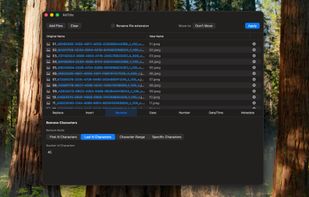
See every change in real-time before committing. Modified text is highlighted in blue, and potential naming conflicts appear in red, ensuring you always know exactly what will happen before clicking Apply.
SEVEN RENAME ACTIONS
Replace: Find and replace text with full regular expression support.
Insert: Add text at the beginning, end, or any position within the filename.
Remove: Strip characters from the start, end, or specific positions.
Case: Convert to uppercase, lowercase, title case, or sentence case.
Number: Add sequential numbering with customizable padding and separators.
Date/Time: Insert timestamps in your preferred format.
Metadata: Rename files using EXIF data, ID3 tags, or document properties.
COMPREHENSIVE METADATA SUPPORT
Extract and apply metadata directly from your files. For photos: camera model, lens, aperture, shutter speed, ISO, and GPS coordinates. For music: artist, album, track number, genre, year, and BPM. For videos: codec, frame rate, resolution, and duration. For documents: author, page count, and keywords.
FLEXIBLE WORKFLOW
Drag and drop files or select entire folders. Chain multiple rename operations together. Move renamed files to a new destination folder. Right-click any file to quickly edit its name or reveal it in Finder. Made a mistake? Undo and redo any rename with ⌘Z and ⌘⇧Z.
NATIVE MAC EXPERIENCE
Built with SwiftUI for seamless macOS integration. A clean, focused interface that stays out of your way while providing complete control over your file names.







 vivenario added ReTitle as alternative to Bulk Rename Utility, ReNamer, Ant Renamer, Advanced Renamer and 33 more
 Nicholas Fay


No comments or reviews, maybe you want to be first?