AppRig icon
AppRig icon

AppRig

A local-first Windows tray app that bundles per-app volume, monitor brightness, sticky notes, time tracking and a dozen other tools in one place.
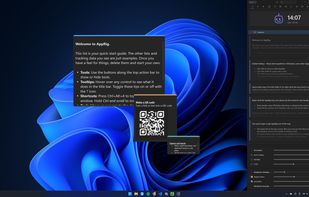
Organize notes and lists, set timers and reminders.

Cost / License

  • Freemium (Pay once)
  • Proprietary

Application type

Platforms

  • Windows
0likes
0articles
Save

Features

Properties

  1.  Lightweight
  2.  Privacy focused
  3.  Distraction-free
  4.  Support for Themes

Features

  1.  Goal Setting
  2.  Automatic Backup
  3.  Works Offline
  4.  Reminders
  5.  No registration required
  6.  No Tracking
  7.  Full-Text Search
  8.  Goal Tracking
  9.  Built-in Color Picker
  10.  Ad-free
  11.  Recurring Tasks
  12.  Dark Mode
  13.  Batch Rename Files
  14.  Task Time Tracking
  15.  Pomodoro Timer
  16.  Sits in the System Tray
  17.  Mouse Highlighting
  18.  Sticky Notes
  19.  Image Conversion
  20.  QR Code Generator
  21.  File Renaming
  22.  Color Palette
  23.  Built-in Image converter
  24.  Image resizing
  25.  Per-app volumen control
  26.  Timer
  27.  Keystroke Visualization
  28.  Color Picker

AppRig News & Activities

Highlights All activities

Recent activities

AppRig information

  • Developed by

    GB flagitsmakingthings
  • Licensing

    Proprietary and Freemium product.
  • Pricing

    One time purchase (perpetual license) that costs up to $27 + free version with limited functionality.
  • Alternatives

    23 alternatives listed
  • Badge

    Get an embeddable badge for AppRig
  • Supported Languages

    • English
AppRig was added to AlternativeTo by itsMakingThings on and this page was last updated .

No comments or reviews, maybe you want to be first?

Official Links

What is AppRig?

AppRig replaces a stack of single-purpose tray utilities with one app that docks to the edge of your screen. It includes a per-app volume mixer with output routing, brightness sliders for every DDC/CI monitor, notes with reminders and always-on-top stickies, a time tracker that tracks billable hours and what you are owed, a quick launcher, a habit and food tracker, a screen colour picker with palettes and a contrast checker, batch rename, batch image conversion, a system monitor, world clocks, timers, keystroke display and a cursor highlighter.

It is local-first: no account, no telemetry, no network calls. Your data stays on your PC. The core tools are free, and a one-time Pro upgrade unlocks extras like earnings tracking, larger batches and more styles.