
Surco icon
Surco icon

Surco

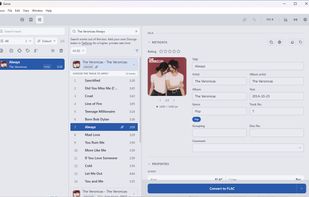
Convert, tag, check audio quality and organize DJ tracks in one app — what used to take five apps, in seconds.
Surco screenshot 1

Cost / License

Platforms

  • Mac
  • Windows
  • Linux
2likes
1comment
0articles

Features

Properties

  1.  Lightweight
  2.  Privacy focused

Features

  1.  File Tagging
  2.  MP3 / ID3 Renaming
  3.  Ad-free
  4.  Hardware Accelerated
  5.  Batch Rename Files
  6.  Works Offline
  7.  Lossless Audio
  8.  Dark Mode
  9.  No registration required
  10.  Batch Editing
  11.  No Tracking
  12.  File Renaming
  13.  Mp3 Tag Editor
  14.  Metadata Editor
  15.  Audio Conversion
  16.  Audio Analysis

Surco News & Activities

Highlights All activities

Recent activities

Surco information

AlternativeTo Categories

Audio & MusicFile ManagementOS & UtilitiesSystem & Hardware

GitHub repository

  •  6 Stars
  •  0 Forks
  •  3 Open Issues
  •   Updated  
View on GitHub

Our users have written 1 comments and reviews about Surco, and it has gotten 2 likes

Surco was added to AlternativeTo by vigosan on and this page was last updated .

Comments and Reviews

   
Top Positive Comment
TheEmperorArt
0

Incredible power, open-source, eliminates and out-competes alternatives like waveform analyzers like Fakin The Funk as well as Audio converters and audio taggers, though I'll keep tagscanner around to for more fine tuning of tags. If you have an offline music collection in files this is a must have. Dev is very responsive

Official Links

What is Surco?

Convert

  • Any format to any AIFF, WAV, FLAC, ALAC or MP3. It also reads M4A, AAC, OGG and OPUS, which always transcode.
  • No re-encode if it matches Copies the bytes as they are; on MP3 and AIFF over APFS it is an instant clone at any size.
  • Quality your way MP3 bitrate, bit depth and sample rate — or the source's own, which is the default.
  • No silent widening Pin the depth so a 16-bit rip never quietly comes out at 24. Leveled volume One constant gain, and a limiter only when the target cannot be hit otherwise.
  • Silence trimming The cut visible on the wave, with millisecond nudging.
  • Rescues broken WAVs The header other apps choke on, repaired on a copy. Your file is never touched.
  • You choose where it lands A folder, beside the original, Apple Music or Engine DJ.

Tag

  • Discogs, Bandcamp, Deezer Artist, album, year, BPM and key. Label and catalogue number come from Discogs only.
  • Matches a whole release By track length, which tells two cuts apart when the title cannot.
  • Bulk editing The fields a release shares, plus find and replace with regex.
  • Artwork From Discogs or your own, with square cropping and a size cap you set.
  • ID3v2.3, not v2.4 So CDJs and rekordbox read it without surprises.
  • Ratings that round-trip In both frames Traktor and Windows Media Player read.
  • Apple Music grouping It writes that into its own frame, invisible to almost every other tool.
  • Tags other programs left Inspect them and remove them one by one, or wipe the whole sheet.
  • Nothing gets lost Edits save themselves: the session comes back even if the app dies mid-crate.

Analyze quality

  • Catches disguised MP3s Draws the spectrum with the codec cut marked on the image.
  • Three things, not one A transcode, treble regenerated by an enhancer, and hi-res that was a stretched 44.1.
  • No false positives It checks there is a real cut first: a dull master is not a fake.
  • Colour-coded read LUFS, true peak, dynamics, L/R balance and noise floor.
  • Clipping like Audacity Same sample-by-sample threshold, so the red marks agree with theirs.
  • Waveform zoom ×256 Re-decodes the visible slice instead of stretching pixels.
  • Vinyl clicks Switch between the original and the repair while it plays, with no gap, to hear what went.
  • BPM and key From the audio itself, always as a suggestion you confirm.
  • What you already have Tells you if a track is in your Apple Music or Engine DJ, and filters the rest.

Organize and export

  • Apple Music With tags and artwork, even on WAV. macOS only, and never FLAC: Music cannot take it.
  • Artwork inside a WAV Which on its own holds neither artwork nor metadata.
  • Traktor cue points Intact between MP3 and AIFF, and into FLAC. Trim and the grid re-anchors by phase.
  • rekordbox, Serato, M3U8 Bridge files: paths and metadata — Serato's crate, paths only. No cues, no ratings.
  • Name templates Files and titles from {artist} - {title}. A slash inside a field never makes a folder.