AI File Sorter is a privacy-first cross-platform desktop application that uses local AI to analyze files, while the app itself safely performs deterministic sorting and renaming after your review. It is designed to reduce clutter, improve consistency, and make files easier to find later, whether for day-to-day cleanup, archiving, or long-term storage.
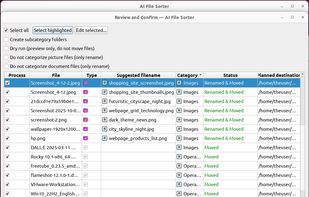
The AI does not directly move or rename your files. Instead, it analyzes file names, file types, folder context, document text, image content, and other available metadata to generate suggestions. You review those suggestions in the app before anything is applied, and the actual file operations are then carried out deterministically by the application.
AI File Sorter can suggest categories and optional subcategories for all kinds of files, helping you tidy cluttered folders such as Downloads, external drives, and NAS storage. For supported file types, it can also suggest better filenames.
For picture files, AI File Sorter can analyze visual content locally and propose meaningful, human-readable names. For example, a generic file like IMG_2048.jpg can be renamed to something descriptive such as clouds_over_lake.jpg. This is especially useful for photo libraries, screenshots, scanned images, and other image-heavy folders. In version 1.8.0, image analysis was improved further, including better handling of screenshots, dashboards, forms, and other UI-like captures so suggestions describe what is actually shown in the image more accurately.
For document files, the app can extract text content and propose clearer filenames based on what the document is about. Supported formats include PDF, DOCX, XLSX, PPTX, ODT, ODS, and ODP, along with common text-based formats. AI File Sorter can also clean up supported audio and video filenames by using embedded metadata such as year, artist, album, or title when available.
Instead of relying only on rigid rules, the app combines AI analysis with taxonomy matching, consistency logic, cached results, and locally approved review decisions to keep suggestions more coherent over time. Version 1.8.0 also adds improved local learning from your review decisions, helping future suggestions better match the way you actually organize your files.
Privacy-first by design:
AI File Sorter can run entirely on your device using local text and visual models such as Gemma 3 4B IT, which is the default visual model in version 1.8.0, along with other supported GGUF backends. No files, filenames, images, document contents, or metadata are uploaded anywhere, and no telemetry is sent. An internet connection is only needed if you explicitly choose to enable a remote model.
How It Works
- Point the app at a folder or drive
- Files are analyzed using the selected local or remote model
- Category and rename suggestions are generated
- You review and adjust the suggestions if needed
- The app then safely applies deterministic file operations only after your approval




 zautomation added AI File Sorter as alternative to Image Sorter
 Mauricio B. Holguin added AI File Sorter as alternative to ORDNA
 Manu Gurudath added AI File Sorter as alternative to Waypost
 Sdiazthomas added AI File Sorter as alternative to Tidy for Mac
 Emin added AI File Sorter as alternative to FileFlow File Organizer and FilePipe
 Mauricio B. Holguin added AI File Sorter as alternative to SortSage
 cavemansoft added AI File Sorter as alternative to CaveButler
 NJAC added AI File Sorter as alternative to Axion Downloads Organizer


No comments or reviews, maybe you want to be first?