AutoShelf automatically organizes your files so you never have to sort anything by hand.
HOW IT WORKS
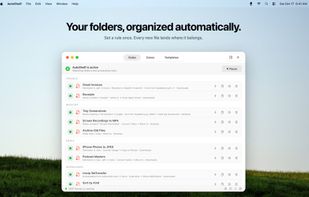
AutoShelf watches the folders you choose (Downloads, Desktop, Documents, or any folder on your Mac, including its subfolders) and automatically organizes new and changed files using rules you build. Set it once and it runs quietly in the background. Preview exactly which files a rule will touch before it runs.
WHAT'S FREE
- 1 rule, watching 1 folder and its subfolders
- 79 ready-made templates, free for everyone
- Preview and dry run before every action
- Activity log with Reveal in Finder
- Rule Trash: deleted rules can be restored
PRO FEATURES
- Unlimited rules
- Multiple watch folders per rule
- Multi-condition rules with AND logic and per-condition negation
- Match files by text content inside images, PDFs, and scans (Live Text + OCR)
- Match files by EXIF photo metadata: camera, lens, ISO, aperture, shutter speed, GPS
- Optimize and compress JPEG and PNG images
- Convert images, video, and audio between formats
- Send photos and videos straight to your Photos library
- Quick Action Zones: floating panels that run any action on dropped files
- Require confirmation before actions run
- Delay execution so you can review first
- Import and export rule configurations
FEATURES
- Watch any folder for new and changed files, including nested subfolders
- Organize by file type, extension, name, hidden status, size, date added, last modified, or last opened
- Detect where a file came from, including the download URL and downloading app
- Move, copy, rename, trash, tag, or archive to ZIP
- Chain multiple actions per rule, with delays and confirmations
- Edit a rule inline, or pop the editor out into its own window
- Duplicate any rule or zone in one click
- Live job progress with batch controls
- Automate everything from the CLI, or drive it from AI agents with the built-in MCP server
- Available in 19 languages
SOME OF THE TEMPLATES
Organize Downloads, Clean Desktop, Organize Screenshots, Sort by Source, Organize RAW Photos, Archive Old PDFs, Auto-delete DMGs, Auto-trash Installers, Auto-trash ZIPs, Trash Old Downloads, Organize Receipts, Organize Invoices, Organize Resumes, Tag Large Files, Tag Confidential Files, Organize Zoom Recordings, Organize 3D Files, Import Photos, Convert HEIC to JPEG, Convert MOV to MP4, Convert WAV to AAC, and many more.
PERFECT FOR
- Keeping Downloads clean automatically
- Sorting screenshots, receipts, and scanned documents
- Auto-deleting installers and leftover archives
- Sorting files by type, source, or content
- Archiving files you never open
- Sending downloaded photos to your Photos library
- Compressing images and converting media
- Automating workflows from the CLI or with AI tools







 Paul added AutoShelf as alternative to FilePipe, Mouzi, Floxtop, File Arbor and 36 more


No comments or reviews, maybe you want to be first?