Apps with 'PDF Markup' feature

All apps in Apps with 'PDF Markup' feature category. Use the filters below to narrow down your search. 
Copy a direct link to this comment to your clipboard
  1. WPS Office icon
     403 likes

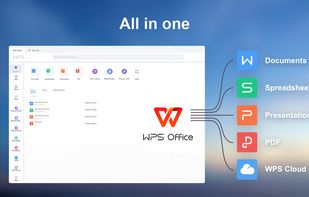
    A free, lightweight office suite offering high compatibility with files and multi-platform support. Includes features for text, presentations, spreadsheets, and PDFs.

    Cost / License

    • Freemium
    • Proprietary

    Application type

    Since

    • Since 2009

    Platforms

    • Windows
    • Mac
    • Linux
    • Chrome OS
    • Debian
    • Ubuntu
    • Android
    • iPhone
    • iPad
    • Android Tablet
    • CN flagChina
    All in one
    compatible with MS 365
    supports 13 languages
    +6
    For Document
    68 alternatives
    2.8
  2. GoodNotes icon
     77 likes

    Easily take notes on mobile devices, annotate PDFs, and organize in folders. Handwritten notes are searchable and sync across devices with iCloud.

    Cost / License

    • Freemium
    • Proprietary

    Application type

    Since

    • Since 2014

    Platforms

    • Windows
    • Mac
    • Online
    • Android
    • iPhone
    • iPad
    • Android Tablet
    • HK flagHong Kong
    GoodNotes screenshot 1
    GoodNotes screenshot 2
    GoodNotes screenshot 3
    87 alternatives
    3.5
  3. Nougat icon
     2 likes

    Transforms scientific PDFs into machine-readable text, accurately interpreting LaTeX math and tables with a Visual Transformer model for structured data extraction.

    Cost / License

    • Free
    • Open Source (MIT)

    Since

    • Since 2026

    Platforms

    • Windows
    • Mac
    • Linux
    Nougat screenshot 1
    12 alternatives
  4. Squid icon
     20 likes

    Take handwritten notes naturally on your Android tablet, phone, or Chromebook supporting Android apps! With Squid you can write just like you would on paper using an active pen, passive stylus, or your finger.

    Cost / License

    • Freemium
    • Proprietary

    Application type

    Since

    • Since 2017

    Platforms

    • Chrome OS
    • Android
    • Android Tablet
    • Kindle Fire
    • US flagUnited States
    Squid screenshot 1
    Squid screenshot 1
    Squid screenshot 2
    +4
    Squid screenshot 3
    29 alternatives
  5. Ncored icon
     1 like

    PDF editor for large CAD and construction drawings: stays smooth on heavy sets, marks up, measures to scale and compares revisions, all locally.

    Cost / License

    • Paid
    • Proprietary

    Application type

    Since

    • Since 2026

    Platforms

    • Windows
    • Mac
    • LT flagLithuania
    • European Union flagEU
    Fast pdf editor for AEC (architects and engineers). View and edit heavy CAD PDF files.
    Ncored screenshot 1
    54 alternatives
  6. CollaNote icon
     6 likes

    Comprehensive software for note-taking, PDF markup, and digital planning with 25 brushes, real-time collaboration, advanced ink engine, and over 150 templates.

    Cost / License

    • Freemium
    • Proprietary

    Application type

    Since

    • Since 2021

    Platforms

    • iPhone
    • iPad
    • VN flagVietnam
    CollaNote screenshot 1
    CollaNote screenshot 1
    CollaNote screenshot 2
    +9
    CollaNote screenshot 3
    42 alternatives
  7. Bluebeam Revu icon
     11 likes

    Professional PDF tool for Windows offering editing, markup, batch processing, 3D PDFs, OCR, forms, collaboration, security, file organization, and CAD integration.

    Cost / License

    • Paid
    • Proprietary

    Application type

    Since

    • Since 2009

    Platforms

    • Windows
    • iPad
    • US flagUnited States
    Bluebeam Revu screenshot 1
    Bluebeam Revu screenshot 1
    101 alternatives
  8. PDFill icon
     39 likes

    With PDFill you can create, fill, delete and submit PDF form fields; insert new formatted text, check, image, hyperlink, whiteout, highlight, drawing, comment and annotation anywhere in the document; save, print or email the filled and password-protected PDF; save and resume...

    Cost / License

    • Freemium
    • Proprietary

    Application type

    Since

    • Since 2009

    Platforms

    • Windows
    • US flagUnited States
    The only free pdf-software able to split very big pdf-files over 200 pages
    Rotate PDF Pages, but only 90, 180 or 270°
    Split or Reorder PDF
    189 alternatives
  9. Notestudio icon
     1 like

    Notestudio brings the charm of traditional handwriting together with powerful digital tools, making note-taking feel natural and intuitive. With flexible paper styles, advanced drawing tools, and a smooth, customizable interface, it’s perfect for capturing and organizing your ideas.

    Cost / License

    • Freemium
    • Proprietary

    Application type

    Since

    • Since 2025

    Platforms

    • Mac
    • iPhone
    • iPad
    • ES flagSpain
    • European Union flagEU
    Notestudio screenshot 1
    Notestudio screenshot 1
    9 alternatives
  10. Jumpdf icon
     1 like

    Jumpdf is a keyboard-focused PDF viewer for documents where one needs to jump between different sections of the document frequently.

    Cost / License

    • Free
    • Open Source (MIT)

    Application type

    Since

    • Since 2024

    Platforms

    • Linux
    • Flathub
    • Flatpak
    Jumpdf screenshot 1
    51 alternatives
  11. iAnnotate icon
     3 likes

    With iAnnotate you can read, annotate, and share PDFs, Microsoft Office files, images and web pages!

    Cost / License

    • Paid
    • Proprietary

    Application type

    Since

    • Since 2012

    Platforms

    • iPhone
    • iPad
    • US flagUnited States
    iAnnotate screenshot 1
    iAnnotate screenshot 1
    iAnnotate screenshot 2
    +9
    iAnnotate screenshot 3
    47 alternatives
  12. ContractorCounter is construction takeoff and PDF markup software that runs in the browser. Upload a drawing, set the scale, then measure lengths, areas and volumes, count items, and mark up the sheet; the quantities build up in a list beside the drawing.

    Cost / License

    • Freemium
    • Proprietary

    Application type

    Since

    • Since 2026

    Platforms

    • Online
    • Software as a Service (SaaS)
    • iPhone
    • iPad
    AI-assisted construction takeoff workspace with drawing markups and chat
    Construction drawing markup workspace with calibrated measurement tools
    7 alternatives
  13. Drawboard Projects (formerly Bullclip) streamlines markup communication on PDF drawings and documents, reducing team frustration and time.

    Cost / License

    • Paid
    • Proprietary

    Since

    • Since 2018

    Platforms

    • Windows
    • Online
    • iPhone
    • iPad
    • GB flagUnited Kingdom
    Drawboard Projects screenshot 1
    Drawboard Projects screenshot 1
    Drawboard Projects screenshot 2
    +2
    Drawboard Projects screenshot 3
    14 alternatives
  14. Onionskin icon
     1 like

    Onionskin is PDF markup software for engineers, builders and architects who review and markup drawing sets every day.

    Cost / License

    • Paid
    • Proprietary

    Application type

    Since

    • New

    Platforms

    • Windows
    • Mac
    • AU flagAustralia
    Light Mode
    Dark Mode
    16 alternatives
  15. Punchlist icon
     1 like

    Punchlist is the annotation layer over your creative work, allowing teams to collaborate and get projects done faster than ever.

    Cost / License

    • Freemium
    • Proprietary

    Application type

    Since

    • Since 2022

    Platforms

    • Online
    • Software as a Service (SaaS)
    Punchlist App Dashboard.
    Adding comments to websites, images or PDF art files is as simple as point-and-click.
    Project Managers can update Item Statuses to In Progress, Ready for Review, Waiting for Feedback, and Done.
    10 alternatives
  16. qPDF Notes icon
     1 like

    View and add comments to Adobe PDF files and fill interactive forms on any Android phone or tablet.

    Cost / License

    • Paid
    • Proprietary

    Application type

    Since

    • Since 2011

    Alerts

    • Discontinued

    Platforms

    • Android
    • Android Tablet
    • US flagUnited States
    qPDF Notes to highlight text, add graphical notes, images to PDF on Android
    qPDF Notes to fill forms on Android
    qPDF Notes lets Android users customize PDF annotations
    20 alternatives
  17. Purple Hammer is native Mac and Windows construction takeoff and estimating software. Markup drawings, measure quantities, compare revisions and price the job in live spreadsheets without bouncing between PDF software and Excel.

    Cost / License

    • Paid
    • Proprietary

    Since

    • Since 2026

    Platforms

    • Windows
    • Mac
    • IL flagIsrael
    Purple hammer  screenshot 1
    Purple hammer  screenshot 1
    Purple hammer  screenshot 2
    +1
    Purple hammer  screenshot 3
    10 alternatives
  18. Pellucid icon
     Like

    Desktop PDF software for reading, annotations, AcroForm fields, custom field design, and page organization on Windows, macOS, and Linux.

    Cost / License

    • Paid
    • Proprietary

    Application type

    Since

    • New

    Platforms

    • Windows
    • Mac
    • Linux
    • US flagUnited States
    Main Interface
    40 alternatives
  19. Review station for AI-generated drawing sets. Redline sheets in the browser, run a 15-rule AEC standards profile, and sign off only when every finding has a named reviewer and written evidence.

    Cost / License

    • Freemium
    • Proprietary

    Since

    • New

    Platforms

    • Online
    • US flagUnited States
    Export Audit Report
    Evidence
    AEC profile
    +1
    Markup
    2 alternatives
  20. Quire PDF icon
     Like

    Private Chrome PDF editor for text search, notes, drawings, signatures, form filling and page management, with local saving and no uploads.

    Cost / License

    • Free
    • Proprietary

    Application type

    Since

    • New

    Platforms

    • Google Chrome
    • US flagUnited States
    Quire PDF screenshot 1
    Highlights, text and a drawn signature
    Filling an existing PDF form
    10 alternatives
  21. Annotyx icon
     Like

    Annotyx is a professional PDF document markup tool designed for speed and precision. Unlike heavy desktop software, Annotyx allows users to instantly upload PDFs or floor plans to measure distances, add polygons, and redline documents directly in the browser.

    Cost / License

    • Free
    • Proprietary

    Since

    • Since 2026

    Platforms

    • Online
    Home page
    markup tool
  22. Quality-control software for architectural drawing sets - mark up issues, assign fixes, verify and close, with a full audit trail.

    Cost / License

    • Paid
    • Proprietary

    Since

    • Since 2026

    Platforms

    • Windows
    • Mac
    Archi Check screenshot 1
    49 alternatives