Notion icon
Notion icon

Notion

Enhance team collaboration and content organization with Notion. Experience real-time access, intuitive drag-and-drop functionalities, and visually simple interfaces designed for productivity in managing tasks, notes, and databases effectively. Ideal for teams of every size.
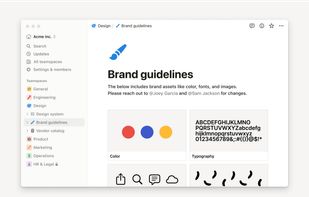
Notion screenshot 1

Cost / License

  • Freemium (Subscription)
  • Proprietary

Platforms

  • Mac
  • Windows
  • Online
  • Android
  • iPhone
  • Android Tablet
  • iPad
  • Software as a Service (SaaS)
4.0
Very Good68 reviews
663likes
78comments

Features

Properties

  1.  Customizable
  2.  Intuitive Interface

Integrations

  1. Slack icon  Slack
  2. Google Maps icon  Google Maps
  3. Google Drive icon  Google Drive
  4.  WebHook
  5. YouTube icon  Youtube

Features

  1.  Database Management Tool
  2.  Wiki
  3.  Support for MarkDown
  4.  Custom templates
  5.  Team Collaboration
  6.  Visual bookmarks
  7.  Relational Database
  8.  Data export/import
  9.  Knowledge Base Structuring
  10.  Kanban Board
  11.  Hyperlinks
  12.  Real time collaboration
  13.  AI-Powered
  14.  Multi-project management
  15.  Tablet support
  16.  Tables
  17.  Custom data fields
  18.  Cross Linking
  19.  Text formatting
  20.  Dark Mode
  21.  Wiki-like interface
  22.  Evernote import
  23. LaTeX icon  Support for LaTeX
  24.  Nested Notes
  25.  Hierarchical Structure
  26.  Drag and Drop
  27.  Web Clipper
  28.  Passkey Support
  29.  Two-factor Authentication
  30.  Syntax Highlighting
  31.  Support for @mentions
  32.  Blocks
  33.  Knowledge Management
  34.  Note organization
  35.  Integrated PDF Viewer
  36.  Student discount
  37.  Collaborative writing
  38.  Pastebin
  39.  Online collaboration
  40.  Visual Organization
  41.  Distraction-free Writing
  42.  Customizable Themes
  43.  Timer for tasks
  44.  Project Tracking
  45.  Prioritize tasks
  46.  LaTeX Math
  47.  Code Snippets
  48.  Browser extension
  49.  Bookmarks
  50.  Real time editing
  51.  Embedded apps
  52.  Embedded media
  53.  Task Automation
  54.  Integrated Search
  55.  Webhook support
  56.  Nested lists
  57.  Knowledge Base
  58.  Built-in AI Assistant
  59.  Data first
  60.  Team management
  61.  Two-Step verification

Notion News & Activities

Highlights All activities

Recent News

Recent activities

  • RebelOps icon
    Verccina added Notion as alternative to RebelOps
  • Dim0 icon
    winlp4ever added Notion as alternative to Dim0
  • Nodalist AI icon
    nodalistai added Notion as alternative to Nodalist AI
  • Timeliner icon
    jpnodin8 added Notion as alternative to Timeliner
  • shaishavap reviewed Notion  

    Notion is where I put everything that doesn't have a clear home — project notes, content plans, research, quick references. The block-based editor is flexible enough that you don't need to decide upfront whether something is a doc, a database, or a list.

    The real value is linking things together. A content calendar that links to individual article drafts, which link to a research database — all in one place without juggling apps. For solo builders and small teams, that replaces a lot of...

  • shaishavap liked Notion
  • Tolaria icon
    POX added Notion as alternative to Tolaria
  • Conduital icon
    gregdm98607 added Notion as alternative to Conduital
  • WitNote icon
    hooosberg added Notion as alternative to WitNote
  • SHrimp icon
    hermitsh_ai added Notion as alternative to SHrimp

Comments and Reviews

   
Comment summary: Notion is praised for its flexibility, comprehensive features, and user-friendly interface, making it ideal for productivity and organization. It combines functionality from applications like Trello and Evernote, supporting multiple platforms for teams and individuals. Positive comments highlight its ability to integrate various tools and its visually appealing design. However, some users criticize its slow performance, particularly on mobile devices, and the lack of offline capabilities. Other concerns include privacy issues, complex login systems, and the absence of a Linux client.
Top Positive Comment
3
11

Notion is a fabulous all round productivity app!

  • In the field of purely notes based apps it is better than the likes of Standard Notes, Laverna, SimpleNote, etc. due to its extensive markdown support, additional features (like inserting images, links, LaTeX, highlighting and text color), and the 'block' architechture that makes arranging and organising information very easy.
  • It serves as a very powerful productivity app that can be made to your preferences, supporting Kanban style views, ToDo lists, Calenders. While It may not be as focused as programs such as Trello, Asana or Monday, its customizability makes this a more powerful tool.
  • It is built for team use, is good for personal use, and can replace shitty shared OneNotes, Google Docs, and other collaborative tools. It more accessible than ever now with a new Android Version
  • It looks really nice
  • Active support

[Edited by 3, August 18]

I no longer use Notion, as while I was enthralled with the software to begin with, underlying issues drew me away.

  1. the system is slow and clunky. inevitable based on the drag and drop based UI, Notion slows down your workflow dramatically. Unlike other word processors, you have to click into boxes and do more setup instead of actual writing, selection and editing of text and lines of text are made more difficult and slow based on the design decisions employed
  2. the login system is highly inconvenient. I had frequent problems with the login system, I understand their wish not to create their own login system, however the email verification system created numerous issues the made me unable to assess my files.
Top Negative Comment
transAdder
14

Cons:

Desktop app doesn't work without online connectivity. Auto-installs under %APPDATA%. Looks like the usual Electron-based app misbehavior.

Shaishavkumar Patel
0

Notion is where I put everything that doesn't have a clear home — project notes, content plans, research, quick references. The block-based editor is flexible enough that you don't need to decide upfront whether something is a doc, a database, or a list.

The real value is linking things together. A content calendar that links to individual article drafts, which link to a research database — all in one place without juggling apps. For solo builders and small teams, that replaces a lot of separate tools.

Free tier is genuinely usable. The AI features are hit-or-miss but the core product is solid.

Kyoto Unknown
0

Powerful but fiddly. Notion can do almost anything; docs, databases, wikis, task tracking, which is also the problem.

Setting up a workspace that feels right takes longer than it should, and the learning curve for databases and relations is steep. The mobile app lags behind the desktop version and offline support is unreliable. Great for power users who enjoy building their own system. Less great if you just want to take notes.

Review by a new / low-activity user.
Ana1234
0

Absolutely love it for trip planning and keeping my personal life organized!

andrewh
0

Generally I think notion is a good tool but in our business we found the freedom of the platform to almost be its draw back. We ended up with countless pages and lots of different attempts at creating SOPs, templates, etc. So while I think Notion has a lot to offer we ended up pairing it back and limiting control for a lot of our team so it now acts more like a wiki for us, rather than a collaboration platform.

Review by a new / low-activity user.
E Thomps
0

I rely on Notion daily to organize my projects and notes

7 of 78 comments

Featured in Lists

I spend a ridiculous amount of time searching for a PKM tool that fits my organizational needs. Everything falls …

List by Darthbert Pleurotuson with 27 apps, updated

A vast compilation of great writing apps and word processors, for all your writing needs. From office suites to …

List by coralinecastell with 33 apps, updated

Master List of all Apps and Software I use for both work and personal life.

List by Jimmy Briggs with 416 apps, updated

What is Notion?

Notion is a collaboration and organization tool for teams. It allows simultaneous content access and contribution in a structured environment, with drag and drop functionality for diverse content types. It is suitable for managing both team projects and individual work, with features such as idea capturing, feedback solicitation, and AI-assisted editing and drafting. It offers over 100 content types, collaborative tools and customizable workflows.

The built-in assistant, Notion AI, simplifies the search process, integrating with other apps to find what you need. It also offers dedicated spaces for each team and project. Additionally, Notion provides templates for various purposes like company wikis, project roadmaps, meeting notes, and calendars. Its range of tools includes a document builder, a wiki, a project manager, a calendar, goal trackers, a website builder, and over 30,000 templates.

Notion Videos

Show 1 more video

Official Links

Page may contain affiliate links. Affiliate links never affect ranking.

Notion information

  • Developed by

    US flagNotion
  • Licensing

    Proprietary and Freemium product.
  • Pricing

    Subscription ranging between $10 and $24 per month + free version with limited functionality.
  • Rating

    Average rating of 4 (68 ratings)
  • Alternatives

    269 alternatives listed
  • News

    44 news article related to Notion
  • Supported Languages

    • English
    • French
    • Japanese
    • Korean
    • German

Our users have written 78 comments and reviews about Notion, and it has gotten 663 likes

Notion was added to AlternativeTo by christopherlupo on and this page was last updated .