


Super Productivity
360 likes
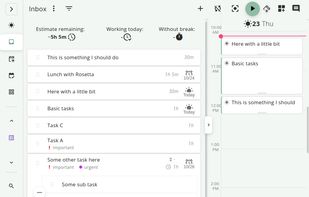
Free, open-source software offering task management and time tracking across Linux, MacOS, and Windows with Jira, GitHub, and GitLab integration, plus a pomodoro timer for breaks and focus. Designed with privacy in mind, it requires no user data collection or registration.

Cost / License
- Free
- Open Source (MIT)
Application typeApplication types
 EU
EUPlatforms
- Mac
- Windows
- Linux
- Online
- Android
- iPhone
- Chrome OS
- Android Tablet
- iPad
- Self-Hosted
- AppImageHub
- Snapcraft
- Flathub
- F-Droid
- Flatpak
- AppImage


Features


Super Productivity News & Activities
Highlights All activities
Recent News
- Paul published news article about Super Productivity

Recent activities
- lilith888 liked Super Productivity
- gnv liked Super Productivity
 david_s_code added Super Productivity as alternative to Dozy
- alt inn commented on Super Productivity
This is not a review, I need to use it more before I review. This is a question. I want to set a reminder for the last day of the month, every three months (to change my toothbrush head). How simple is that to do? (if the last day of the month is not straightforward, then the 1st day of the month). Thank you.
 StarDo added Super Productivity as alternative to StarDo
 taskflo added Super Productivity as alternative to Taskflo
 Paul Fernkopf added Super Productivity as alternative to Ebbi
 Dennis added Super Productivity as alternative to OmmiQ
 Paul added Super Productivity as alternative to say.work
 marowalabs added Super Productivity as alternative to WorkContext


Featured in Lists


DeMicrosoft Your Life
How are you?
In this list I bring you a variety of alternative software to those from Microsoft, and also that these free and open source programs
So enjoy this list!
(I will be updating it every day)


Progress & Management
A list with 568 apps by AmileyaRyver without a description.


My Alts For Big Name Companies
alternatives to big name Company's products. spread the word! Also check out these lists for weaning yourself off of these companies;
https://alternativeto.net/lists/41294/degoogling-list/
https://alternativeto.net/lists/41294/degoogling-list/
https://alternativeto.net/lists/41298/alts-for-big-gaming/
https://alternativeto.net/lists/41819/alternative-to-Re-getting-Games-Again (I DONT PROMOTE STEALING GAMES, AND YOU BETTER NOT DO SO!!!!)
FYI; Google who OWNS Android is trying to make Android NO LONGER OPEN SOURCE (which will BADLY HURT F-Droid) , click here to sign the petition to say "NO!" : https://keepandroidopen.org/ or if you are SICK of siphoning data to Google convert to either GrapheneOS (if you have the currently supported devices) or Mobile Linux distro such as these; .



What is Super Productivity?
Super Productivity information
Developed by
 Johannes Millan
 Licensing
Open Source (MIT) and Free product.Written in
Rating
Average rating of 4.8Alternatives
386 alternatives listedBadge
Get an embeddable badge for Super ProductivitySupported Languages

AlternativeTo Categories
Office & Productivity, Backup & Sync, Security & Privacy, Sport & Health, Business & CommerceApple AppStore
- Updated
- 4.75 avg rating
GitHub repository
- 22,442 Stars
- 2,105 Forks
- 1459 Open Issues
- Updated


Comments and Reviews
Simple yet feature-rich, works both as a desktop app and in your browser! You have full control over your data :)
This is not a review, I need to use it more before I review. This is a question. I want to set a reminder for the last day of the month, every three months (to change my toothbrush head). How simple is that to do? (if the last day of the month is not straightforward, then the 1st day of the month). Thank you.
The best open source todo app I've ever used. Simple yet feature-rich, extremely customisable, works perfecty both on smartphone and on desktop. I like the fact that I have full control over my data. One of my absolute favourite apps.
Extremely customisable and easy to set up.
Every productivity app put into one while being open source for free!
Best todo app that I've used - both simple and sophisticated. Been using it for 5+ years.
I enjoy using the app. The UI is really intuitive and beautiful. It's one of the apps that at the base of it is not fun to use, but due to the implementation of the UI and the UX, it's very nice to use. There are issues that happen with the synchronization of the data between devices (I'm using a next cloud instance on my VPS). The db gets corrupt sometimes which causes it to revert some updates of the tasks. This is the biggest problem of this app.
Still, I prefer it for my personal use to paid and proprietary software.