• Logseq icon
  • Obsidian icon
  • Anytype icon
  • RemNote icon
  • Trilium Notes icon
  • +22

The Best (and the rest) of Personal Knowledge Management Software [2022] [Updated 2023]

Darthbert PleurotusonDarthbert Pleurotuson27 appsUpdated
Copy a direct link to this comment to your clipboard

I spend a ridiculous amount of time searching for a PKM tool that fits my organizational needs. Everything falls short. I want to help others on their own quests by compiling this list. Tags on AlternativeTo are helpful, but I wanted a place to keep a curated list with my own findings that others can contribute to.

Where I can, I have tried to answer the following important questions for each app:
- Is it open source?
- Is it offline-capable?
- Can blocks/notes exist in multiple locations? As well as providing rough overall ratings (Scale of 1 to 5) for the following metrics: - Organization: How does the app allow you to structure information? Is it flexible? Is it logical? - User experience (UX): Is it easy to use? Is the interface designed in a way that is not just logical, but natural for the everyday user? - Privacy: To the best of my (limited) knowledge, does this tool protect your personal data AND is it designed so that you can ensure the safety of your data yourself rather than relying on the app developers (trust, but verify).

Please comment with additions/suggestions, collaboration makes things better.

Frontrunners

The apps that, for various reasons enumerated here, seem like they have the best chance of developing into something truly outstanding. At this point, there's nothing that I can say is truly satisfying, but I am very picky.

  1. Logseq icon
     Like

    Local-first, privacy-focused notebook supporting Markdown and Org mode, offline use, encrypted backup, extensible with plugins, and more.

    Cost / License

    • Free
    • Open Source

    Application type

    Platforms

    • Mac
    • Windows
    • Linux
    • Android
    • iPhone
    • iPad
    • Self-Hosted
    • Flathub
    • F-Droid
    Logseq screenshot 1
    Logseq screenshot 1
    Darthbert PleurotusonDarthbert Pleurotuson’s note

    My daily driver. This app has a lot to like and is development is rolling along at an encouraging clip. Logseq is an outliner at heart, but with a fluid enough user experience (based on markdown and/or org files) to make it a comfortable option for editing documents. Has a decent selection of plugins that looks like it will continue to expand. Still, there are plenty of rough patches to smooth out in terms of customization and user experience (see this post: https://discuss.logseq.com/t/thoughts-on-logseq-vs-obsidian/8614). This is probably the favorite to meet my goals in the future.

    Is it open source? Yes Is it offline-capable? Yes Can blocks/notes exist in multiple locations? Almost. Through the block embed feature, Logseq allows you to transclude blocks in multiple locations. Transclusions can be edited in place, which is a big advantage over other programs that allow embeds/transclusion. But the block only has one "true" parent block, so functionality is limited.

    Organization: 4 UX: 3.5 Privacy: 5

  2. Obsidian icon
     Like

    Obsidian is a note-taking app that lets you create a personal knowledge graph with ease. It is designed for non-linear thinking and allows you to easily link your notes together wiki-style.

    Cost / License

    • Freemium
    • Proprietary

    Application type

    Platforms

    • Mac
    • Windows
    • Linux
    • Android
    • iPhone
    • Android Tablet
    • iPad
    • Snapcraft
    • Microsoft Edge
    • Google Chrome
    • Flathub
    • Safari
    • AppImage
    • Mozilla Firefox
    Obsidian screenshot 1
    Obsidian screenshot 1
    Obsidian screenshot 2
    +6
    Obsidian screenshot 3
    Darthbert PleurotusonDarthbert Pleurotuson’s note

    A powerful markdown editor with a large user base and a lot of great plugins. It isn't open source but can be configured so as to ensure data integrity. Mobile app is surprisingly good, a rarity among entries on this list. Honestly if this app had a better system for block embeds and editable transclusion, it would probably be my go-to.

    Is it open source? No Is it offline-capable? Yes Can blocks/notes exist in multiple locations? No. Pages and blocks can be embedded/transcluded, but transclusions can't be edited in place. There are some clunky semi-workarounds for this but I didn't find them to be practical.

    Organization: 3.5 UX: 4.5 Privacy: 5

  3. Anytype icon
     Like

    Organizes notes, tasks, and projects offline using Markdown, P2P syncing, and encrypted storage, complemented by dynamic collections on all devices.

    Cost / License

    • Freemium
    • Source Available

    Application type

    Platforms

    • Mac
    • Windows
    • Linux
    • Android
    • iPhone
    • Android Tablet
    • iPad
    • Self-Hosted
    • Google Chrome
    • Flathub
    • Flatpak
    • Docker
    Movie Database
    Daily Journal
    Habit Tracker
    +6
    Files
    Darthbert PleurotusonDarthbert Pleurotuson’s note

    My heart is with this one. It is still in alpha but the developers' vision is strongly in line with what I'd like to see from an ideal PKM tool. Very flexible layout and block/object based organizational structure. I am an alpha tester and I can attest that this app is still missing a lot of functionality, but you can see that it has huge potential. The verdict is still out, but if Anytype can deliver what it promises it will blow away the competition.

    Is it open source? Not yet, but devs say it will be Is it offline-capable? Yes Can blocks/notes exist in multiple locations? Yes

    Organization: TBD UX: TBD Privacy: TBD

  4. RemNote icon
     Like

    A note-taking tool that gives you memory superpowers. It automatically generates flashcards from your notes and figures out the optimal time to practice each flashcard.

    Cost / License

    • Freemium
    • Proprietary

    Application type

    Platforms

    • Mac
    • Windows
    • Linux
    • Online
    • Android
    • Google Chrome
    • Flathub
    • Flatpak
    RemNote screenshot 1
    RemNote screenshot 1
    RemNote screenshot 2
    Darthbert PleurotusonDarthbert Pleurotuson’s note

    After failing to include Remnote at all in the initial version of this list, I am adding it directly to the "Frontrunners" section. What gives?? I discovered Remnote shortly after creating this list, and though a lot of its core functionality was impressive, it had a lot of kinks to be worked out. Frustrated by finding yet another app that just didn't quite live up to its potential, I didn't bother to add it here. Now, having revisited Remnote several months later, I am pleasantly surprised by the steady stream of improvements the Remnote team has been adding, making for a much improved experience and a promising future. Highlights include:

    • Strong offline functionality, desktop app, and free plan make trying this app as a daily driver relatively painless (and easier to trust with your data despite being closed source)
    • Android app available (haven't tried it) and iOS app scheduled for release in February 2023
    • Solid plugin system with small but growing list of user-created plugins

    Stay tuned! This one could be the app to beat.

    Is it open source? No Is it offline-capable? Yes Can blocks/notes exist in multiple locations? Yes

    Organization: 4 UX: 4 Privacy: 4.5

Contenders

These apps are good. With some changes they could easily be on my shortlist. I note here why, in my opinion, they fall short.

  1. The original trilium is transfered to this repo by its owner and the app continues to develop here as stated here: https://github.com/TriliumNext/Trilium

    Cost / License

    • Free
    • Open Source

    Application type

    Platforms

    • Mac
    • Windows
    • Linux
    • Self-Hosted
    • Google Chrome
    • Cloudron
    • Mozilla Firefox
    Trilium Notes screenshot 1
    Trilium Notes screenshot 1
    Trilium Notes screenshot 2
    +9
    Trilium Notes screenshot 3
    Darthbert PleurotusonDarthbert Pleurotuson’s note

    Trillium gets a lot right in that it is a good outliner and a good note-taking app, and it has a robust system for allowing notes to exist in multiple locations. Those traits alone make it a solid contender. However it seems to lack a decent plugin system, something that gives options like Logseq, Obsidian and TiddlyWiki much-needed additional functionality and allows users to easily benefit from each other's ideas. There is a script API (actually two APIs), but they are still "experimental" and regardless there's no sign of any sort of centralized collection of user-created scripts.

    If this had a working plugin system and an offline-capable mobile version, I'd say it would be better than Logseq and Obsidian. Unfortunately there's no sign that those features are going to be added any time soon though, if at all.

    Is it open source? Yes Is it offline-capable? Yes (desktop only) Can blocks/notes exist in multiple locations? Yes (through the "cloning" feature)

    Organization: 4.5 UX: 3.5 Privacy: 5

  2. TiddlyWiki is a single html file with all the characteristics of a wiki - including all of the functionality (including editing, saving, tagging and searching) and the style sheet. Because its a single file, its very portable - you can email it, put it on a web server or share...

    Cost / License

    • Free
    • Open Source

    Application type

    Platforms

    • Mac
    • Windows
    • Linux
    • Online
    • BSD
    • Self-Hosted
    • Xfce
    • RemoteStorage
    TiddlyWiki screenshot 1
    Darthbert PleurotusonDarthbert Pleurotuson’s note

    TiddlyWiki is based on a great concept: all components of TiddlyWiki (both notes and the underlying building blocks) are blocks called "Tiddlers" that form a single HTML file that can modify itself. This makes it a lightweight note-taking app that is portable and infinitely customizable. There is a wide selection of plugins, although the degree of quality varies and some may not work well with others. In practice, the notes you create as a user tend to be longer than they should given TW's focus on atomization (there is a promising plugin called Streams that addresses this). Overall, it feels like a strong foundation that someone could build a truly outstanding tool with, but the baseline experience is clunky if you aren't prepared to take some serious time customizing things.

    Is it open source? Yes Is it offline-capable? Yes Can blocks/notes exist in multiple locations? Not exactly. Tiddlers can be transcluded but transclusions can't be edited in place. There might be some way to hack together a slick editable transclusion method but I haven't found one.

    Organization: 4 UX: 3 Privacy: 5

  3. Notion icon
     Like

    Streamline teamwork with real-time collaboration, drag-and-drop content organization, and visual simplicity across notes, tasks, wikis, and databases.

    Cost / License

    • Freemium
    • Proprietary

    Application type

    Platforms

    • Mac
    • Windows
    • Online
    • Android
    • iPhone
    • Android Tablet
    • iPad
    • Software as a Service (SaaS)
    Notion screenshot 1
    Notion screenshot 1
    Notion screenshot 2
    +12
    Notion screenshot 3
    Darthbert PleurotusonDarthbert Pleurotuson’s note

    I really like the functionality and feel of Notion. I don't like that your data is stored remotely by a for-profit company. Pretty much as simple as that. Notion isn't really a contender for me because they'll never change their business model, I just put it here because I really like using it. Note that Anytype is sometimes described as an aspiring Notion clone.

    Is it open source? No Is it offline-capable? No Can blocks/notes exist in multiple locations? Yes (through the "synced blocks" feature)

    Organization: 4.5 UX: 4.5 Privacy: 1

The Rest

Other options. I've looked into them, but I've learned enough to put them on the backburner. Note that just because an app is here, doesn't mean it isn't the right choice for you. Some of these seem pretty decent. Others, where noted, have serious shortcomings.

  1. As easy to use as a word document or bulleted list, and as powerful for finding, collecting, and connecting related ideas as a graph database. Collaborate with others in real time, or store all your data locally.

    Cost / License

    • Paid
    • Proprietary

    Application type

    Platforms

    • Online
    • Android
    • iPhone
    Roam Research screenshot 1
    Darthbert PleurotusonDarthbert Pleurotuson’s note

    I've actually never tried Roam Research, but it's hard not to learn about from how much people talk about it. Frankly, if you are willing to shell out $15/month and don't mind the privacy concerns, try this out. I would, except that both are dealbreakers for me. Maybe soon Logseq will be as good.

    [Update: I finally tried signing up for a free trial of Roam. If there's something that sets Roam apart from Logseq, I sure didn't notice it. Seems Logseq has done a great job of replicating] Roam's key features. As it stands currently I see no reason to let my free trial roll over to a full Roam subscription.]

    Is it open source? No Is it offline-capable? Yes Can blocks/notes exist in multiple locations? Yes

    Organization: 4.5 UX: ??? Privacy: 2

  2. Leo is an open source text editor/outliner that features clones (virtual copies of outline nodes) as its central tool of organization, navigation, customization and scripting.

    Cost / License

    • Free
    • Open Source

    Application type

    Platforms

    • Mac
    • Windows
    • Linux
    Leo Editor screenshot 1
    Darthbert PleurotusonDarthbert Pleurotuson’s note

    This program has a really strong implementation of what they call clones (allowing a node to exist in multiple places). It's a shame that it is an immense pain to set up and to use. Limited selection of plugins and it doesn't look like the developer/community have much interest in making it easier for novices. If you are a serious programmer and have more patience than I do, you might find this to be a really neat tool for coding. Maybe you can find a way to tap into Leo's powerful outlining functionality from a more user-friendly app (the website has a decent explanation of how to use Leo with other programs). I don't know. This one frustrates me because it could be great but the UX is just not there.

    Is it open source? Yes Is it offline-capable? Yes Can blocks/notes exist in multiple locations? Yes

    Organization: 5 UX: 1.5 Privacy: 5

  3. Org mode icon
     Like

    Org mode is for keeping notes, maintaining TODO lists, planning projects, and authoring documents with a fast and effective plain-text system.

    Cost / License

    • Free
    • Open Source

    Application type

    Platforms

    • Mac
    • Windows
    • Linux
    • Terminal
    • GNU Emacs
    • Termux
    Org mode screenshot 1
    Structured Editing
    Transparent Tables
    +4
    Superior Source Code
    Darthbert PleurotusonDarthbert Pleurotuson’s note

    A powerful organizational tool based on the Emacs text editor. I tried for a while to get into Emacs and concluded that while it is a neat text editor that I continue to use sometimes, I don't have the time to customize it to the point where it I think it would be useful to me as far as PKM is concerned. If you're an Emacs person, you probably already know and love Org and maybe could benefit from combining it with other Emacs packages like org-transclude (pretty underwhelming when I tried it) or Hyperbole. If you're not an Emacs person, be prepared to fully embrace learning how to navigate the Emacs environment if you want this to be your go-to.

  4. TiddlyRoam is your open source external brain. TiddlyRoam allows you to quickly create your own wiki. You can add fragments of thoughts and findings whenever they come to you. TiddlyRoam will link them and help you spot the patterns.

    Cost / License

    • Free
    • Open Source

    Application type

    Platforms

    • Mac
    • Windows
    • Linux
    • Chrome OS
    • Self-Hosted
    • TiddlyWiki
    A full screen view of TiddlyRoam.
    The graph map.
    Darthbert PleurotusonDarthbert Pleurotuson’s note

    Pretty self explanatory: a TiddlyWiki variant trying to replicate the functionality of Roam. Pretty good, but as with many TiddlyWiki-based tools it is kind of rough and doesn't always play nice with other TiddlyWiki plugins. Wasn't for me but this is one I encourage people to try out.

  5. Org-roam icon
     Like

    Org-roam is a Roam replica built around the all-powerful Org-mode.

    Cost / License

    • Free
    • Open Source

    Application type

    Platforms

    • Mac
    • Windows
    • Linux
    • GNU Emacs
    Org-roam screenshot 1
    Org-roam screenshot 1
    Org-roam screenshot 2
    +1
    Org-roam screenshot 3
    Darthbert PleurotusonDarthbert Pleurotuson’s note

    An attempt to replicate Roam using org-mode. Again, if you're an Emacs user, worth checking out, if not, maybe not. If Roam is all it's cracked up to be, this didn't succeed in fully implementing its functionality.

  6. Free, open-source note-taking with rich text, cross-platform support, syntax highlighting, embedded files, and customizable interface.

    Cost / License

    • Free
    • Open Source

    Application type

    Platforms

    • Mac
    • Windows
    • Linux
    • Flathub
    • PortableApps.com
    • Flatpak
    CherryTree screenshot 1
    CherryTree screenshot 1
    CherryTree screenshot 2
    +3
    CherryTree screenshot 3
    Darthbert PleurotusonDarthbert Pleurotuson’s note

    Kind of old and clunky looking. Strictly hierarchical outline structures so I pretty much lost interest when I learned that.

  7. Freeplane icon
     Like

    Freeplane is a powerful and free software for building mind maps. It is a redesigned version of the well known FreeMind icon FreeMind , and is created by one of FreeMind's key developers.

    Cost / License

    • Free
    • Open Source

    Application type

    Platforms

    • Mac
    • Windows
    • Linux
    • BSD
    • Java
    Freeplane screenshot 1
    Organization of contacts
    Editing a node
    +1
    Freeplane screenshot 3
    Darthbert PleurotusonDarthbert Pleurotuson’s note

    Worth checking out if you are a fan of pure mind-mappers, not so much if you like text-heavy organization methods.

  8. Joplin icon
     Like

    Open source note-taking app with Markdown support, to-do integration, and synchronization with cloud services like Dropbox and OneDrive.

    Cost / License

    • Freemium
    • Open Source

    Application type

    Platforms

    • Mac
    • Windows
    • Linux
    • Online
    • Android
    • iPhone
    • Android Tablet
    • iPad
    • Self-Hosted
    • AppImageHub
    • Snapcraft
    • Google Chrome
    • Flathub
    • PortableApps.com
    • F-Droid
    • Cloudron
    • Homebrew
    • Chocolatey
    • Termux
    • Mozilla Firefox
    Joplin screenshot 1
    Joplin screenshot 1
    Joplin screenshot 2
    +7
    Joplin screenshot 3
    Darthbert PleurotusonDarthbert Pleurotuson’s note

    A great app for basic note-taking but not especially feature-rich when it comes to full-fledged PKM.

  9. Zettlr icon
     Like

    Comprehensive writing tool for notes, citations, and drafting with privacy-first features and multi-language support, perfect for diverse writing tasks.

    Cost / License

    • Free
    • Open Source

    Application type

    Platforms

    • Mac
    • Windows
    • Linux
    • Flathub
    • PortableApps.com
    Zettlr Main Window (dark mode)
    Zettlr Main Window (light mode)
    The Berlin Theme (dark mode)
    +5
    The Berlin Theme (light mode)
    Darthbert PleurotusonDarthbert Pleurotuson’s note

    Tried it, wasn't for me

  10. Workflowy icon
     Like

    Provides infinite text-based nested lists, real-time collaboration, tagging, file uploads, kanban boards, offline access, and seamless sync across devices.

    Cost / License

    • Freemium
    • Proprietary

    Application type

    Platforms

    • Mac
    • Windows
    • Linux
    • Online
    • Android
    • iPhone
    • Android Tablet
    • iPad
    Workflowy screenshot 1
    Workflowy screenshot 1
    Workflowy screenshot 2
    +6
    Workflowy screenshot 3
    Darthbert PleurotusonDarthbert Pleurotuson’s note

    Outstanding functionality as an outliner app--including the coveted ability to include blocks in multiple locations--but honestly not much else. Not open source, not offline capable, no plugins, and no sign that any of that will change. If you just want a straightforward outliner tool Workflowy does the job well but for a more complete PKM system there's nothing this app can do that couldn't be done just as well by Remnote (and a lot Remnote can do that this can't).

Bonus: Sighted In the Wild

Options I've heard of, but don't really know anything about. Included here to save you some time. If you have experience with them please chime in.

  1. Notesnook icon
     Like

    Fully open-source, end-to-end encrypted notes with device-based security, secure sync, offline access, powerful editor, vault, backups, and exports.

    Cost / License

    • Freemium
    • Open Source

    Application type

    Platforms

    • Mac
    • Windows
    • Linux
    • Online
    • Android
    • iPhone
    • Android Tablet
    • iPad
    • Google Chrome
    • Flathub
    • F-Droid
    • Software as a Service (SaaS)
    • Flatpak
    • Self-Hosted
    Notesnook screenshot 1
    Notesnook screenshot 1
    Notesnook screenshot 2
    +6
    Notesnook screenshot 3
    Darthbert PleurotusonDarthbert Pleurotuson’s note

    Billed as an open source Evernote alternative. Thanks @candroid_man for suggesting this one.

  2. Dynalist icon
     Like

    Dynalist is a web app that lets you break down and organize your thoughts in the format of lists.

    Cost / License

    • Freemium
    • Proprietary

    Application type

    Platforms

    • Mac
    • Windows
    • Linux
    • Online
    • Android
    • iPhone
    • iPad
    Web
    Dark theme
    Mobile
    +7
    Mobile dark theme
  3.  Craft icon
     Like

    Create and share visually rich documents across devices with nested notes, universal command, and easy export options, available online and offline.

    Cost / License

    • Freemium
    • Proprietary

    Application type

    Platforms

    • Mac
    • Windows
    • Online
    • iPhone
    • iPad
     Craft screenshot 1
     Craft screenshot 1
     Craft screenshot 2
    +13
     Craft screenshot 3
  4. Capture and organize knowledge with a network-based note system, providing a novel approach to creating a distinct and personalized idea network.

    Cost / License

    • Freemium
    • Proprietary

    Application type

    Platforms

    • Mac
    • Windows
    • Online
    • Android
    • iPhone
    • Android Tablet
    • Linux
    • iPad
    Capacities screenshot 1
    Wall view to get an overview of a topic. All mentions are displayed.
    Graph view to browse your network of thoughts.
    +4
    Combine images, code, math, and columns on a page to outline your thoughts.
  5. Tana icon
     Like

    Tana's combination of simple concepts lets you build anything. Easily turn raw notes into tasks, bugs, follow-ups and more with Supertags. Everything in Tana is connected in a graph, so you can leave files and folders behind. Data flows to where it needs to be.

    Cost / License

    • Paid
    • Proprietary

    Application type

    Platforms

    • Online
    Tana screenshot 1
    Tana screenshot 1
    Tana screenshot 2
    +3
    Tana screenshot 3
  6. Loreshelf icon
     Like

    Loreshelf is an Open Source knowledge archive that enables you to organize your data and reduce the information noise from original sources such as contracts, services, properties, regulations, and others.

    Cost / License

    • Free
    • Open Source

    Application type

    Platforms

    • Mac
    • Windows
    • Linux
    Loreshelf screenshot 1
    Loreshelf screenshot 1
    Loreshelf screenshot 2
    +2
    Loreshelf screenshot 3
  7. ClickUp icon
     Like

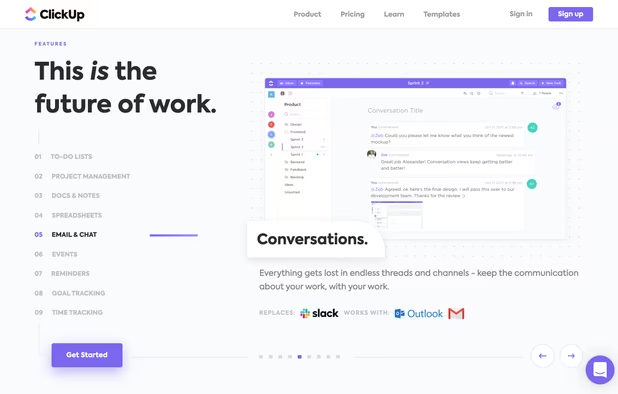
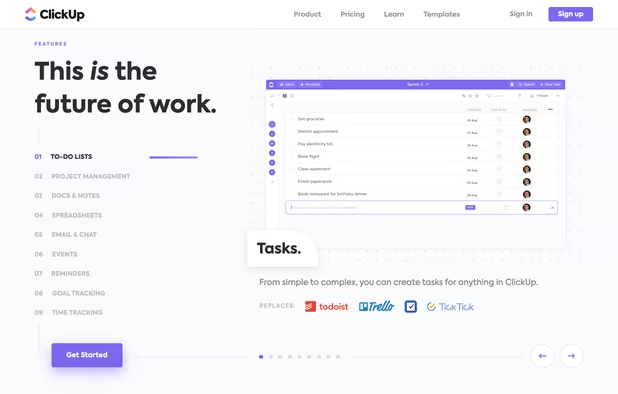
    All-in-one platform combines project, task, and time management with customizable dashboards, modular add-ons, and collaboration tools for agile workflows.

    Cost / License

    • Freemium
    • Proprietary

    Application type

    Platforms

    • Mac
    • Windows
    • Linux
    • Online
    • Android
    • iPhone
    • Android Tablet
    • iPad
    • Apple Watch
    • Software as a Service (SaaS)
    ClickUp screenshot 1
    ClickUp screenshot 1
    ClickUp screenshot 2
    +10
    ClickUp screenshot 3
    Darthbert PleurotusonDarthbert Pleurotuson’s note

    Don't know much about this one, but of course I have been seeing a lot about it because they are spending a ton on advertising. They are clearly targeting users in the business realm but it looks like it has a ton of features and would probably be a great option if it weren't for what I'm sure are glaring privacy concerns (despite their toothless assertion that they are "serious about security and privacy." I honestly have been meaning to sign up (with a throwaway email of course) and check this one out, but the lack of personal control over your data makes it hard for me to imagine sticking around.

  8. Saga.so icon
     Like

    Integrates docs and notes, autolinks knowledge, enables background search, public sharing, real-time collaboration, and connects external tools for seamless teamwork.

    Cost / License

    • Free Personal
    • Proprietary

    Application type

    Platforms

    • Mac
    • Windows
    • Online
    • Software as a Service (SaaS)
    Saga.so screenshot 1
    Saga.so screenshot 1
    Saga.so screenshot 2
    Darthbert PleurotusonDarthbert Pleurotuson’s note

    Absolutely no idea if this one is legit.

Discontinued

  1. Athens icon
     Like

    The problem with notetaking apps like Evernote or Apple Notes is that once you write a note, after a week you never look at it again. Without any organization, you're stuck praying that search will work for your future self.

    Cost / License

    • Free
    • Open Source

    Application type

    Platforms

    • Mac
    • Windows
    • Linux
    • Self-Hosted
    • Software as a Service (SaaS)
    Athens screenshot 1
    Darthbert PleurotusonDarthbert Pleurotuson’s note

    Seems to me very similar to Logseq, but less feature-rich.

    [Update: Athens Research has been discontinued]

End note: Sighted in the Wild (continued)

Here are a couple more "sighted in the wild" options that aren't yet on AlternativeTo. Some of these might be total duds but if they amount to anything someone can add a page for them:

  • Flint
  • Tangent Notes

Comments

baileyfurrow
0

Another one worth mentioning is AppFlowy. Started a couple years ago as a Notion alternative that is open source and stores data locally.

skvintett
0

I think StandardNotes would fit in this list : Standard Notes icon Standard Notes

Global Base Sourcing Limited
0

Best Personal Knowledge Management Software Thanks for sharing knowledgeable content...

candroid_man
1

Check out Notesnook icon Notesnook as well. I've been helping the devs find bugs and whatnot, and it is very promising, I've been using it as my daily driver for about a year. My only issue with it currently is how limited organization is currently. You get Notebooks and Topics for "folders" and you cannot go any deeper in the hierarchy yet. Their main goal is open sourcing by the end of this month, but they do plan to fix this soon

1 reply
Darthbert Pleurotuson
Replying to @candroid_man

Hey thanks for the suggestion, and apologies: I meant to add this to the list when I first saw your comment. Adding it now.