


SumatraPDF
1713 likes
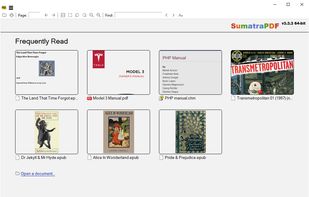
This free, open-source viewer for Windows supports multiple formats like PDF, eBooks (ePub, Mobi), CHM, and Comic Books (CBZ, CBR). Prioritizing simplicity and speed, it offers a lightweight, portable design with a minimalist interface, catering to users seeking fast and efficient document viewing.

Cost / License
- Free
- Open Source (GPL-3.0)
Application typeApplication types
 EU
EUPlatforms
- Windows


Features

Highlights All activities
SumatraPDF News & Activities
Recent News
- Mauricio B. Holguin published news article about SumatraPDF

Recent activities
- humble-advisor liked SumatraPDF
 pan4ratte added SumatraPDF as alternative to Lectrix
- 16midyusoffplay1311 liked SumatraPDF
 pdfkoivip-dev added SumatraPDF as alternative to PDFkoi
 Christer-S-derlund added SumatraPDF as alternative to AntiPDF
- gdaz8lhqgo liked SumatraPDF
- Forseti liked SumatraPDF
 Arjun-Maniyani added SumatraPDF as alternative to Gander
- dimanesterchuk liked SumatraPDF
 Reginald Owusu added SumatraPDF as alternative to REC PDF PRO





Open/Free soft must have
Must have


Free tools (Software that can help you mostly in any field)
This is going to be a list of the free tools/software that can be used mostly in any field. it's based on websites recommendations, personal experience and YouTube videos. If there's any software that you like to be added here pls inform me so we can do it together. They won't be in the alphabetical order. Together we can do it. If you find any software in the list that's not free let me know


My Windows Setup
These are all the software I use on my windows machine. I am privacy freak. So, I mostly use open source software. Checkout "My Firefox setup" list for firefox extensions.
Official Links
Install from the command line
winget install -e --id SumatraPDF.SumatraPDF
Developed by
 Krzysztof Kowalczyk
 Licensing
Open Source (GPL-3.0) and Free product.Written in
Rating
Average rating of 4.3Alternatives
137 alternatives listedBadge
Get an embeddable badge for SumatraPDFSupported Languages

AlternativeTo Categories
News & Books, Office & Productivity, Photos & GraphicsGitHub repository
- 17,753 Stars
- 2,056 Forks
- 45 Open Issues
- Updated


Comments and Reviews
Even when it may have a somewhat unpleasant aesthetic, it is fast and very light. This marvel is an essential part of the Freeware / OpenSource suite of applications that I always install and use on my PC.
Do yourself a favor, forget about other programs like Adobe Reader, etc.
At first I was impressed by the several formats supported and simplistic interface. Until I found out it lacks basic features like a highlighter and support to forms.
This is my goto pdf viewer after finally switching from the absolute enraging garbage of adobe acrobat reader. Super lightweight, very easy to set up options to basically emulate the simplicity of adobe acrobat reader from 15 years ago before it became a bloated ad funnel
Too minimalistic to be useful. No page thumbnails. No font changing. Dark theme is glitchy. Main menu is hidden in a tiny hamburger button.
Basically, if all you need is a quick preview, Sumatra is fine. For actual reading and navigation, no.
I’ve tried numerous browser extensions and "heavy" PDF software to find a comfortable night-reading setup, but nothing comes close to Sumatra PDF.
What makes it stand out is its incredible speed and tiny disk size (under 20MB). Unlike other readers that just "theme" the menu bars, Sumatra allows for a true color inversion of the document itself. By using the simple i shortcut or customizing the Advanced Options file, I was able to get pure white text on a pitch-black background, which is perfect for late-night reading without eye strain.
The level of customization is impressive for such a minimalist app. I was able to set a Default Zoom (Fit Width) and hide all toolbars for a distraction-free, full-screen experience. If you want a reader that is lightning-fast, free, and actually respects your system resources, this is it.
It is light and spunky. However, I couldn't figure out how to see/hide layers and set a specific zoom (example: 37.5%). I use a projector for cutting out patterns so I need to have very good control over the zoom levels.
Lightweight, fast, non-cluttery UI and has all the basic functionality to read a PDF. I think it's more than enough for 90% of people