AntiPDF icon
AntiPDF icon

AntiPDF

 Like

A fast, private PDF reader and editor for Windows. Free and ad-free: huge files open instantly, scans become searchable text, and dark themes reach the page itself. No account, no tracking.
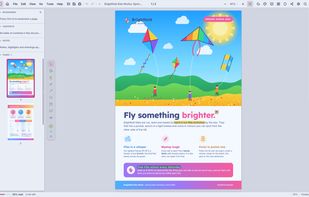
Reading in the bright Original theme, with page thumbnails and the side panel

Cost / License

  • Freemium (Pay once or Subscription)
  • Proprietary

Application type

Platforms

  • Windows
0likes
0articles
Save

Features

Properties

Features

Highlights All activities

AntiPDF News & Activities

Recent activities

AntiPDF information

  • Developed by

    DE flagAnti Softworks
  • Licensing

    Proprietary and Freemium product.
  • Pricing

    One time purchase that costs $115, and / or subscription that costs $12 per month + free version with limited functionality.
  • Alternatives

    5 alternatives listed
  • Badge

    Get an embeddable badge for AntiPDF
  • Supported Languages

    • English

AlternativeTo Category

Office & Productivity
AntiPDF was added to AlternativeTo by Christer-S-derlund on and this page was last updated .

No comments or reviews, maybe you want to be first?

Official Links

What is AntiPDF?

AntiPDF is a PDF reader and editor for people who are tired of Acrobat: no subscription required, no ads, no tracking, and your documents never leave your computer.

Fast with big files. A 10 GB PDF opens in milliseconds and scrolls smoothly, because pages are built only when they come into view. Slow work like text recognition and saving runs in the background.

Free, with no time limit:

  • Reading, search as you type, bookmarks, table of contents, thumbnails and a reading view
  • 35 light and dark themes that color the page itself, not only the window
  • Markup: highlights, pen, arrows, text boxes, notes and hand-drawn signatures, saved into the PDF
  • Text recognition (OCR) on your own computer: scanned pages become searchable and copyable
  • A Scan window that takes pages from a scanner, webcam or phone and straightens and reads them
  • Organize pages: reorder, rotate, delete, insert and extract. Edit a line of text, replace a picture, fill in forms
  • Printing: booklets, several pages per sheet, two-sided, and a black ink mode that saves toner
  • Opens OpenDocument files, images, multi-page TIFF, CBZ comics, Markdown and plain text as PDFs

Pro adds real redaction (card numbers, IDs, e-mail addresses and more are removed, even on scanned pages), password protection (AES-256), certificate signing, watermarks, and cleaning out metadata, scripts and attachments. Pro is a subscription that also includes end-to-end encrypted sharing, live sessions, chat and 25 GB of storage, or a one-time purchase you keep forever.