• Affinity Photo icon
  • Affinity Designer icon
  • Affinity Publisher icon
  • DaVinci Resolve icon
  • HitFilm Pro icon
  • +11

Working in the creative industry but don't want to use Adobe products?

PaulPaul16 appsUpdated
Copy a direct link to this comment to your clipboard

For quite a long time, I've been looking into entirely ditching https://alternativeto.net/software/adobe-creative-suite/ products because of the price (€60/month), the subscription model, the fact that you have to use their Creative Cloud in order to use their software and to sync anything, the way https://alternativeto.net/software/adobe-photoshop/, https://alternativeto.net/software/adobe-illustrator/, and https://alternativeto.net/software/adobe-indesign/ are bloated, the fact that often you can't use the software if you don't have an Internet connection because Adobe must be able to check your license… and so on and so on.

For a long time, their software were amazing and above everything on the market, but now, Adobe software feel like old complicated bloated tools to me. And, so I took my courage with both hands, uninstalled all Adobe products on my computer, canceled my subscription and deleted my https://alternativeto.net/software/behance-network/ and Adobe accounts.

I've since then replaced all Adobe software with the following ones:

  1. Real-time raster graphics editor with non-destructive edits, unlimited layers, and workspace for RAW editing, supporting major colour spaces and formats.

    Cost / License

    • Paid
    • Proprietary

    Application type

    Platforms

    • Mac
    • Windows
    • iPad
    Affinity Photo screenshot 1
    Affinity Photo screenshot 1
    Affinity Photo screenshot 2
    +7
    Affinity Photo screenshot 3
    PaulPaul’s note

    Adobe product to replace: Adobe Photoshop icon Adobe Photoshop

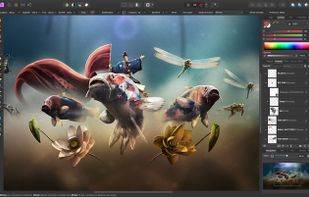
    Affinity Photo is a powerful professional photo editing software that offers sophisticated tools to edit and improve your images. Affinity Photo has an intuitive interface and offers powerful tools that allow professionals as well as the public to retouch their images.

    Also worth mentioning: GIMP icon GIMP, Krita icon Krita, Pixelmator icon Pixelmator & Photopea icon Photopea

  2. Fast, smooth vector graphic design software with curve precision, vibrant colors, live gradients, and dynamic drawing tools, ideal for professionals.

    Cost / License

    • Paid
    • Proprietary

    Application type

    Platforms

    • Mac
    • Windows
    • iPad
    Affinity Designer screenshot 1
    Affinity Designer screenshot 1
    Affinity Designer screenshot 2
    +7
    Affinity Designer screenshot 3
    PaulPaul’s note

    Adobe product to replace: Adobe Illustrator icon Adobe Illustrator

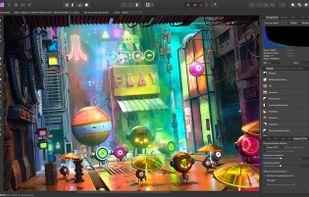
    Affinity Designer is an incredibly accurate vector illustrator that feels fast and at home in the hands of creative professionals. It intuitively combines rock solid and crisp vector art with flexible layer management and an impressive range of high quality raster tools for finishing. With accuracy, quality and speed at the heart of every single design task, and the ability to finesse designs without switching apps, this fresh-faced multi-discipline illustrator lets creatives shine.

    Also worth mentioning: CorelDRAW Graphics Suite icon CorelDRAW Graphics Suite, Inkscape icon Inkscape & Corel Vector icon Corel Vector

  3. Advanced desktop publishing software with real-time collaboration, high-performance architecture, seamless Affinity suite integration, and custom typography.

    Cost / License

    • Paid
    • Proprietary

    Application type

    Platforms

    • Mac
    • Windows
    • iPad
    Affinity Publisher screenshot 1
    Affinity Publisher screenshot 1
    Affinity Publisher screenshot 2
    +9
    Affinity Publisher screenshot 3
    PaulPaul’s note

    Adobe product to replace: Adobe InDesign icon Adobe InDesign

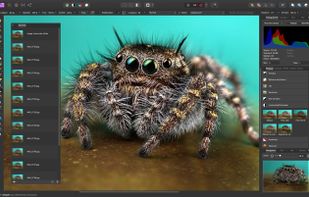
    Bring your vision to life with Affinity Publisher, the most advanced professional publishing software from the developers of the award-winning Affinity Designer and Affinity Photo apps. This incredibly smooth, intuitive app gives you the power to combine your images, graphics, and text to make beautiful layouts ready for publication. From magazines, books, brochures, posters, reports, and stationery, to other creations, Affinity Publisher has everything you need to create the perfect layout. Like the two previous apps, it comes at a one time fee of $49.99 and all updates are free.

    Also worth mentioning: QuarkXPress icon QuarkXPress, Scribus icon Scribus & Swift Publisher icon Swift Publisher

  4. Advanced video editing and color correction with integrated visual effects, motion graphics, and audio post-production tools, used by professionals.

    Cost / License

    • Freemium
    • Proprietary

    Application type

    Platforms

    • Mac
    • Windows
    • Linux
    • iPad
    Hollywood's #1 Post Solution
    All In One Solution for Post Production
    Edit
The world's fastest and
most advanced professional NLE.
    +9
    Cut
Designed for editors
to turn around work fast!
    PaulPaul’s note

    Adobe product to replace: Adobe Premiere Pro icon Adobe Premiere Pro

    DaVinci Resolve is a very complete color grading software that allows you to play with colorimetry as well as edit, mix, and composite your videos. Thanks to its complete interface, DaVinci Resolve allows you to manage your projects from A to Z without too much difficulty. Multitrack management allows you to work with multiple video and audio sequences simultaneously. Multicam support gives your work a formidable professional look and quality by automatically synchronizing audio and video tracks through sound wave analysis.

    Also worth mentioning: Final Cut Pro icon Final Cut Pro, Kdenlive icon Kdenlive, Lightworks icon Lightworks & Olive Video Editor icon Olive Video Editor

  5. HitFilm merges FXHome VisionLab Studio icon FXHome VisionLab Studio , FXHome Effectslab icon FXHome Effectslab and into one software.

    Cost / License

    • Paid
    • Proprietary

    Application type

    Platforms

    • Mac
    • Windows
    Editing
    Drag and drop Presets - 3D Effects - Muzzle Flashes-M16
    Drag and drop 3D-Fire-Bonfire
    +4
    Drag and drop 3D - Falling debris
    PaulPaul’s note

    Adobe product to replace: Adobe After Effects icon Adobe After Effects

    FXhome HitFilm is an all-in-one editor, compositor, and VFX powerhouse featuring a unique mix of video editing, visual effects, and 3D compositing for filmmakers and professional motion artists. It's everything you need in one product.

    Also worth mentioning: Blackmagic Design Fusion icon Blackmagic Design Fusion, Apple Motion icon Apple Motion, Natron icon Natron, NUKE icon NUKE & Blender icon Blender

  6. Figma icon
     Like

    Web-based vector graphics editor with desktop apps, focusing on real-time collaboration and version control for UI/UX design.

    Cost / License

    • Freemium
    • Proprietary

    Application type

    Platforms

    • Mac
    • Windows
    • Online
    • Android
    • iPhone
    • Chrome OS
    • Android Tablet
    • iPad
    • Software as a Service (SaaS)
    ,
    ,
    Figma screenshot 2
    +4
    Figma screenshot 3
    PaulPaul’s note

    Adobe product to replace: Adobe XD icon Adobe XD

    Figma is an interface design application that runs in the browser–but it’s actually much more than that. I would go so far as to say it’s probably the best application for team-based collaborative design projects. Figma gives you all the tools you need for the design phase of the project, including vector tools which are capable of fully-fledged illustration, as well as prototyping capabilities, and code generation for hand-off.

    Also worth mentioning: Sketch icon Sketch, InVision icon InVision, Framer icon Framer, Akira icon Akira & Alva icon Alva

  7. Capture One is a leading raw converter and workflow software which enables photographers to reduce the time and effort required to deliver astounding ready-to-use images with excellent color and detail.

    Cost / License

    • Paid
    • Proprietary

    Application type

    Platforms

    • Mac
    • Windows
    • iPhone
    • iPad
    Capture One screenshot 1
    Capture One screenshot 1
    Capture One screenshot 2
    +1
    Capture One screenshot 3
    PaulPaul’s note

    Adobe product to replace: Adobe Lightroom icon Adobe Lightroom

    Capture One is a professional RAW converter offering you ultimate image quality with accurate colors and incredible detail from more than 400 high-end cameras — straight out of the box. It offers state-of-the-art tethered capture, powerful digital asset management, extensive adjustment tools, and a flexible workflow.

    Also worth mentioning: darktable icon darktable, Luminar Neo icon Luminar Neo, DxO PhotoLab icon DxO PhotoLab, RAW Power icon RAW Power & RawTherapee icon RawTherapee

  8. Ocenaudio icon
     Like

    Ocenaudio is a cross-platform, easy to use, fast and functional audio editor. It is the ideal software for people who need to edit and analyze audio files without complications. ocenaudio also has powerful features that will please more advanced users.

    Cost / License

    • Free
    • Proprietary

    Application type

    Platforms

    • Mac
    • Windows
    • Linux
    Ocenaudio version 3.7.19 running on Windows with an audio file open.
    Ocenaudio version 3.7.19 running on Windows with no file open.
    Ocenaudio screenshot 2
    +4
    audio screenshot
    PaulPaul’s note

    Adobe product to replace: Adobe Audition icon Adobe Audition

    Ocenaudio is a multi-platform audio editor that allows you to easily cut pieces of audio files using the spectrogram. Different effects are available such as adding silences, changing the amplitude, managing the equalizer, and more. These effects are applied in real time, which makes it much easier to go back in case of an error. Finally, Ocenaudio supports multi-selection and is not limited in the length or quantity of tracks to work on.

    Also worth mentioning: Ardour icon Ardour & Audacity icon Audacity

  9. Pinegrow is a Mac, Windows and Linux web editor that lets you build responsive websites faster with live multi-page editing, CSS & SASS styling, CSS Grid editor and smart components for Bootstrap, Foundation and WordPress.

    Cost / License

    • Paid
    • Proprietary

    Application type

    Platforms

    • Mac
    • Windows
    • Linux
    • CSS
    • Sass
    • Wordpress
    • Atom
    • Bootstrap
    Pinegrow Web Editor screenshot 1
    Pinegrow Web Editor screenshot 1
    Pinegrow Web Editor screenshot 2
    +3
    Pinegrow Web Editor screenshot 3
    PaulPaul’s note

    Adobe product to replace: Adobe Dreamweaver icon Adobe Dreamweaver

    Pinegrow (also know as Pinegrow Web Designer) is desktop app that lets you mockup and design webpages faster with multi-page editing, CSS and LESS styling, and smart components for Bootstrap, Foundation, Angular JS, and WordPress.

    Also worth mentioning: Webflow icon Webflow, Pingendo icon Pingendo, Mobirise icon Mobirise & Blocs icon Blocs

  10. Canva icon
     Like

    Versatile design tool integrating photo, video editing, and AI-powered features for creating graphics, logos, and social media content efficiently.

    Cost / License

    • Freemium
    • Proprietary

    Application type

    Platforms

    • Mac
    • Windows
    • Linux
    • Online
    • Android
    • iPhone
    • Android Tablet
    • iPad
    • Software as a Service (SaaS)
    Canva screenshot 1
    Canva screenshot 1
    Canva screenshot 2
    +5
    Canva screenshot 3
    PaulPaul’s note

    Adobe product to replace: Adobe Express icon Adobe Express

    Canva offers a graphic studio for everyone. Indeed, thanks to this online service, you will be able to easily create a whole series of documents from banners to posters, newspapers, and flyers. A true graphic Swiss army knife, Canva has its place in your digital toolbox. Thousands of templates are available to serve as a starting point, then you can choose the format, background and images, not to mention fonts or colors. Once finished, all you have to do is download your creation as an image or PDF file.

    Also worth mentioning: Pablo by Buffer icon Pablo by Buffer, Desygner icon Desygner & DesignBold icon DesignBold

  11. Okular icon
     Like

    Multi-platform document viewer supporting PDF, EPUB, comics and images with annotation tools, sidebar navigation, signature verification, and text-to-speech.

    Cost / License

    • Free
    • Open Source

    Application type

    Platforms

    • Windows
    • Linux
    • BSD
    • KDE Plasma
    • Snapcraft
    • Linux Mobile
    • Flathub
    • Haiku
    Okular screenshot 1
    Okular screenshot 1
    Okular screenshot 2
    +2
    Okular screenshot 3
    PaulPaul’s note

    Adobe product to replace: Adobe Acrobat Reader icon Adobe Acrobat Reader

    Okular is a universal document viewer developed by KDE. Okular works on multiple platforms, including but not limited to Linux, Windows, macOS, *BSD, etc. Okular combines the excellent functionalities with the versatility of supporting different kind of documents, like PDF, Postscript, DjVu, CHM, XPS, ePub, and others. Of course, the first choice would be to use the document viewer integrated with your OS (like Preview icon Preview for macOS icon macOS), but if you don't like it, here are some alternatives that you could like.

    Also worth mentioning: SumatraPDF icon SumatraPDF, zathura icon zathura, Foxit PDF Reader icon Foxit PDF Reader & MuPDF icon MuPDF

  12. Plug in your memory cards and start picking winners and deleting rejects almost instantaneously. Move from image to image without that annoying rendering delay. Add dynamic caption, copyright, and keyword information individually or in batches.

    Cost / License

    • Paid
    • Proprietary

    Application type

    Platforms

    • Mac
    • Windows
    PaulPaul’s note

    Adobe product to replace: Adobe Bridge icon Adobe Bridge

    Photo Mechanic is a photographer's image browser tool. It is the answer for professional digital photographers looking for a fast and easy-to-use image browser for digital camera files. Photo Mechanic's innovative batch captioning, renaming, speedy browsing, and Photoshop connectivity features have made it the choice of thousands of photojournalists and professional photographers worldwide. Optimized for use with professional cameras from Nikon, Canon, Olympus and Pentax, Photo Mechanic has become the standard tool for digital image browsing.

    Also worth mentioning: Eagle  icon Eagle , Pixave icon Pixave, digiKam icon digiKam, ACDSee Photo Studio icon ACDSee Photo Studio & XnView MP icon XnView MP

  13. Pexels icon
     Like

    The best free stock photos & videos shared by talented creators.

    Cost / License

    • Free
    • Proprietary

    Application type

    Platforms

    • Online
    Pexels screenshot 1
    Pexels screenshot 1
    Pexels screenshot 2
    PaulPaul’s note

    Adobe product to replace: Adobe Stock icon Adobe Stock

    If you are looking for images to enhance your web pages, then Pexels is the right tool for you. This online service allows you to share, search and download thousands of royalty-free photos, illustrations and videos for both personal and professional use. Easy to use, simply type your query into the appropriate field and launch the search.

    Also worth mentioning: Unsplash icon Unsplash, Pixabay icon Pixabay & LibreStock icon LibreStock

    You can also take a look at this list (by me) or this one made by Mao.

  14. Dribbble icon
     Like

    Dribbble is the go-to resource for discovering and connecting with designers and creative talent around the globe.

    Cost / License

    • Freemium
    • Proprietary

    Application type

    Platforms

    • Online
    Dribbble screenshot 1
    PaulPaul’s note

    Adobe product to replace: Behance icon Behance

    Dribbble is an online community for showcasing user-made artwork. It functions as a self-promotion and networking platform for graphic design, web design, illustration, photography, and other creative areas. It is one of the largest platforms for designers to share their work online — competing directly with Adobe Behance — the latter being the largest.

    Also worth mentioning: DeviantArt icon DeviantArt or your own website

  15. Font Squirrel is a collection of free fonts for commercial use. We scour the internet for truly free, AND, high quality fonts. We also have the world's greatest, and only of it's kind, @font-face font generator.

    Cost / License

    • Free
    • Proprietary

    Application type

    Platforms

    • Online
    Font Squirrel screenshot 1
    Font Squirrel screenshot 1
    Font Squirrel screenshot 2
    PaulPaul’s note

    Adobe product to replace: Adobe Fonts icon Adobe Fonts

    Font Squirrel is the best resource for free, hand-picked, high-quality, commercial-use fonts. Font Squirrel also has a great @font-face font generator. It means that if you own a @font-face license for your fonts, you can use the generator to create web-kits or to tweak your existing kits to improve rendering and file sizes.

    Also worth mentioning: Google Fonts icon Google Fonts, Font Library icon Font Library & dafont.com icon dafont.com

  16. Comprehensive platform offering drag-and-drop web creation, ecommerce support, templates, and marketing tools, with free hosting and 24/7 support.

    Cost / License

    • Paid
    • Proprietary

    Application type

    Platforms

    • Online
    • Android
    • iPhone
    • Android Tablet
    • iPad
    • Software as a Service (SaaS)
    Squarespace screenshot 1
    Squarespace screenshot 1
    Squarespace screenshot 2
    +5
    Squarespace screenshot 3
    PaulPaul’s note

    Adobe product to replace: Adobe Portfolio icon Adobe Portfolio

    Launched in 2004, Squarespace has become a reference software for companies that want to create an e-commerce website with a modern design. Today, Squarespace also allows you to create high quality One Page sites and blogs.

    Also worth mentioning: Webflow icon Webflow & Cargo icon Cargo


It feels really good to be free of Adobe, and so far everything's great. I don't have to pay a monthly fee to use some software anymore and I'm really happy with that. Of course, it's not for everyone and lots of companies use Adobe products on a daily basis and don't let you choose of your software. But, if you're a freelancer like me, you might be tempted to make the switch!

Feel free to ask if you have any questions or if you have recommendations for me.

No comments so far, maybe you want to be first?