Apps tagged with 'Window Manager' Page 10 of 14

All apps in Apps tagged with 'Window Manager' category. Use the filters below to narrow down your search. 
Copy a direct link to this comment to your clipboard
  1. WinExplorer icon
     1 like

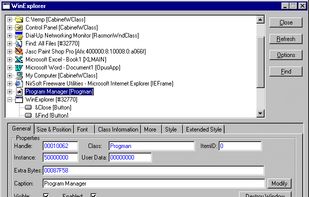
    For every window in the hierarchy, you can view its properties, like handle, class name, caption, size, position and more. You can also modify some properties, like Caption and Visible/Enabled.

    Cost / License

    • Free
    • Open Source

    Alerts

    • Discontinued

    Platforms

    • Windows
    • IL flagIsrael
    WinExplorer screenshot 1
    5 alternatives
  2. AROW icon
     1 like

    Arrange, resize, snap, and move windows in OS X with the help of keyboard shortcuts, certain window dragging gestures, or using OS X's window buttons.

    Cost / License

    • Paid
    • Proprietary

    Application type

    Alerts

    • Discontinued

    Platforms

    • Mac
    Snap windows by dragging it to the edge of the screen.
    Move and resize windows with smart panel.
    Define window buttons' behaviors for quick snap.
    +1
    Options
    67 alternatives
  3. Monitile icon
     3 likes

    Windows tray utility that captures app windows, positions and screens, then restores sessions at sign-in or after monitor changes without duplicates.

    Cost / License

    • Freemium
    • Proprietary

    Application type

    Platforms

    • Windows
    Monitile screenshot 1
    Monitile screenshot 1
    Monitile screenshot 2
    6 alternatives
  4. TileWindows icon
     3 likes

    TileWindows helps you to easily organize your desktop: Move and resize your application windows, so you can view them side by side, by using keyboard shortcuts.

    Cost / License

    • Paid
    • Proprietary

    Application type

    Alerts

    • Discontinued

    Platforms

    • Mac
    • DE flagGermany
    • European Union flagEU
    TileWindows screenshot 1
    TileWindows screenshot 1
    TileWindows screenshot 2
    +1
    TileWindows screenshot 3
    46 alternatives
  5. Groups any macOS app windows together under folder-style tabs, lets you switch, hide, and preview windows, supports all apps, restores sessions, and never alters your layout.

    Cost / License

    • Paid
    • Proprietary

    Application type

    Platforms

    • Mac
    • US flagUnited States
    A Claude window grouped with a browser: Tack's tab strip sits above the active window, and clicking a tab switches which window is in front.
    Two windows joined into one group, with a strip of folder-style tabs above them. Clicking a tab brings that window forward and hides the rest.
    6 alternatives
  6. Gridy icon
     4 likes

    Gridy adds an invisible grid to Windows, so that any window you move or resize is snapped to it. Snapping is enabled with mouse drag or keyboard a...

    Cost / License

    • Free
    • Proprietary

    Application type

    Platforms

    • Windows
    • PortableApps.com
    Gridy screenshot 1
    30 alternatives
  7. Tabame icon
     1 like

    Tabame is an alternative to Windows Taskbar. It also contains great tools such as advanced Hotkeys, QuickRun, Trktivity and Wizardly.

    Cost / License

    • Free
    • Open Source (MIT)

    Application type

    Platforms

    • Windows
    QuickMenu
    Interface
    Trktivity
    +2
    Fancyshot
    7 alternatives
  8. Monitor Glue icon
     2 likes

    macOS forgets your window layout whenever you switch monitors: unplug, and every window piles onto the laptop screen; plug back in, and nothing goes back. Monitor Glue is a free, open-source menu-bar app that remembers where each window lives — separately for every monitor you...

    Cost / License

    • Free
    • Open Source (MIT)

    Application type

    Platforms

    • Mac
    Monitor Glue screenshot 1
    Monitor Glue screenshot 1
    Monitor Glue screenshot 2
    +2
    Monitor Glue screenshot 3
    3 alternatives
  9. Scopo icon
     1 like

    Scopo replaces Cmd+Tab with a window switcher scoped to your current macOS Space. One Space = one project. You see only the windows that belong there.

    Cost / License

    • Paid
    • Proprietary

    Application type

    Platforms

    • Mac
    Main feature - space scoped window switcher
    search windows across all spaces
    move window to the right space
    +1
    label your spaces
    32 alternatives
  10. Aero Shake icon
     1 like

    Aero Shake is a new feature for windows 7. It allows you to minimize and restore the windows that are open in your desktop. This awesome and practical trick allows you to focus in the windows that you have chosen.

    Cost / License

    • Free
    • Open Source

    Application type

    Platforms

    • Windows
    Aero Shake screenshot 1
    34 alternatives
  11. Workflo icon
     1 like

    Workflo automatically arranges the windows on your Mac: it opens the apps you need, moves and resizes every window the way you set it, and clears the rest, before a call, before a focus block, and every time you dock or undock.

    Cost / License

    • Paid
    • Proprietary

    Application type

    Platforms

    • Mac
    • IN flagIndia
    Workflo screenshot 1
    Workflo screenshot 1
    Workflo screenshot 2
    +2
    Workflo screenshot 3
    14 alternatives
  12. Snapset icon
     1 like

    Snapset is a workspace manager for Mac that saves and restores apps, window arrangements, browser tabs, and Finder folder locations. Create layouts for different tasks and switch using keyboard shortcuts, the menu bar, or voice commands processed locally on your Mac.

    Cost / License

    • Paid
    • Proprietary

    Application type

    Platforms

    • Mac
    Save and restore your entire Mac workspace
    Automatic layouts for different display setups
    Voice control processed locally on your Mac
    +2
    Switch layouts from the menu bar and other triggers
    12 alternatives
  13. Jwno icon
     1 like

    A tiling window manager for Windows 10/11, built with Janet and ??. This repo is a one-way mirror. The actual development happens in a separate Fossil repo.

    Cost / License

    • Free Personal
    • Open Source (MIT)

    Application type

    Platforms

    • Windows
    Jwno screenshot 1
    11 alternatives
  14. iSnap icon
     1 like

    Managing the windows on your computer has become a snap! With the iSnap app, you can organize various windows to fit perfectly on your screen and access them simultaneously!

    Cost / License

    • Paid
    • Proprietary

    Application type

    Platforms

    • Mac
    iSnap screenshot 1
    iSnap screenshot 1
    iSnap screenshot 2
    46 alternatives
  15. WinMover icon
     1 like

    WinMover is an application for moving windows more comfortable with the the mouse in Microsoft Windows®. It is fully customizable and can mimic the behaviour of many window managers for UNIX and Linux.

    Cost / License

    • Free
    • Proprietary

    Application type

    Alerts

    • Warning

    Platforms

    • Windows
    • SE flagSweden
    • European Union flagEU
    WinMover screenshot 1
    32 alternatives
  16. Easily manage windows, including automatic alignment and sizing, pinning and unpinning (set on top), shortcuts to stack and view side by side and shortcuts to change size and position.

    Cost / License

    • Free
    • Open Source

    Application type

    Platforms

    • Windows
    Hotkeys
    Options
    4 alternatives
  17.  2 likes

    A small utility which allows you to easily organize your open windows by tiling, resizing and positioning them to make the best use of your desktop real estate. It's easy to configure and supports multiple monitors.

    Cost / License

    Application type

    Platforms

    • Linux
    x11PyGrid screenshot 1
    43 alternatives
  18. OptiTune icon
     2 likes

    OptiTune is an IT Management System that lets you manage thousands of computers, provide remote desktop support, deploy applications, manage updates, handle endpoint protection, and more. All from one cloud based console. Your first year is free.

    Cost / License

    • Freemium
    • Proprietary

    Application type

    Platforms

    • Windows
    • Android
    • US flagUnited States
    The main dashboard for OptiTune
    Using the built in Remote Desktop and File Transfer
    Using the web browser based Remote Command Prompt
    +3
    Using the real time (live update) Remote Task Manager
    45 alternatives
  19. Split Screen allows you to effortlessly resize windows to exactly half your desktop at the touch of a simple keystroke. Gone are the days of trying to resize windows to fit nicely next to each other, with Split Screen it is as easy as pressing a button.

    Cost / License

    • Paid
    • Proprietary

    Application type

    Platforms

    • Mac
    Split Screen screenshot 1
    Split Screen screenshot 1
    Split Screen screenshot 2
    +2
    Split Screen screenshot 3