
GroupShelf icon
GroupShelf icon

GroupShelf

Groups windows from any macOS app into browser-style tabs. Shift-drag one window onto another to tab them, drag a tab out to split, and give each group a color and a name.
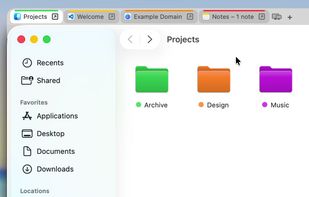
Four apps in one group: Finder, VS Code, a browser and Notes, each tab with its own color

Cost / License

  • Pay once
  • Proprietary

Application type

Platforms

  • Mac  Requires macOS 15 or later
  • Homebrew
2likes
0articles
Save

Features

Properties

  1.  Lightweight

Features

  1.  Dark Mode
  2.  Support for Multiple Monitors
  3.  Works Offline
  4.  No registration required
  5.  Ad-free
  6.  No Tracking
  7.  Tabbed interface

GroupShelf News & Activities

Highlights All activities

Recent activities

GroupShelf information

  • Developed by

    Alpharium Inc.
  • Licensing

    Proprietary and Commercial product.
  • Pricing

    One time purchase (perpetual license) that costs $10.
  • Alternatives

    5 alternatives listed
  • Badge

    Get an embeddable badge for GroupShelf
  • Supported Languages

    • English
    • Japanese
    • Korean
    • German
    • French
    • Spanish
    • Italian
    • Chinese
    • Portuguese

AlternativeTo Category

OS & Utilities
GroupShelf was added to AlternativeTo by alpharium on and this page was last updated .

No comments or reviews, maybe you want to be first?

What is GroupShelf?

GroupShelf is a macOS utility that groups windows from different apps into tabs, like browser tabs for your whole desktop.

Hold Shift and drop one window onto another to combine them into a group. A tab bar sits above the group: click a tab to switch windows, or drag a tab out to split it off again. The modifier key is configurable.

Features:

  • Works with windows from any app: Finder, editors, terminals, browsers
  • No limit on the number of groups; each can have an accent color and a name
  • Follows an app's own native tabs: tabs opened with ⌘T join the group
  • Built natively with AppKit, not Electron
  • macOS 15 or later, on Apple Silicon and Intel
  • Available in 10 languages
  • Install from a DMG or with Homebrew

GroupShelf uses the macOS Accessibility permission only to move, resize and raise windows together as a group. It does not read window contents, record the screen, or collect usage data.

Pricing: a one-time purchase of $9.99 covers up to 3 Macs and includes free 1.x updates. The 30-day free trial is fully featured and needs no account.