Workflo icon
Workflo icon

Workflo

Mac workspace automation that stages your window layouts on its own, from your calendar or the clock, and never asks for Screen Recording permission.

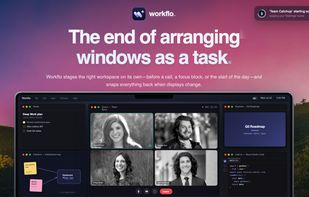
Workflo screenshot 1

Cost / License

  • Pay once
  • Proprietary

Application type

Platforms

  • Mac
  • Software as a Service (SaaS)
1like
0comments
0articles

Features

Properties

  1.  Privacy focused
  2.  Lightweight
  3.  Local-First

Features

  1.  Support for Multiple Monitors
  2.  No registration required
  3.  Calendar Integration
  4.  Recurring Tasks
  5.  No Tracking
  6.  Ad-free
  7.  Works Offline
  8.  Dark Mode
  9.  Workflow Automation
  10. Apple Shortcuts icon  Apple Shortcuts Integration
  11.  Sits in the MenuBar
  12.  Tiling Window Manager

Workflo News & Activities

Highlights All activities

Recent activities

Workflo information

  • Developed by

    IN flagLucid Labs
  • Licensing

    Proprietary and Commercial product.
  • Pricing

    One time purchase (perpetual license) ranging between $16 and $20.
  • Alternatives

    12 alternatives listed
  • Supported Languages

    • English

AlternativeTo Categories

Office & ProductivityOS & Utilities
Workflo was added to AlternativeTo by ch1rag on and this page was last updated .
No comments or reviews, maybe you want to be first?

What is Workflo?

Every window tool for the Mac waits to be asked. Workflo applies Scenes on its own: it watches your calendar for video calls (Zoom, Meet, Teams, Webex, FaceTime) and stages the right apps, arranged, before the meeting starts. Time-of-day triggers cover focus blocks and the start of the workday, and every Scene also gets its own global hotkey and a place in the menu bar.

It remembers each window, not just each app: position and size per display setup, so two Chrome windows or three Xcode projects each go back to their own spot, and when you dock or undock, everything snaps back where it belongs. Nothing moves without a cancelable heads-up first.

Workflo never requests Screen Recording. It runs on Accessibility alone, so it structurally cannot see your screen contents, and calendar matching happens locally. Native Swift, about 4 MB, layouts stored as local JSON, no account, no cloud, no subscription. $19.99 one-time, 7-day free trial.

Workflo Videos

Show 1 more video

Official Links