





BetterCmdTab
15 likes
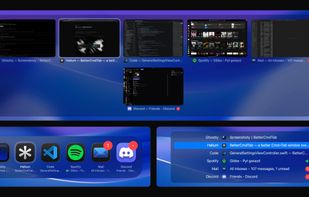
Native switcher for macOS offers vertical and grid layouts, window and app cycling, menu bar integration, fuzzy search, app launch, unread badges, audio alerts, pinning, quick actions, instant Space switching, full privacy, and robust multi-monitor support.

Cost / License
- Free
- Open Source (GPL-3.0)
Application type
 EU
EUPlatforms
- Mac

Features
BetterCmdTab News & Activities
Highlights All activities
Recent News
No news, maybe you know any news worth sharing?
Share a News Tip
Recent activities
 sihua zheng added BetterCmdTab as alternative to Open Contexts
 nickybricks added BetterCmdTab as alternative to Peek App
 julien_dev added BetterCmdTab as alternative to Better Window Switcher
- rokartur updated BetterCmdTab
- Ben liked BetterCmdTab
- dnylanderos liked BetterCmdTab
- Randy22 liked BetterCmdTab
 mkworld-t0 added BetterCmdTab as alternative to FlowShelf
- bws liked BetterCmdTab
- rokartur updated BetterCmdTab


BetterCmdTab information
Developed by
 Artur Rok
 Licensing
Open Source (GPL-3.0) and Free product.Written in
Alternatives
32 alternatives listedBadge
Get an embeddable badge for BetterCmdTabSupported Languages

AlternativeTo Category
OS & UtilitiesGitHub repository
- 784 Stars
- 36 Forks
- 26 Open Issues
- Updated


Comments and Reviews
Unlike the standard Cmd+Tab, which simply switches applications, BetterCmdTab allows you to switch between windows inside a single application. Do you work in Word with three documents and in Chrome with a dozen tabs? One tap of Tab will take you to the next window, rather than jumping between Word and Chrome. This saves a lot of time and clicks.