Apps with 'Voice dictation' feature Page 5 of 6

All apps in Apps with 'Voice dictation' feature category. Use the filters below to narrow down your search. 
Copy a direct link to this comment to your clipboard
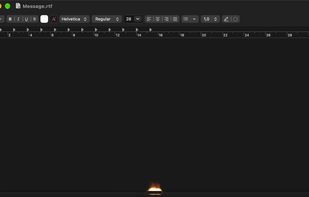
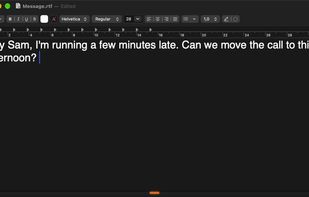
  1. Hold a key, talk, and clean text appears wherever you type. Speech to text runs on your Mac, so your voice never leaves it. Optional AI clean-up uses your own Claude key or a local model, and each app can have its own writing style.

    Cost / License

    • Free
    • Open Source (MIT)

    Since

    • New

    Platforms

    • Mac
    Foni by Jason Andreadis screenshot 1
    Foni by Jason Andreadis screenshot 2
    1 alternative
  2. On-device voice dictation for Mac. Hold a hotkey, speak, release, and Whisper-transcribed text appears at your cursor. No cloud, no account, no subscription.

    Cost / License

    • Freemium (Pay once)
    • Proprietary

    Application type

    Since

    • Since 2026

    Platforms

    • Mac
    • US flagUnited States
    Transcriptions happen anytime, anywhere with the press of a key.
    Customizable settings.
    Customizable appearance options.
    Configurable post-processing behaviors and rules.
    15 alternatives
  3. A local-first notes inbox for your Mac. One keystroke, and it lands as plain markdown in a folder you own.

    Cost / License

    • Pay once
    • Proprietary

    Application type

    Since

    • New

    Platforms

    • Mac
    • IN flagIndia
    Jot for Mac screenshot 1
    Jot for Mac screenshot 2
    Jot for Mac screenshot 3
    +1
    Jot for Mac screenshot 4
    24 alternatives
  4. Hold Fn, speak, and the text appears wherever your cursor is, in any app. QuietSpeech uses Apple's speech recognizer and Apple Intelligence, so there is no API key to set up and dictation works offline.

    Cost / License

    Since

    • New

    Platforms

    • Mac
    • IN flagIndia
    The QuietSpeech menu in the menu bar
    Dictating into a text editor while holding Fn
    Rewriting selected text by voice
    Custom vocabulary settings
    5 alternatives
  5. Swifly icon
     Like

    Voice typing for Mac, Windows and iPhone, with text refinement, translation, a personal dictionary and reusable snippets.

    Cost / License

    • Freemium (Subscription)
    • Proprietary

    Application type

    Since

    • New

    Platforms

    • Windows
    • Mac
    • iPhone
    • FR flagFrance
    • European Union flagEU
    Swifly screenshot 1
    Swifly screenshot 2
    +8
    Swifly screenshot 3
    6 alternatives
  6. PATAPIM icon
     Like

    Desktop cockpit that runs Claude Code, Codex and Gemini CLI in project-organized terminals, with phone remote control, on-device voice dictation and Telegram bots.

    Cost / License

    • Freemium
    • Proprietary

    Application type

    Since

    • Since 2026

    Platforms

    • Windows
    • Mac
    Phone remote control: the same live terminal on desktop and phone, tap to resume
    Quick-launch palette: type or dictate a task and pick Claude, Codex or Antigravity
    Computer control settings: off by default, explicit warning and emergency kill switch
    WhatsApp integration: agents can read and reply on your channels
    6 alternatives
  7. Sawti icon
     1 like

    Voice dictation built for Arabic speakers: speak Arabic in your own dialect and get clean Arabic text or clear professional English typed into any app.

    Cost / License

    • Subscription
    • Proprietary

    Since

    • New

    Platforms

    • Windows
    • Mac
    • Android
    • iPhone
    • iPad
    • FR flagFrance
    • European Union flagEU
    Sawti screenshot 1
    Sawti screenshot 2
    Sawti screenshot 3
    9 alternatives
  8. Murmr icon
     Like

    Murmr is AI dictation that runs entirely on your own computer. Press a key, talk, and clean text appears wherever your cursor is: email, documents, chat, code comments.

    Cost / License

    • Freemium (Pay once)
    • Proprietary

    Since

    • New

    Platforms

    • Windows
    • Mac
    Murmr screenshot 1
    Murmr screenshot 2
    Murmr screenshot 3
    11 alternatives
  9. EFKey icon
     Like

    iPhone/iPad keyboard with superpowers, designed from the start for privacy and speed.

    Cost / License

    • Freemium (Pay once)
    • Proprietary

    Since

    • New

    Platforms

    • iPhone
    • iPad
    • SK flagSlovakia
    • European Union flagEU
    Two languages at once: EN and SK corrected together, mid-sentence.
    Autocorrect that reads context: germany becomes Germany.
    +5
    Clipboard history with categories and search (Pro).
    5 alternatives
  10. inlaut icon
     Like

    Free, open-source menu bar dictation for the Mac. Hold a key, speak, and the text appears at the cursor in any app. Speech recognition runs fully on-device, in German and English.

    Cost / License

    Since

    • New

    GitHub

    • GitHub stars: 2

    Platforms

    • Mac
    inlaut screenshot 1
    inlaut screenshot 2
    7 alternatives
  11. Many learners lack speaking practice that matches their level. DictaLearn provides free, adaptive speaking practice that adjusts to each learner and tracks progress, making effective practice accessible to everyone.

    Cost / License

    • Free
    • Proprietary

    Since

    • Since 2025

    Platforms

    • Online
    • US flagUnited States
    DictaLearn screenshot 1
  12. Fast Dictate icon
     1 like

    FastDictate is a professional desktop voice dictation app built for privacy-conscious professionals. It works system-wide — dictate into any application, any text field, anywhere on your desktop.

    Cost / License

    • Freemium (Subscription)
    • Proprietary

    Application type

    Since

    • Since 2026

    Platforms

    • Windows
    • Mac
    • FR flagFrance
    • European Union flagEU
    Fast Dictate screenshot 1
    9 alternatives
  13. Yakki icon
     Like

    Yakki is a privacy-first voice dictation app for macOS that runs entirely on-device. Press a hotkey, speak naturally, and your words appear instantly in any text field—no cloud, no subscriptions, no latency.

    Cost / License

    • Pay once or Subscription
    • Proprietary

    Since

    • Since 2026

    Platforms

    • Mac
    • GB flagUnited Kingdom
    Yakki screenshot 1
    Yakki screenshot 2
    Yakki screenshot 3
    +1
    Yakki screenshot 4
  14. YazSes icon
     Like

    Offline hold-to-talk voice dictation and transcription for the desktop. Hold a key, speak, release — the text is typed into the focused app. Speech recognition runs locally after setup and model download, so no cloud account, API key, GPU or subscription is needed.

    Cost / License

    Application type

    Since

    • Since 2026 (updated Aug 2026)

    GitHub

    • GitHub stars: 4

    Platforms

    • Windows
    • Mac
    • Linux
    YazSes screenshot 1
    YazSes screenshot 2
    YazSes screenshot 3
    8 alternatives
  15. Create and use your AI shortcuts in one click or with voice dictation. Write, reply, translate, summarize, expand, rephrase etc.

    Cost / License

    • Freemium (Subscription)
    • Proprietary

    Since

    • Since 2025

    Platforms

    • Google Chrome
    Readact.ai screenshot 1
    Readact.ai screenshot 2
    6 alternatives
  16. Dictadoc icon
     Like

    100% offline and secure medical voice dictation for Mac and Windows. The affordable, cloud-free, and subscription-free alternative for all medical and paramedical professionals.

    Cost / License

    • Subscription
    • Proprietary

    Since

    • Since 2026

    Platforms

    • Windows
    • Mac
    • FR flagFrance
    • European Union flagEU
    Main interface of the software Dictadoc
    3 alternatives
  17. Ultra-low-latency desktop voice dictation for Windows and macOS. A fast, one-time purchase alternative to subscription tools.

    Cost / License

    • Pay once
    • Proprietary

    Since

    • Since 2026

    Platforms

    • Windows
    • Mac
    • TW flagTaiwan
    Mode UI - Multi-Scenario Formatting Profiles
    My Memory - Custom Dictionary & Auto-Replacement
    Custom Hotkeys & Dictation Shortcuts
    General Settings & API Configuration
    15 alternatives
  18. Amical icon
     Like

    Amical is an AI dictation app. Hold a key, speak, and it types into whichever app has focus, then rewrites your words for that app: a proper email in Gmail, a loose reply in Slack, a clean prompt in Cursor.

    Cost / License

    • Freemium (Subscription)
    • Open Source (MIT)

    Application type

    Since

    • New

    GitHub

    • GitHub stars: 1.6k

    Platforms

    • Windows
    • Mac
    • Android
    • iPhone
    • iPad
    Amical screenshot 1
    5 alternatives
  19. SpeechPilot is a Chrome extension for people who type all day in browser-based chat and support tools. Dictate straight into any text field with spoken punctuation in 13 languages (speech recognition in 69 languages).

    Cost / License

    • Freemium (Pay once)
    • Proprietary

    Since

    • New

    Platforms

    • Google Chrome
    • Microsoft Edge
    • DE flagGermany
    • European Union flagEU
    Side bar with profile notes: one click fills the field, no scrolling back through the chat
    Dictate straight into any chat or support panel, with spoken punctuation
    Saved text blocks inserted into the reply field with one click
    Settings: recognition language, replacements, emojis and side bar
    25 alternatives
  20. Sayline icon
     Like

    The most productive way to type in 2026. Just press a key, start speaking, and see the word appear.

    Cost / License

    • Pay once
    • Proprietary

    Since

    • Since 2026

    Platforms

    • Mac
    Save 1 hour every day with voice dictation using Sayline
    Send Emails 4x Faster with Sayline
  21. Scriptable local dictation that uses the text on your screen to fix names, and your rules to format numbers, dates, and links.

    Cost / License

    Since

    • New

    GitHub

    • GitHub stars: 22

    Platforms

    • Mac
    • Homebrew
    • AD flagAndorra
    Dictating into Claude Code: the spoken words "carrot anchor" become CaretAnchor, spelled from the word on screen.
    After you fix a word, ParrotFlow offers to learn the spelling, here Vue instead of "view".
    Three rules in config.yaml turn spoken words into #478, @siobhan and $49.99 in a Slack message.
    With the ParrotFlow skill, Claude Code adds a rule to config.yaml and checks it. Saying "P zero" now writes P0.
    11 alternatives
  22. Verbatim icon
     Like

    Verbatim turns your voice into polished text fast. It uses Mistral Voxtral Mini for speech-to-text — a transcription model that won our benchmark against GPT-4o mini, Gemini 2.5 Flash, AssemblyAI Universal, and Deepgram Nova on accuracy, and runs around 3x faster than ElevenLabs...

    Cost / License

    • Freemium (Subscription)
    • Proprietary

    Since

    • Since 2026

    Platforms

    • Windows
    • Mac
    Main Screen
    Advanced Settings
    Settings Screen Part 2
    Settings Screen
  23. RadMyk icon
     Like

    Radiology dictation that runs fully on your machine. Types at the cursor in any app - PACS, RIS, EHR, Word, Citrix. Radiology-tuned vocabulary, 96.1% measured accuracy. One-time purchase, no subscription. Native on macOS (Apple Silicon) and Windows, works offline.

    Cost / License

    • Pay once
    • Proprietary

    Since

    • Since 2026

    Platforms

    • Windows
    • Mac
    1 alternative
  24. voconly icon
     Like

    Voconly is a free, open-source offline speech to text tool for Windows that runs entirely on your device. Voconly keeps all audio data local—no uploads, no internet required, complete privacy. Powered by local AI, it combines real-time speech recognition with on-device LLM...

    Cost / License

    • Free
    • Open Source (MIT)

    Application type

    Since

    • New

    GitHub

    • GitHub stars: 17

    Platforms

    • Windows
    • Mac
    • CN flagChina
    Voconly main interface
    Voconly official website homepage.
    6 alternatives
  25. Whisper Dictator is a free desktop dictation application that runs entirely on your computer. Powered by OpenAI's Whisper AI model, it converts speech to text with high accuracy in over 90 languages — without sending any data to the cloud.

    Cost / License

    • Freemium (Pay once or Subscription)
    • Proprietary

    Application type

    Since

    • Since 2026

    Platforms

    • Windows
    • BR flagBrazil
    Whisper Dictator screenshot 1
    9 alternatives